Forum Replies Created

Page 15 of 46
  • Jim Scott

    December 23, 2020 at 6:27 pm in reply to: Hard surface issue once applying Subdivision Surface

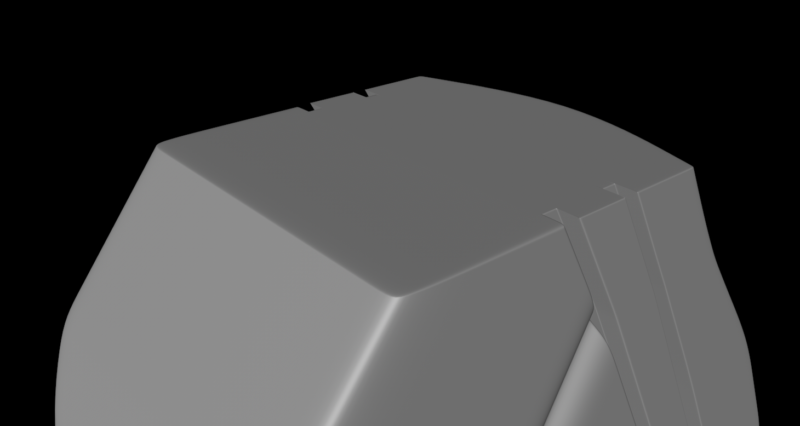
    If it helps, here’s the modified example. I only did some quick loop cuts around the top edges, so you would need to do the same to clean up the bottom ones.

  • Jim Scott

    December 23, 2020 at 6:09 pm in reply to: Hard surface issue once applying Subdivision Surface

    Hi Felipe,

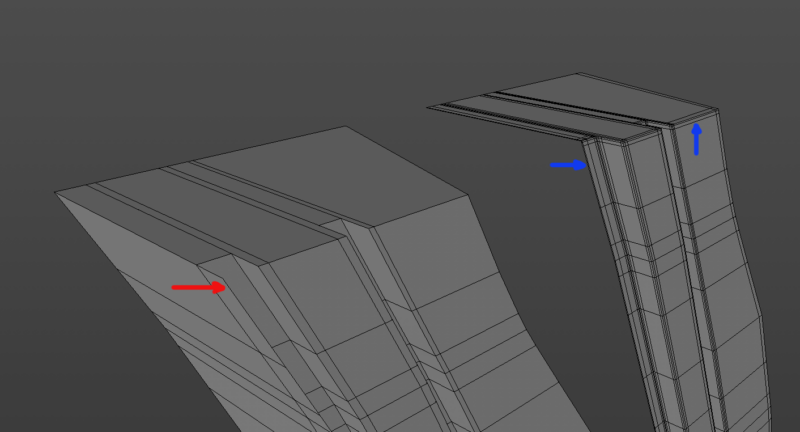
    Assuming you’re looking for a result more like the first image below, some issues that are causing the Subdivision Surface to excessively distort the edges are the polygons extending laterally at the front of Polygon.1 (see red arrow in the second image), and the lack of edge definition. In my example I removed all of the polygons at that front face (they’ll be hidden anyway), added some loop cuts to better define the edges (see blue arrows for examples), and moved Polygon.1 to overlap slightly. I also added some loop cuts around the edges of the face of Polygon that meets Polygon.1 to define those edges and keep the Subd Surface from pulling those edges away. Hope this helps.

  • Jim Scott

    December 14, 2020 at 3:24 pm in reply to: Space in text wile on a spline

    I guess the issue was solved.

  • Jim Scott

    December 12, 2020 at 7:59 pm in reply to: Is C4Depot Legit or Not?

    Glad to hear it.

  • Jim Scott

    December 12, 2020 at 4:20 pm in reply to: Is C4Depot Legit or Not?

    You’re welcome.

  • Jim Scott

    December 11, 2020 at 3:28 pm in reply to: How to add jitter in a cloner?

    Glad I could help. Thanks for reporting back.

  • Jim Scott

    December 10, 2020 at 6:35 pm in reply to: How to add jitter in a cloner?

    Just add a Random effector with small position and rotation (H) values.

  • Jim Scott

    December 10, 2020 at 3:30 am in reply to: Space in text wile on a spline

    If you create one Motext object with two words and the space between them it will carry over to the spline wrap.

  • Jim Scott

    December 8, 2020 at 12:01 am in reply to: Is C4Depot Legit or Not?

    James,

    I think I misunderstood your comments about the files and thought that you were referring to the .lib4d files. In rereading your post I believe you are referring to your project files which used Infinite Ocean and City Rig. If that’s the case, then my comment about redownloading the files isn’t applicable, but they may have still been corrupted. Sometimes opening troublesome project files in a new scene in C4D can work, but if you cannot even find them on your hard drive that option is obviously not available. Other than trying a reboot of your computer, which I’m guessing you’ve probably already done, I don’t know what else to suggest.

  • Jim Scott

    December 7, 2020 at 11:47 pm in reply to: Is C4Depot Legit or Not?

    Hi James,

    I have purchased several items from C4Depot, including those you mentioned, but it’s been several years so I can’t vouch for their current support. In the past they always responded to my inquiries, though I do seem to remember that it may have taken a day or so at times. Hopefully their lack of a response to you is only temporary. As far as I know, they are just a two-man operation, so they don’t have a dedicated support department and delays responding are somewhat par for the course.

    As far as the files are concerned, they shouldn’t just disappear, so it sounds like they may have gotten corrupted somehow. If you didn’t keep backup copies, do you still have the download link (if that’s how you got them)? Or if their online store has you set up an account you should be able to access the downloads there. I don’t remember how that worked as it’s been at least five years since my last purchase.

    Good luck.

Page 15 of 46

We use anonymous cookies to give you the best experience we can.
Our Privacy policy | GDPR Policy