

Activity › Forums › Maxon Cinema 4D › Hard surface issue once applying Subdivision Surface
-
Hard surface issue once applying Subdivision Surface
Posted by Felipe Prado on December 22, 2020 at 7:31 pmJim Scott replied 5 years, 8 months ago 2 Members · 3 Replies -
3 Replies
-

Jim Scott
December 23, 2020 at 6:09 pmHi Felipe,
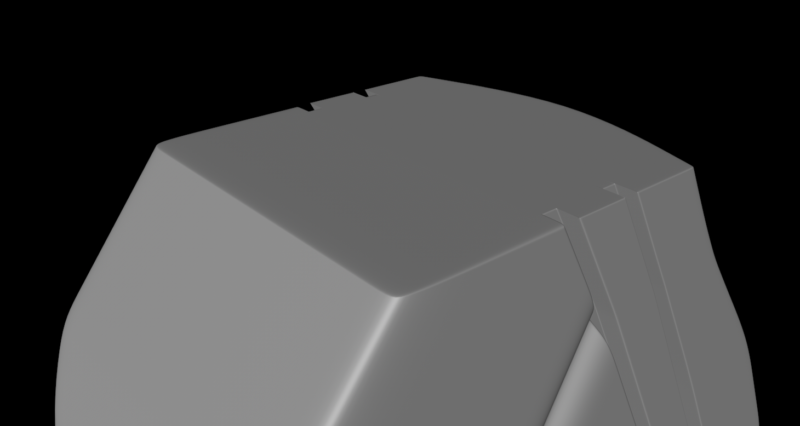
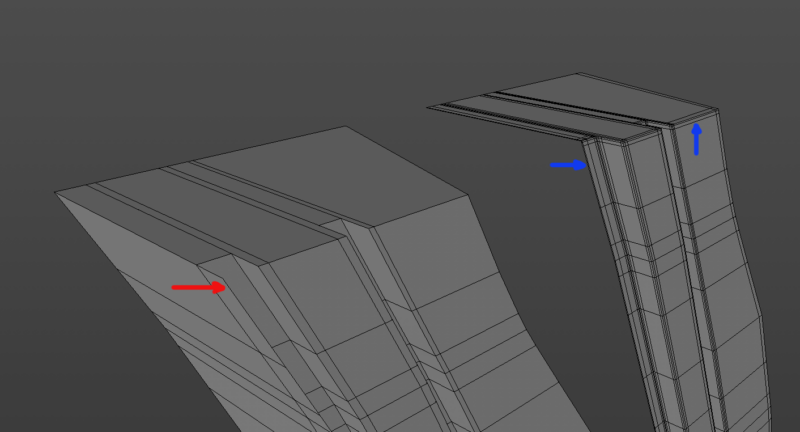
Assuming you’re looking for a result more like the first image below, some issues that are causing the Subdivision Surface to excessively distort the edges are the polygons extending laterally at the front of Polygon.1 (see red arrow in the second image), and the lack of edge definition. In my example I removed all of the polygons at that front face (they’ll be hidden anyway), added some loop cuts to better define the edges (see blue arrows for examples), and moved Polygon.1 to overlap slightly. I also added some loop cuts around the edges of the face of Polygon that meets Polygon.1 to define those edges and keep the Subd Surface from pulling those edges away. Hope this helps.

-
Jim Scott
December 23, 2020 at 6:27 pmIf it helps, here’s the modified example. I only did some quick loop cuts around the top edges, so you would need to do the same to clean up the bottom ones.
-
Jim Scott
December 31, 2020 at 2:38 pmWell? It would really be nice to know if my efforts were helpful and appreciated.
Happy New Year
Reply to this Discussion! Login or Sign Up