Forum Replies Created

Page 22 of 112
  • Graham Quince

    August 11, 2022 at 9:53 am in reply to: Element 3D OpneGL issue with IMAC

    Have you updated to the latest versions (Video Copilot released a bunch of updates for Mac)?

    And have you updated your graphics card drivers?

  • Are you trying to get the shapes to follow the path?

    If that’s the case, I’d start by drawing out a path on a layer, then copy the path and paste it into the shape layer’s position. Then go to Layer > Transform > Auto Orient and choose A Long Path

    This will work for a single shape, so now you have to duplicate the layer and offset the motion OR precompose your layer and offset the precomps (a much better idea as you can tweak the motion as you need to)

  • I think you probably need to precompose your roto-ed layer – although I’d reccomend rendering out the footage with an alpha channel as this will be less processor intensive.

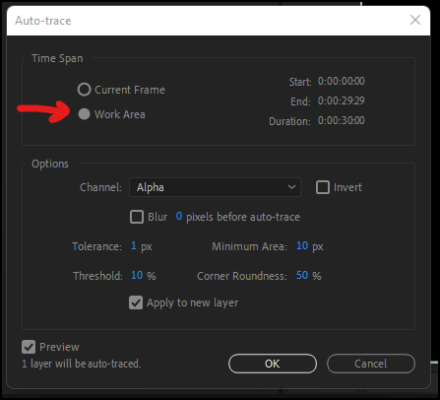
    If you absolutely need this to be a mask, the auto trace tool can use the work area instead of the current frame and the work area can be shorter than your whole comp.

    One last thing to mention, it might be worth exploring auto-trace on its own without the rotobrush, as it can use luminance or colour channels to create masks instead of just the alpha channel

  • Graham Quince

    August 3, 2022 at 9:46 am in reply to: Particular/Soundkeys fireworks explode to Bass

    Using the Keyframe assistant in the Animation menu, you should be able to convert audio to keyframes.

    Then with an expression, depending how the fireworks are set up in Particular, you could trigger them depending on the audio amplitude.

    Alternatively, you could preview the audio and hit the * key on the keypad to add a layer marker on the beat. Or if like me you have no rhythm. you can expand the waveform on the audio file and use the marker against the beat points.

    Either way, once you’re done, something like Dan Ebbert’s expression for opacity based on layer markers should help:

    https://www.motionscript.com/design-guide/marker-sync.html

  • Expressions in AE run every frame – so what’s needed is an IF statement to check the value of the source text – and when the source text displays a value within 5 seconds of each minute, then run that colour change function.

    Something like:

    var mins = parseInt(time/60);

    var secs = parseInt(time)-(mins*60);

    var col = "#FF0000";

    if (secs < 6 || secs > 55) {

    col = "#00FF00";

    }

    hexToRgb(col)

  • Hi Simon,

    So I’ve signed up for Helium and I can move the VDB files in the timeline easily enough. Are you moving the actual VDB sequences?

    I’ve also posted a question on AEScripts’ dedicated board as I think the only way to time remap is to nest the comp in another and time remap that (with using Helium’s import tool)

  • Graham Quince

    July 24, 2022 at 1:28 pm in reply to: DUIK and a ‘growing’ character?

    DUIK uses Null objects for its “middle ground” between controllers and image files – so in theory, you can just adjust the controllers to the adult positions and the IK should continue to work. Where you might have issues will be in the changing shapes – as you’ll probably have to manually adjust the scales on each limb.

    Another approach might be the puppet tool – where you have an animation of the growing and manipulate the puppet points to keep up and create the movement.

    Third option, the Reshape effect will morph a layer from one mask to another, so you could use that to blend the different ages together.

    Last option, if you have access to Video Copilot’s Element 3D and 3D models of the different ages, you could use Mixamo to create the animations of each age performing the same movement, convert them to Obj Sequences in Blender and then bring them in Element to see them in After Effects and animate using option #2 or #3 above.

  • I don’t have Helium, but I imagine this is a After Effects / GPU not coping situation. C4D Lite layers can have this happen. If it really cannot work, can you render out the explosions as 2D videos and add them back in at the time you want.

    Just on the Helium point, can you post some screenshots / mini-review? At $50 it seems very reasonably priced, especially with it able to use VBDs

  • Graham Quince

    July 24, 2022 at 1:19 pm in reply to: PreComp to Smart Object in Photoshop

    Eek, I’ve not used Smart Layers in Photoshop before but I think you’ll need a middle step. Export out just the element to be replaced as well as the completed watch. Then you can use that element for its shape and alpha channel, which I presume you need for smart layers.

  • I’d use opacity – but when you say “professional” ar you wanting something more interesting? Check out the transition effects or even some of the transition presets.

Page 22 of 112

We use anonymous cookies to give you the best experience we can.
Our Privacy policy | GDPR Policy