Creative Communities of the World Forums

The peer to peer support community for media production professionals.

Activity Forums Adobe After Effects Can I create a keyframed from roto information to be applied to a new layer?

  • Can I create a keyframed from roto information to be applied to a new layer?

    Posted by Ashlea Wessel on August 9, 2022 at 10:49 pm

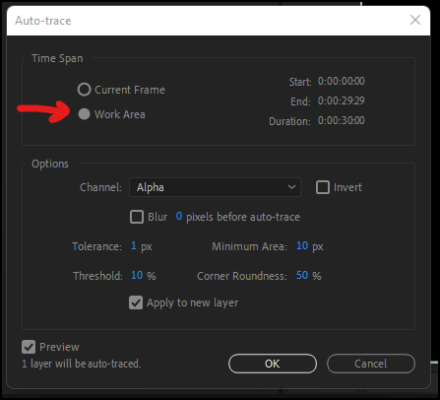
    Hi there, hoping someone may have an answer to this problem. I’ve roto’d a layer (layer 1) and I’m looking to take that roto info and make a keyframed mask out of it in order to apply it to layer 2 so that I can have layer 2 masked with layer 3 showing through and scrap layer 1 altogether ( I just needed the shape/ motion fro layer 1). I found tutorials that suggested auto-trace in order to achieve this but when I apply auto trace (even after freezing the roto) it only allows me to create a static mask from a single frame or selects the entire frame so that I have a 16×9 rectangular mask and completely ignores the roto information. Has anyone had experience with this issue or does anyone know another method for creating a keyframed mask from a roto that can be applied to a separate layer?

    Thanks in advance! Ps I am using the most recent version of AE

    Graham Quince replied 3 years, 12 months ago 3 Members · 2 Replies
  • 2 Replies
  • Andy Kiernan

    August 10, 2022 at 9:16 am

    if you have a layer roto’d, so , for example, you have a man roto’d out, you can then use that as a track matte, alpha matte as is, or use a fill to make the roto’d layer white and use luma matte.

    If you’re needing the actual mask data, to maybe add a stroke or something, I cant think of a simple way to do that.

  • Graham Quince

    August 11, 2022 at 9:43 am

    I think you probably need to precompose your roto-ed layer – although I’d reccomend rendering out the footage with an alpha channel as this will be less processor intensive.

    If you absolutely need this to be a mask, the auto trace tool can use the work area instead of the current frame and the work area can be shorter than your whole comp.

    One last thing to mention, it might be worth exploring auto-trace on its own without the rotobrush, as it can use luminance or colour channels to create masks instead of just the alpha channel

We use anonymous cookies to give you the best experience we can.
Our Privacy policy | GDPR Policy