Forum Replies Created

Page 63 of 277
  • Filip Vandueren

    January 24, 2021 at 12:53 pm in reply to: Electromagnetic Field Visualization

    You can quickly proto-type this with text layers that have a right pointing arrow: “→”

    and a particle text-layer “O”

    Each arrow-layer would need an expression for rotation, for 2D that would be:

    particleLayer = thisComp.layer("O");
    p= position - particleLayer.position;
    radiansToDegrees(Math.atan2(p[1],p[0]));

    And also an expression for scale, based on the distance towards the central particle. I suppose it would be the inverse square so:

    particleLayer = thisComp.layer("O");
    strength = 10;
    d= length(position - particleLayer.position);
    value * strength*(1/Math.sqrt(d));

    (this would give an divide by zero error if an arrow is at the exact same location as the particle, but I guess that’s physically accurate 🙂 )

  • Filip Vandueren

    January 24, 2021 at 12:33 pm in reply to: Motion curve documentation in AE

    You could document the influences and velocities one needs to input.

    Unfortunately, that’s only practical for easing into 0 velocity, you can say: velocity is 0 with an influence of 33% (essentially easy ease, in this case.)

    But for example a more interesting effect is: velocity out [double of what it would be on linear], influence 33%. You can’t just say velocity out: 1000, influence 33%, because that first number totally depends on the situation and after effects doesn’t support relative velocities like that.

    You could create some “preset” scripts or expressions that users can apply to convert linear paths to your consistent values though, but it’s not as intuitive as what it would be in css etc.

  • Filip Vandueren

    January 24, 2021 at 12:11 pm in reply to: Trim path – rotate edge angle

    Can’t be done with shapes. You can try with text on path with many repeated “â—„” triangle shapes.

  • Did you perhaps forget to switch the order of the parameters for y, being the 2nd ?

    x = L.toComp([rect.left+rect.width,0])[0];
    [x, value[1]];

    Becomes

    y = L.toComp([0, rect.top+rect.height])[1];
    [value[0],y];

  • if (time <= inPoint+0.5) {
    output = linear(time,inPoint, inPoint+.5, 0, 100);
    } else {
    output = linear(time,outPoint+.5, outPoint, 100, 0);
    }
    output;
  • Filip Vandueren

    January 23, 2021 at 8:08 pm in reply to: Create shape/box based on word index

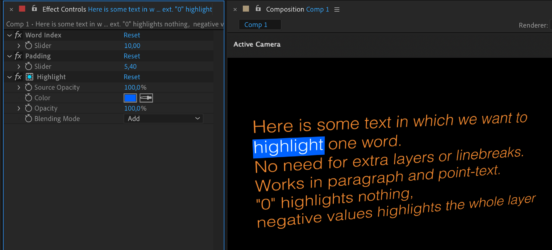
    Here’s my try of a single word highlighter.

    This one works as an animation preset that can simply be added to any text-layer (paragraph, point, 3D… doesn’t matter).

  • Filip Vandueren

    January 22, 2021 at 1:43 pm in reply to: Slider (Decimal) to Binary

    That would be:

    decimal=effect("Slider Control")("Slider").value;
    binary = decimal.toString(2).padStart(10,"0");
  • Filip Vandueren

    January 22, 2021 at 1:39 pm in reply to: A difficult request [Scrambling Letters]

    https://imgur.com/enMYww9

    This took about 15 minutes 🙂

    View post on imgur.com

  • Filip Vandueren

    January 22, 2021 at 1:18 pm in reply to: A difficult request [Scrambling Letters]

    Try to think of each letter as it’s own animation, since they’re not moving anyway.

    That shouldn’t be too hard, even just manually creating that for 1 letter would take only a few minutes.

    Then copy that animation over, offset each 1 frame and change the final letter and you’re done.

    You’ll only have to take care of the laste 7 characters remaining red.

    I think this is a classic case of overthinking stuff on how to do it with clever text animators and/or expression, when – since you have a very clear plan of what it should look like – just manually keyframing it would be so much faster.

    We’ve all been down that rabbithole 🙂

  • Filip Vandueren

    January 22, 2021 at 1:11 pm in reply to: Completion % slider control with Delay

    Be aware that “index” is a reserved keyword in expressions and shouldn’be used as a variable name.

    I’m not entirely sure what your question is, but maybe something like this:

    A = thisComp.layer(1).effect("Completion")("Slider");
    i=index-1;
    totalLayer = 3;
    overlap = 2;
    totalLayer+=overlap;
    linear(A,(100/totalLayer)*i,(100/totalLayer)*(i+overlap),0,90);

    At overlap-values between 0 and 1, there will be a pause between each next turn.

    Overlap==1 will be no overlap.

    Overlap > 1 will give more and more overlap

Page 63 of 277

We use anonymous cookies to give you the best experience we can.
Our Privacy policy | GDPR Policy