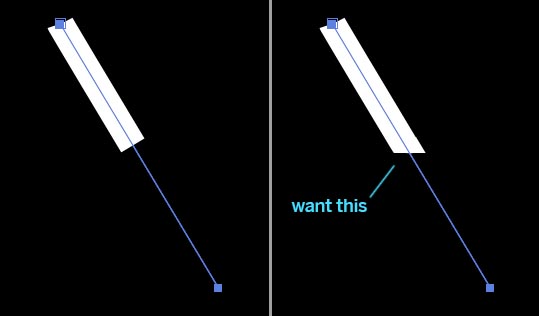
Activity › Forums › Adobe After Effects › Trim path – rotate edge angle Adobe After Effects Trim path – rotate edge angle Posted by Chad Ridgeway on January 24, 2021 at 6:43 am I’d like to rotate the edge of shape layer stroke so that the trim path edge doesn’t default to the angle of the path. Stacey Dunleavy replied 5 years, 3 months ago 3 Members · 2 Replies 2 Replies Filip Vandueren January 24, 2021 at 12:11 pm Can’t be done with shapes. You can try with text on path with many repeated “◄” triangle shapes. Stacey Dunleavy January 27, 2021 at 7:39 pm Draw it as a shape and tween to get the effect? Reply to this Discussion! Login or Sign Up Public All Members My Connections Only Me PublicAll MembersMy ConnectionsOnly Me Public All Members My Connections Only Me Reply to this Discussion! Login or Sign Up