Forum Replies Created

Page 11 of 24
  • Devrim Akteke

    April 21, 2025 at 5:59 pm in reply to: Can I Render Preview Clips, like in Premiere?

    When timeline proxy mode is set to full, you should see the best quality in Canvas, similar to Premiere, Full, Half, and Quarter.

  • Devrim Akteke

    April 21, 2025 at 5:20 pm in reply to: Can I Render Preview Clips, like in Premiere?

    Davinci is still not handling things quite well. This is one of them.

    By the way, is your Timeline Proxy Resolution set to Full?

  • Devrim Akteke

    April 21, 2025 at 3:58 pm in reply to: Can I Render Preview Clips, like in Premiere?

    Hi,

    Yes, of course, render for better playback. You should go to the Playback menu and choose Render Cache – Smart. or User. And you should check Project Settings – Master Settings and set up a video format for render.

  • Devrim Akteke

    April 14, 2025 at 4:17 am in reply to: Best Final cut pro music settings

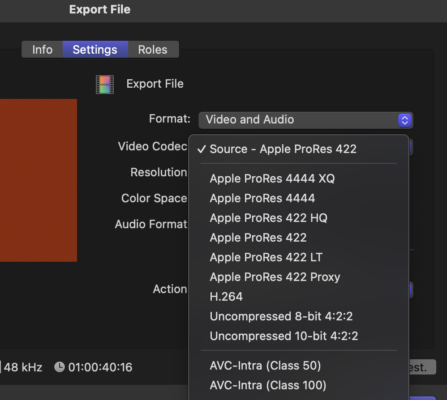
    Hi, Compressor is a very helpful application. It enables you to set up many different export options for almost any kind of codec and aspect ratio pixel sizes and batch export options. As you can see on the screenshot there is an Uncompressed option you can use in FCP. It wasn’t there before and actually, I don’t remember in which version it started to allow uncompressed export. That link you sent, those are the talks from 2014.

    On this latest info page, you can search for uncompressed and there are 4 times it says about uncompressed options. Looks like some of them are new. https://support.apple.com/en-la/102825

    You can try the latest version, FCP11.1 with a trial version download and that may help to figure out if it works without buying FCP and Compressor.

  • Devrim Akteke

    April 12, 2025 at 11:55 pm in reply to: Best Final cut pro music settings

    When you export you will choose Video and Audio and one of the Prores options.

  • Hi, It is hard to say what could be the problem. But first, did you contact them for support?

    They have 2 videos about this issue, I guess you watched those. It should be better to ask for support.

  • Devrim Akteke

    April 11, 2025 at 7:17 am in reply to: Best Final cut pro music settings

    Hi,

    Prores flavors or H264 are video codecs, they don’t affect your audio quality. But of course in Final Cut Pro when you select H.264 export it gives you the AAC codec for audio and when you choose any one of the Prores codec you get Linear PCM. To have better audio quality, before export, you should check your project settings, your timeline setting for audio should be 48 and not 44.1. Honestly, I don’t believe you will have too much difference when you play your video on a laptop or a TV if you choose H264-AAC or Prores-PCM but to have the best quality in FCPX you should choose the Prores 422-Linear PCM option. There is no difference between Prores 422 and Prores 4444 regarding audio quality.

  • Devrim Akteke

    April 6, 2025 at 8:27 am in reply to: Audio mixing tools

    Hi, Most of the brands will be ok. I don’t want to name a brand cause there are many brands and price tags in different regions/countries. If you have an electronics store nearby you may test some of them.

  • Devrim Akteke

    April 5, 2025 at 3:50 pm in reply to: Audio mixing tools

    Hi,

    Are you just planning to use speakers or planning to add some recording units?

    For speakers you don’t need to do anything, just plug in your speakers and you are ready. Alternatively, you can use some Bluetooth speakers if you don’t want to deal with cables.

  • Hi,

    It should probably be ok. The free version basically limits the resolutions above 4k and 8 bit and some effects don’t work.

    You can check the below list.

    The free version allows you to export videos in 4K resolution — which is more than enough for most content creators. However, there are some limitations.

    • No access to certain advanced features like multi-GPU support, which speeds up rendering, and advanced noise reduction aren’t available in the free version.
    • Some of the powerful AI tools available in the Studio version, such as the Magic Mask and Face Refinement, aren’t included in the free version.
    • There are several effects you won’t be able to use, such as Grain and Lens Distortion.
    • While the free version contains scopes for your grading, the professional HDR scopes are missing from Davinci Resolve free.
    • The free version is also missing the tools to grade 3D projects or synchronize Davinci systems for remote grading.
    • The free version supports only 8-bit formats, while the Studio version supports 10-bit formats.
Page 11 of 24

We use anonymous cookies to give you the best experience we can.
Our Privacy policy | GDPR Policy