Forum Replies Created

Page 10 of 24
  • Devrim Akteke

    June 6, 2025 at 8:32 am in reply to: Automate ‘scale clip to sequence settings’

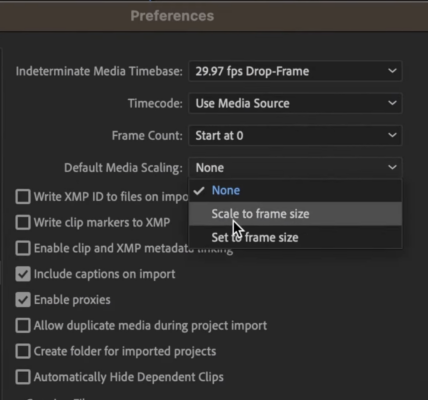
    Hi, yes, that is a very useful setting, and that is under Preferences- Media settings.

    And choose the Set to Frame Size, not the scale, to keep the quality better.

  • Devrim Akteke

    May 13, 2025 at 10:27 pm in reply to: Computer upgrade but which one?

    Hi,

    Personally, I don’t recommend the M4 Mac mini unless it is the M4 Pro.

    You will regret it very quickly if you buy a regular M4. If you can upgrade the RAM of M2 Max to 64GB, it will be a good machine for a long time.

  • Yes sequences needed. If you put the footage onto sequences, you can use it.

    It would be helpfull to have the selected footage laid on to sequences and, they can start watching and selecting on the sequences immediately.

  • Hi Maria,

    You can use Project Manager. It is at the very bottom of the File menu. You can use Collect Files and Copy to a new location option. It will copy all your materials inside your project to a new location. So before starting this you may want to remove the materials you don’t want to be transferred from your Premiere project.

  • Well, with Trump on top again, he is trying to achieve what he couldn’t succeed in before, but obviously, he started to remember the R gear quickly.

    M2 Mac Pro would definitely be faster than the current machine. Of course, the specifications you choose may affect. Also, you can upgrade and continue to work flawlessly. It will be very good unless you need too many motion graphics, 3d renders, etc.

    I had a 2017 MacBook Pro and replaced it with a Nov 2024 M4 MacBook Pro in February. I do too many multicam jobs, and I was struggling even with the proxy files sometimes, but now I can play 4 streams of 4K footage easily. When I invest in a new machine, I consider using it for at least 7-8 years and calculate my budget that way. I also have a 2009 MacBook Pro. I still use it for live events with Blackmagic Atem as a switcher.

    I would go for M2 instead of upgrading, and I would wait for M4 if I were not in a hurry. Of course, it is not guaranteed that they will market the M4 Mac Pro within a year. Especially with the Trump effect now.

  • Devrim Akteke

    May 5, 2025 at 5:15 am in reply to: Video reframing

    Well, hard to say without seeing, but I am leaving a tutorial link. Maybe that helps to clarify the process. https://www.youtube.com/watch?v=g3-Sz4sHyCE

  • Devrim Akteke

    May 3, 2025 at 12:44 am in reply to: Video reframing

    Hi, I think you need the Transform effect from the OpenFX section. You should apply the Transform effect to the clip and choose Open FX Overlay from the bottom left of the canvas window. In the inspector, you should choose Interactive Pins on Effects—Open Effects tab.

  • You can use both depending on your needs. Captions don’t let you stylize, it is mainly for basic subtitling. If you need more style and animations with your text, you have to use Titles.

  • Captions are very powerful, especially now with the Transcribe to captions option. It is very fast and helpful. But as you mentioned, you cannot modify their style as much as you need. One thing you can do is, after creating the captions, you can export the captions and you will have itt-formatted export, and if you go to editingtools.io website, you can convert this itt to xml and import it into Final Cut Pro, and you will have Titles that you can modify as much as you need.

  • Ahh, it is really hard to answer because it is unclear when we will see the new M4 Mac Pros.

    Possibly within a year, but not guaranteed. Should you wait for the M4 Mac Pro or buy the M2 one, or upgrade the current computer… The issue with upgrading the current one is the software is changing with the hardware. You can continue to edit with your current machine but some software specifications will work only on Silicon Macs. Some retiming options, magnetic mask, etc.

    You should also consider this before upgrading. And the other issue is if you buy the M2 Mac Pro now, and M4 comes just after you bought that 🙁

    You should write down and list the pros and cons. And sleep on it.

Page 10 of 24

We use anonymous cookies to give you the best experience we can.
Our Privacy policy | GDPR Policy