Forum Replies Created

Page 11 of 14
  • Tom Morton

    October 13, 2023 at 9:48 pm in reply to: Expression edge object?

    Check out my example above, this will achieve what you want without any expressions which will be much faster and still 100% accurate.

    If you specially need expressions for any reason there’s a couple of options but in this case I would avoid as it can be done more easily with built in effects. The example above will work fine for an alpha or color channel.

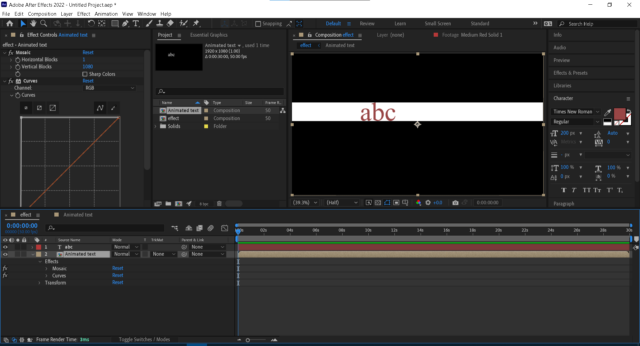
    The mosaic effect averages all the pixels in the entire row, and curves effect takes any color that isn’t pure black and makes it white. You can use this strategy in different ways but it will always respond to the animated object, in my case the abc text.

  • Tom Morton

    October 13, 2023 at 8:18 pm in reply to: Expression edge object?

    Actually you don’t need any expressions. Nest the animated object with a black background. Apply a mosic effect with 1 width and 1080 height (or height of comp). Then apply a curves effect to make everything not pure black into white.

    Simple!

  • Tom Morton

    October 13, 2023 at 7:34 pm in reply to: Expression edge object?

    Definitely is something that could be controlled by expressions, but feel I’d need a bit more info. Is the object in the middle something that will change or will it always be the “A”? And what sort of animations is applied to it?

  • What if you just group the layers under a null or just change the axis points of all layers to be 0,0,0. does that fix it? Not 100% sure I understand the problem.

  • Tom Morton

    October 10, 2023 at 6:27 am in reply to: C-100 clip “seams” question

    Think there’s a few reasons why clips get cut, but the audio should never drop out. The clips get cut into smaller parts as a failsafe to ensure there’s not a problem – some file systems will only support files up to a certain size, some cameras will only have the RAM to store a certain amount of data before it has to be dumped on the card.

    My 5D splits files at 4GB size, but I’ve never had an audio issue. I don’t think the setting can be changed so you might be best off getting an external audio recorder. I use the Zoom H1N and it’s very good value for money.

    There’s a long conversation about this on the canon forums: https://community.usa.canon.com/t5/Camcorders/Split-files/td-p/251458/page/4

  • Tom Morton

    October 9, 2023 at 1:09 pm in reply to: Glyphs?

    Interesting, not aware of any glyphs panel for AE but also never needed one I don’t think – in any program where I need an unusual glyph or symbol, I generally use the Windows emoji panel which contains everything in the Unicode library, glyphs, emojis, symbols etc. Shortcut key is Windows + . (period).

    Even in illustrator or indesign, I find it easier while typing to press Win+period, select a character and then keep typing, not a big fan of the Adobe glyph panels.

  • Tom Morton

    October 8, 2023 at 3:41 pm in reply to: Setting timecode in Davinci

    This is what frame.io is built for – ever since I’ve used it it’s simplified the way I work and get feedback on videos. I use it on Premiere Pro but there’s a Davinci plugin too, even without the plugin it makes things easier.

    Another trick is to work backwards on timeline edits, so after each edit, the timeline before it is unchanged so you can go to the original timecode still. But frame.io is the way to go, I use it professionally and have got away with the free version so far.

  • Tom Morton

    October 6, 2023 at 10:39 am in reply to: Animating a track matte

    Do you want the scrolling text like you have the credits at the end of a movie? Premiere Pro has a built in tools for this now via the Essential Graphics panel (or it might be essential text) that makes it a lot simpler then animating track mattes.

  • Tom Morton

    October 6, 2023 at 10:36 am in reply to: Proxies Not Batch Attaching

    Have you used the proxies successfully before or is the first time you’ve tried to do this?

  • Yup, there’s 3 main areas where everything can change:

    1. Physical hardware

    In camera, the physical size of the sensor and how it is used makes a difference, as does the quality of the sensor, and the quality of the lens. For instance my 5D IV uses the whole full frame sensor when shooting 1080p and resamples the resolution down to 1080p. When shooting 4K, it uses a cropped area of the sensor instead with no sampling. This effects the amount of light that is absorbed as well.

    2. Pre-shoot settings

    ISO, shutter speed, aperture, the focus point/mode of the lens, AF tracking, stabilization and other settings will all affect how the camera shoots an image/video. Is it in focus? Can the sensor handle the ISO / low light?

    3. Video file settings

    How the camera saves the file makes a difference. The bitrate, compression, codec, frame rate all will have a knock-on effect on the video quality. Low bitrate = less quality, frame rate will affect shutter speed.

    So there’s tons and tons of variables here.

    For example an old GoPro shooting 4K video on a small, old sensor will have to boost the ISO artificially to get good lighting and the old GoPro sensors were notoriously bad in low light. Also remember the shutter speed on a video is limited to the frame rate. At 50fps you can’t shoot at faster than 1/50th of a second because the frames start to overlap.

    So 5Dii shooting a still image on a full frame sensor has significant advantage. Larger sensor and bigger lens lets more light in, so can shoot at a lower ISO. A still image could be shot at 1/500th of a second using a fast lens and the AF system is very good so you can get a crisp shot with no noise.

    Video and photo will never really be comparable. Just remember that a video is a series of photos in sequence – if you could shoot a video on a 5Dii at it’s full resolution, the camera doesn’t have the RAM and the CPU to cope with the quantity of data passing through it. Even if it were possible, an average memory card would fill in seconds, if it even had the read/write speed to absorb the video.

    Hope that helps!

Page 11 of 14

We use anonymous cookies to give you the best experience we can.
Our Privacy policy | GDPR Policy