Forum Replies Created

Page 10 of 14
  • Tom Morton

    October 25, 2023 at 3:06 pm in reply to: Using a layer as a boundary for other layers

    well anything is possible… but you haven’t given much information. Do you have a database of which photos are part of which state? Are the photos names randomly or can the names be used to define where the photo goes. If you have a database, what format is it in? If you don’t have a database, what could the script use to determine which photo / layer goes on which state?

    Also, just to be sure… how is this video related, ie why do you need After Effects? If it’s a static image, I would lean towards, Indesign or Illustrator, but you haven’t described whether there’s some animation involved or anything? Any animation or movement would also affect how the script operates.

    Let us know!

  • Was it saved on a cloud platform? It sounds possible, and if it was then any cloud storage should have a deleted items folder with old stuff stored in it. Also, did you restore any other files during that time?

    It does sounds like a storage problem more than a Premiere Pro issue, but while we’re on that subject, I’d seriously encourage you not to use this workflow again. Premiere Pro is a very buggy program, and not that reliable for professional use. I use it, but I’m not a fan and I’ll keep lots of versions in case things go wrong – every video project I work on has around 2-5 project file versions. I will create a project file called “Video Example v1” and then at critical points in editing I would save down a new copy called “Video Example v2” and so on.

    I’ll also duplicate sequences and version them before I do a set of change (from client feedback or whatever) and then the project and any files linked to it are backed up to the cloud.

    I’ve had a fair few times when a project file has corrupted itself, and going back to a previous version is the only thing that saved me doing everything again.

    I know it’s easy to be wise after the event, but I think you should be looking into file recovery options rather than premiere pro help – if they’re deleted permanently then I’m very sorry but your hard work may be lost. 😔

  • That might work but it’s more typical to add a compositing tag (right click on the item on the object manager) and uncheck seen by camera.

  • Tom Morton

    October 20, 2023 at 8:09 am in reply to: Set sourceText of another layer?

    fascinated to know where this would be useful though…

  • Tom Morton

    October 20, 2023 at 7:50 am in reply to: Script for TSV importing

    Firstly, congrats on a beautifully written script, think you’ve done a great job commenting and formatting it and maintaining clarity throughout.

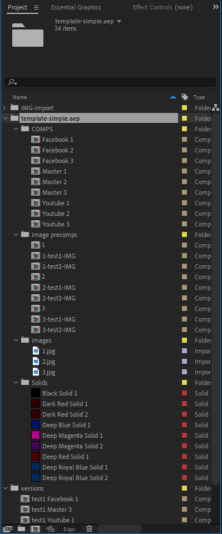
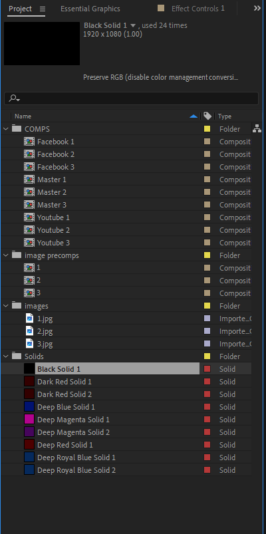
    I can’t see the problem straight off, but for interest I’ve added before and after screenshots of the project, as the original project get’s nested on import, and may affect the script locations?

    In the duplicated comp versions, the nested numbered comps get replaced with the image, rather than the image in the nested comp being replaced.

    Regards the image duplication, I get 18 images imported: the script firstly loops through 2 rows of data in the TSV file. Then it loops through the 3 versions, before calling the importImagesForPrecomp<b style=”font-family: inherit; font-size: inherit; color: var(–darkreader-text–bb-body-text-color); –darkreader-inline-color: var(–darkreader-text–darkreader-text–bb-body-text-color);” data-darkreader-inline-color=””>() function, so you’ve got 6 calls to the function. Inside the function you loop through the images 3 times, so you get 18 images imported. I can see you’ve added logic to prevent duplicates being imported but I think you’re getting some false positives here.

    I’ll let you know if I find anything else but you might find it useful to check the IF statement on line 67 and ensure it’s running correctly, as that’s the most obvious breakpoint. Test the output of the tests in the statement and ensure they’re always 100% what you expect.


  • Tom Morton

    October 20, 2023 at 6:18 am in reply to: Expression edge object?

    That’s ok guys! 🙂

  • Tom Morton

    October 18, 2023 at 6:35 am in reply to: Video isn’t exporting properly

    Rename the logs file with “.old” or something. Then try the export again with “Log” set to “per frame info”. You could make the video start 1.5 seconds in to reduce the logs you get too. Then you should get a clean logs file with a lot more detail, if you can’t see any obvious errors then dump the whole file on here and we’ll see if we can spot anything.

  • You may not find a built in function, you might need to use an online generator to create the LUT you need and use it as a conversion tool. Check out this post: https://creativecow.net/forums/thread/lin-to-log-ae/

  • Tom Morton

    October 17, 2023 at 6:07 am in reply to: Combine more MOGRTs

    Yep it’s all possible. Some tips:

    When you create the mogrt in AE, use a static image as a placeholder, not video as this will make your mogrt size smaller. Add the images, animate them as if they were video, and then drag the image source layers into the essential graphics panel.

    You should export the mogrt and test it in premiere pro yourself as there’s a couple of quirks with how Premiere Pro handles mogrts that have embedded video placeholders. I sometimes have added extra expression controls into the mogrt to help control the video placeholder.

  • Personally I wouldn’t – the easy way is buy a video with this effect from shutterstock, the harder way is I’d render it out in 3D – Cinema 4D has some smoke effects built in and I’d use them first to see what I could achieve.

    If you really want to do it in After Effects I’d probably start with the Particle Systems II effect, and play with some slow particles fading upwards, you could make a wispy feathered piece of smoke as the particle and then mask it all to the area you want to keep it to.

    Here’s a good tutorial that might help: https://motionarray.com/learn/after-effects/smoke-effects-in-after-effects/

Page 10 of 14

We use anonymous cookies to give you the best experience we can.
Our Privacy policy | GDPR Policy