


Thaxter Clavemarlton
Forum Replies Created
-

Thaxter Clavemarlton
March 20, 2009 at 12:45 pm in reply to: Creating a studio with an HDTV monitor on set.Choose one of the following (or, likely a combination of two.)
1- Normal set lighting and white balance and adjust the on-set LCD and/or it’s SOURCES to look natural in that lighting.
2- Adjust your camera and white balance to match the on-set LCD and gel your lighting to match that. (The set will look ODD to the eye.)
3- Lock-down most of your shots, and lay-in the video on the on-set LCD using post production effects.
(You can put a blue or green color on the on-set LCD screen and use a chroma-key in post.) -
[Mike Cohen] “This makes me think the output of the mixer is not line level, or a line level that is somehow incompatible with the camera’s version of line level. If the mixer is outputting -10db and the camera is expecting +4, could that be it? The manual does not make it clear what level the line level output actually is. “
The output of the Behringer UB1204 is +4 LINE LEVEL
Image below is from the USER MANUAL available on-line athttps://www.behringerdownload.de/UB-Mixer_/UB-GROUP_2_ENG_Rev_D.pdf
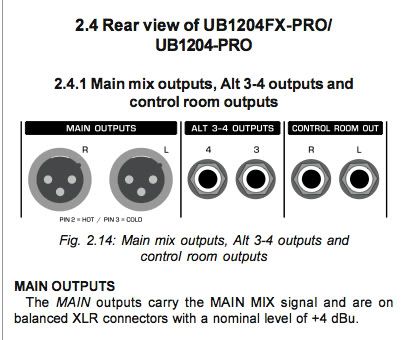
You definitely need to adjust the camera’s manual level controls to match the output of the mixer.
FWIW, at least for checking… try the AUTO level setting on the PD-170. It will quickly give you a better idea of true input signal.
-
[Mike Cohen] “XLR from main outs into a Sony PD-170, input set to Mic, manual gain for a good level, but on headphones out of camera there is a hum. “
The Behringer UB-1204 has LINE-LEVEL outputs.
Set the camcorder to LINE-LEVEL and the noise will disappear.
(Or at least drop down to a very acceptable level.) -
Thaxter Clavemarlton
March 12, 2009 at 10:55 am in reply to: G5 Power PC Mac not keeping up with HD video[David See] “My video is on external USB 2.0 drives and they are pretty full. “
USB is not recommended for video.
-
[juan carlos Riveros] “any suggestion to locate the reciever?”
Elevated in the room, above people’s heads.
It would take some experimentation.
If you keep the receiver closer to the area that you’ll move through
that can increase the signal it receives,
but that can also lead to some overloads when you are very near,
and drop-outs as you move farther away.Low-end wireless video is generally unstable and unreliable.
Best solution:
If you want it to WORK… use a cable.
As was suggested, a “cable-puller” assistant can help with this .
I’d try to figure a way to make that happen. -
Be aware that inexpensive wireless video coming from a camera in motion, surrounded by moving bodies, is likely going to be very “iffy.”
Plan on lots of video noise and lost signal on the screen much of the time.
Strategic positioning of the receiver may help.
-
[Bob Zelin] “you need an output card, from a company like AJA or Blackmagic to output to beta SP”
Maybe, but maybe not.
Yes, If the absolute highest quality of a BetaSP master is needed, then using a card out of FCP and the Mac to output to Component Video to the BetaSP is the right method.
OTOH, If the OP is shooting, editing , and outputting to tape in the DV format,
then there’s not an overriding much need to
get a card to output to the BetaSP.Just dub a BetaSP copy from the DV “master” tape, machine-to-machine
(S-Video connection will be much better quality than composite.)Just a less expensive alternative, assuming a DV edited master.
-
Thaxter Clavemarlton
March 1, 2009 at 6:19 pm in reply to: Time Lapse Clip difficulty when Sped up in FCPSounds like you might have a corrupted file.
Try recapturing that clip.
-
Thaxter Clavemarlton
March 1, 2009 at 4:03 am in reply to: Time Lapse Clip difficulty when Sped up in FCPSounds like you may have an “out point” marked on the clip before the end.
If that’s not it,
after you’ve put the sped up clip on the timeline, go back to your original
captured clip (make sure it is set to normal (or closer to normal) speed and
simply edit a few of the last night time frames onto the end of the faster clip on the timeline. -
If this is like most DV camcorders with A/V inputs,
you need to connect the audio to the RCA jacks (might even normally be the audio outputs) on the camcorder, not the XLR inputs.The XLR inputs are only active in “camera” mode.
