Rob James
 37
COW Coins
37
COW Coins
 94
VEGAS Pro Coins
94
VEGAS Pro Coins
Forum Replies Created
-

Bill, did you by any chance save that skeleton emitter? I think that may be exactly what I’m looking for. But it seems the cinebydesign website is completely down. I’d LOVE a link to that emitter if anyone still has it?
-
One more update. I have good news, after talking with the folks over at the OBS forum, there is a way to get this full screen on my TV. Right clicking in the Scene, and selecting Projector Screen does the trick. Mind you I did have to change the resolution of my Surface Pro from 2880 X 1920 to 1920 X 1080, but once I did that, I got exactly what I was hoping to achieve. Scrolling words on my TV as large as my TV screen. It’s like a gigantic Teleprompter! So, I consider this 98.5% resolved, so thanks to everyone who offered advice. The reason I say it’s not 100% resolved is because, you can’t save a Scene in OBS, in Projector Mode, so it doesn’t load that way when opening OBS. You have to quickly switch upon loading. And there is no keyboard command to start PLAY on an audio track. As it is now, OBS begins scrolling and playing the audio track immediately, there is no time to prepare, which makes it pretty difficult. But given a few takes, I think I can make it work. Once again, thanks to everyone who participated. 😀
-
Elgato Teleprompter is a very nice unit, and initially I was going to buy one, and considered a few others as well. At the end of the day, it came down to this. I didn’t want to be wearing reading glasses on Set. So I thought, what about using my large TV as a Monitor, then type my script in all “Caps” with large fonts. Initial tests out of Vegas, using the Credit Roll looked great and were the right size to read without reading glasses. But it’s a bit awkward in timing the scrolling in that Program, hence my initial post here. Then Jurgen suggested OBS. Been working on that for days now, and it’s very close. Now it’s just software limitations making it not perfect. But seeing scrolling text, HUGE in a large TV is really good. So, if I can convince the Developers to make a few feature enhancements, it will be perfect! For me at least.
-
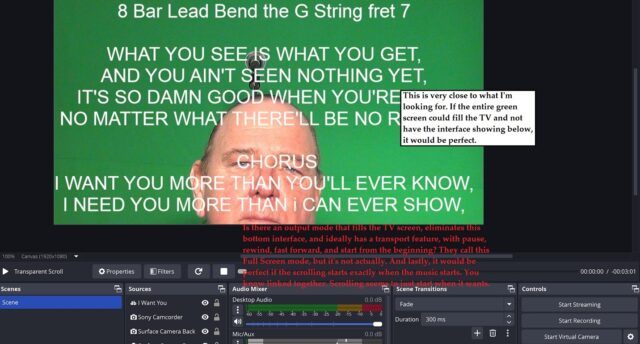
Thanks guys, for your continued support and ideas. First an update, I was making a stupid mistake, and I had connected my TV to the output of the Capture Card, which is why I wasn’t seeing the scrolling on my TV. Once I connected the TV to the output of OBS, I could see both screens scrolling. Progress, but not exactly what I want. So then I switched to what OBS calls Full Screen, but it’s not, there is still a partial interface at the bottom of the screen. So while I can use this now as is, I sure would like to see an update where it is true Full Screen, and has transport controls on the bottom. You know, pause, rewind, fast forward, play, start from the beginning etc. Now that would be perfect! Especially if they could link the scrolling to start with the click of the audio play button. Does anyone know how to get in touch with the OBS Development Team and make suggestions for updates? As it is, this is workable, but not ideal. To be clear I don’t want to record video into OBS, the camera records via a remote control. Then I take that footage back in to Vegas and Chrome Key a Background in. Jurgen I’m interested in this thing you call Screen Mirroring, please tell me more. And Brent I will definitely check out the solution you are recommending. I completely agree with you, this is a very important topic, and relevant to today’s Producers, that do it all on their own. I mean if I can keep myself centered in the frame, and read the dialogue or lyrics while staring directly at the TV, it eliminates the need for a Cameraman and a Teleprompter Operator. Anyways, below is a screenshot of what I’ve been able to do with the existing software. Basically using OBS as a makeshift Teleprompter Monitor system.

-
So Jurgen, I am almost there. I have the text scrolling on both screens in OBS, but there is no text on my TV screen, which is where I need it to be. I also can’t figure out how to start and stop the text scrolling, how is that done? Lastly, is there a way to add an audio track so that I can time the scrolling to match the lyrics. Either by spacing the words or adjusting the speed of the lyrics. Ideally, I would like the scrolling to begin when the audio track begins, if that’s possible? So, I would need to know how to start the audio as well and link it to the scrolling text. If I can figure out how to attach a video from my phone, into this post, you’ll able to see I’m close.
-
Well what Render Settings do you use in Vegas for output to the Internet?
-
That tutorial definitely helps! The missing piece of the puzzle. And I can probably cut and paste from my text file, to speed up the process. But what about my question about importing an mp4 (transparent credit roll) from a Vegas Render. Is that importable into OBS….as a second option, instead of creating scrolling text in OBS?
-
So from my research, I’ve found I do need a Capture Card (adapter) So I ordered this one online https://www.amazon.ca/dp/B0CDLH7DMK/ref=sspa_dk_detail_0?pd_rd_i=B0CDLH7DMK&pd_rd_w=xlrOz&content-id=amzn1.sym.516c2169-755e-413a-a38a-68230f4ab66f&pf_rd_p=516c2169-755e-413a-a38a-68230f4ab66f&pf_rd_r=9E23238GP6NN49EW9FNG&pd_rd_wg=o1EeK&pd_rd_r=a7171698-1fd6-497e-ad99-3d9656adfe88&s=electronics&sp_csd=d2lkZ2V0TmFtZT1zcF9kZXRhaWw&th=1 I saw this guy’s video https://www.youtube.com/watch?v=Ar87pSwO1kM&t=107s and it seems quite straight forward. So, I’m left with only two questions. Can I use that adapter and stream “Live” camera into Vegas, and scroll the monologue with Transparent Credit Roll. OR……failing that, how do I load the transparent credit roll I rendered out of Vegas and load it into OBS? The second option being my preferred method. Or can you create credit rolls, right inside of OBS?
-
Here are the screenshots you requested. Two of them, are how it looks in Vegas, and one of them shows how it looks on Smartphones and Windows Media Player. My goal is NO black areas around the video……in other words full screen, in the Players that the Internet uses to play them. I’m sure I’m just using the wrong Render Settings.
-
Yes, I can do that. But I can assure you I’m in 16:9, my Camcorder only records in that mode. And I set all my Clips to 16:9 in Pan/Crop. As you can see by my Render Settings I also have checked off Stretch to fill. The screenshot you may be referring to, was taken down by Mods. Why, I have no idea, she was fully clothed. Anyways, that screenshot illustrated my point, that when the video is played back, either on a Smartphone or Windows Media Player, is does not fill the screen entirely. Not the tops, the bottoms or the sides. There must be a Render Setting that fills all those black spaces, that is not a huge file? In other words compatible with Internet downloads, yet still of a good qualtiy. I’m off to make your screenshot, this time it won’t be of the talent.