Forum Replies Created

Page 3 of 8
  • Rob Ainscough

    April 22, 2024 at 3:02 am in reply to: New Build For Video Editing PC

    Depends on what you edit and file sizes … you’ll not see a huge difference between top end Gen4 M.2 vs. Gen5 M.2 but since you’re building new system, the price difference isn’t that significant $260 for 2TB Gen5 vs. High speed Gen4 2TB at $160.

  • Rob Ainscough

    April 19, 2024 at 8:44 pm in reply to: New Build For Video Editing PC

    The DDR5 performance will help. H.265 Adobe doesn’t like for timeline editing, I’d convert that to a ProRes flavor before starting a project.

    I used to be a fan of ASUS, but their quality and performance seems to have taken a dive for the worse over the years (especially recently). I’ve used Gigabyte boards many years ago but it did fail me, haven’t tried them recently. I’ve been using MSI boards recently and they seem good (not great but good) and stable.

    So far DaVinci has been faster in everything, timeline, renders, FX, and even DaVinci Fusion (equivalent to Ae) working faster than similar Adobe projects. But I do use BMD external hardware that only works with DaVinci so my workflow is much improved there also. Learning wise, DaVinci is node and Adobe is layers. DaVinci UI is more intuitive and the “pages are just tabs” are one click where-as in Adobe Pr I have to change “workspaces” to get the optimal UI layout … so going back and forth between Color grading and edit and fusion is super easy.

    As far as Timeline boost, you will improvement with Gen5 but don’t expect miracles, much of what happens is the timeline is decoding (hence my suggestion to convert H.265 to ProRes) … some compressions just turn Pr into a performance nightmare. You can always use proxies for editing, but for color grading no way one should be using proxies IMHO.

    Oh, you listed 4070Ti … I would recommend the 4070Ti Super 16GB variant at $829 or the AMD 7900XTX at $929 … both work well, but the 7900XTX will render faster. I use Topaz Video AI as my benchmark tool since they leverage the GPUs rendering performance almost entirely and reflect relative performance rendering.

    I posted some benchmarks on my 7900XTX 24GB and nVidia 3090 using Topaz Video AI here:

    https://community.topazlabs.com/t/video-ai-4-2-x-user-benchmarking-results/64143/30?u=robin.ainscough

    4090 24GB here:

    https://community.topazlabs.com/t/video-ai-4-2-x-user-benchmarking-results/64143/56?u=robin.ainscough

    4070 Ti Super 16GB using Topaz Video AI here:

    https://community.topazlabs.com/t/video-ai-4-2-x-user-benchmarking-results/64143/65?u=robin.ainscough

  • Rob Ainscough

    April 19, 2024 at 4:35 pm in reply to: New Build For Video Editing PC

    Saw this a week ago, but got swamped with work. Before I add my 2 cents, just be aware the is no magic hardware to make Pr go that much faster. Things to look for are FX that are GPU accelerated (very few of the good ones actually are GPU accelerated).

    I have to put my 2 cents in for DaVinci Resolve … I know I sound like a fanboy for DaVinci, but I’m not, it’s only because I’ve worked/work both Adobe and BMD path and see users tossing excessive money at Adobe to make it go faster. It’s just super easy to setup a headless DaVinci workstation that will render your project in the background allowing you to continue on the same project … what I call “no wait” workflow.

    Anyway, onto your hardware choices.

    ASUS “Prime” motherboards are ASUS low end variants … look for the Z790-E chipset which provides PCIe 5.

    I would remove the “Cache M.2 drive”. Get a Gen5 M.2 4TB and put it in the PCIe 5 slot from the Z790-E supported.

    Don’t add 8TB HDD, that can actually slow your entire system down. If you want Backup storage I suggest getting a external HDD (USB3) or NAS … 8TB seems kinda small for backup … what sort of video files/formats are you working with?

    The nVidia 4070Ti is a good card but for a few $$ more the AMD 7900XTX will render out faster especially if you’re using Topaz Video AI plugins (AMD fully support CUDA).

    Cheers, Rob.

  • Rob Ainscough

    April 19, 2024 at 4:08 pm in reply to: Risks of Converting Mid-project

    Vote for Option 1 also … I still use Adobe Pr but only “in the office” per project requirements (otherwise DaVinci Resolve for majority projects). Pr 2024 is not going to make things less stable, in fact likely the opposite. Also Pr 2024 has higher list of requirements both OS and hardware.

  • IMHO, nothing makes Adobe Premiere Pro run fast … not even a 96core AMD CPU with nVidia 4090 GPU and 128GB RAM. Here is what nVidia recommend for GPU acceleration for Adobe Premiere:

    https://www.nvidia.com/en-us/studio/software/

    Recommended Desktop GPU : GeForce RTX 4070 Ti SUPER or NVIDIA RTX 4500

    Recommended Laptop GPU : GeForce RTX 4080 Laptop GPU or NVIDIA RTX 4000 Laptop GPU

    For laptop I would look at Dell/Alienware (about $4000) for video editing $3700:

    https://www.dell.com/en-us/shop/game-laptops/new-m18/spd/alienware-m18-r2-laptop/useashctom18r203

    For external drives I would go with USB-C to M.2 nVME enclosure with M.2 2-4TB SSD (10G).

    https://www.amazon.com/SSK-Aluminum-Enclosure-Adapter-External/dp/B07MNFH1PX

    or if you want Lightning 3/4 and USB-C then more expensive (40G):

    https://www.amazon.com/UGREEN-Enclosure-Anti-Drop-Compatible-Thunderbolt/dp/B0CLV3D3H6

    Cheers, Rob.

  • Rob Ainscough

    February 29, 2024 at 4:34 pm in reply to: Premiere Pro or Davinci

    I have a Sony A7RV and no issues color grading in Resolve nor Pr … what’s your specific issue?

  • Having done both, DaVinci Resolve I found to be easy and more efficient. But I did BMD color grading panel. However, if I take that out of the compare, I still think Resolve has a better color grading workflow. Both can produce desired results, but I just find Resolve easier and more stable.

    – shot-matching where one can analyze the color profiles across a variety of shots

    – tracking for highlight/shadow adjustments to specific areas

    – team projects are super easy to manage with multiple colorist on the same project

    – simple click on color tab and all is setup efficiently (much better than Pr Workspaces)

    – node based so easy to go in/out of RAW profile to Rec709 (or whatever you desire and HDR)

    – working with LUTs are very easy

    – again nodes, they just help me visually (so much better than Pr stacked layers)

    – all the scopes one could possibly need

    – performance (so much more responsive than Pr) in any medium

    Cheers, Rob.

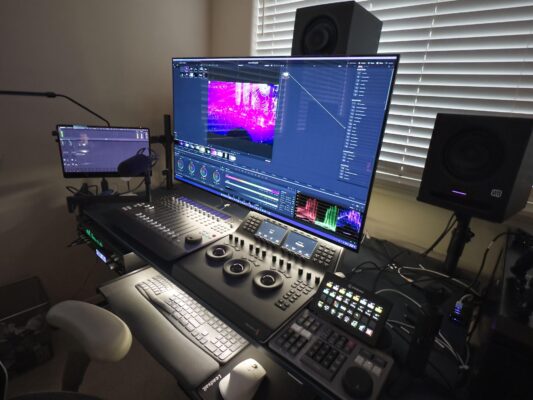
    EDIT: the Mic in my pic is mostly for my own notes … rather than type in notes or use a notepad I just record my verbal notes inline (sequence) for reminders and or ideas and mute as needed … my big secret to efficiency, just don’t tell anyone 😉

  • Rob Ainscough

    February 21, 2024 at 7:00 pm in reply to: Thoughts on Resolve

    ProRes was good at one time but it’s progressively being phased out as better compression processes evolve. Don’t get wrong, ProRes will be around for a while but in this NLE market it’s no longer as relevant as it once was.

    Apple ProRes isn’t native in Resolve (many long discussions about this) for Windows, but you can still work ProRes if you really need to (warning on disk space consumption) … good video tutorial here: https://www.youtube.com/watch?app=desktop&v=-a915EkxDe4

  • Rob Ainscough

    February 18, 2024 at 5:42 pm in reply to: Sound stutters on export and on playback

    FYI, you shouldn’t need to convert anything … that’s strictly an Adobe issue that many found (myself included) frustrating hence my departure from Adobe to DaVinci Resolve where I’ve never had any issues … heck I change audio track types from Mono to Stereo to 5.1 to 7.1 on the fly without them being “destructive” to the original source in DaVinci … try that in Adobe and it will crash and burn.

  • Rob Ainscough

    February 18, 2024 at 5:38 pm in reply to: OS Updates

    I’d wait until you finish the project. Upgrading any OS (be it Apple or Windows) will only make matters worse not better in terms of problem diagnostics … even more so if you already have a problem.

    Did you recently do any Adobe Pr updates? Sadly Adobe is notorious for buggy updates.

    Is your Mac having any issues with other software (not Adobe)? Stability problems can also be a result of your hardware so I’d recommend running some testing tools for your Mac to load it and see how well it performs.

Page 3 of 8

We use anonymous cookies to give you the best experience we can.
Our Privacy policy | GDPR Policy