Forum Replies Created

Page 4 of 8
  • Rob Ainscough

    February 16, 2024 at 6:18 pm in reply to: Sound stutters on export and on playback

    Sounds like an Adobe issue … what version?

  • Rob Ainscough

    February 15, 2024 at 7:19 pm in reply to: Sound stutters on export and on playback

    Did you unlink/decouple the audio track from the original 30 fps video?

    Have you tried rendering out audio only from the original 30 fps video and then place that rendered out audio in your 25 fps video sequence?

    You shouldn’t need to modify the sample rate … in fact you don’t want to.

  • A few options:

    Based on limited info, suggest ProRes 422 (no need for HQ) or H.264 MP4.

    Otherwise, you’ll need to interrogate each media file source to determine lowest common denominator and go with that. If Pr doesn’t provide enough search for “Media Inspector Tool” … free and very useful.

  • The selection of which ProRes flavor to use will vary based on how the original footage was captured.

    No point in using ProRes 4444 (XG) if you aren’t capturing with it … things like 12bit per channel color support, 16bit Alpha.

    Many captures are ProRes 422 HQ … very common.

  • H.265 for HEVC would be my choice.

    BUT, need to know:

    1. How large a display and what’s it’s resolution and expected view distance?

    2. Your client hardware (device displaying the footage).

    3. Media in which you plan to transfer the footage.

    For some bizarre reason (think Apple) Microsoft charge $1 for HEVC codec for Windows PCs. HEVC is a lossless compression.

    Stick to ProRes if you’re (and client) all Apple based, don’t care about file sizes, and need it to work well in Adobe Pr.

    Cheers, Rob.

    EDIT: MP4 will be restricted to 4K content but is the MOST compatible and should work on anything. H.265 HEVC limit is 8K 300 FPS HDR10.

  • When you say “all is working fine” … I’m assuming just the nVidia GPU for rendering using CUDA (no Intel embedded)?

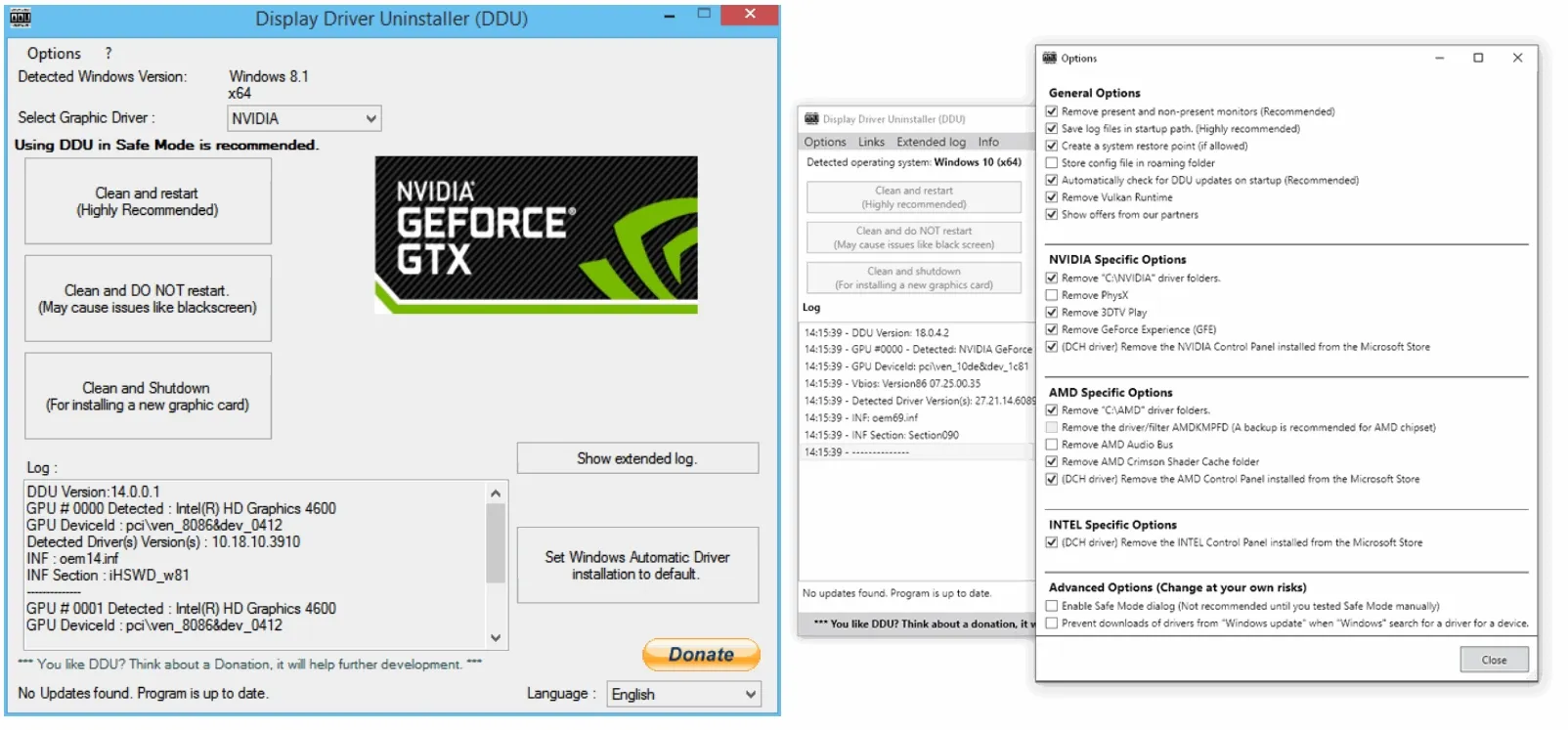
    Handy tool for cleaning nVidia drivers is call DDU

    1. Download latest nVidia “studio” drivers (not GRD)

    2. Download DDU (unzip and extract)

    3. Boot PC into safe mode (msconfig and check Safe mode)

    4. When loaded in safe mode run msconfig again and uncheck safe mode)

    5. In Safe Mode: Disconnect your internet connection (disable wireless and/or network)

    6. In Safe Mode: Run DDU (select GPU and hit Clean and Restart)

    7. Reboot (still stay disconnected from Internet)

    8. Manually install the nVidia Studio drivers from step 1

    9. Once complete reboot

    10. Re-enabled your network

    DDU you can get here (trusted):

    https://www.guru3d.com/download/display-driver-uninstaller-download/

  • Intel Iris Xe Graphics does NOT support CUDA so don’t really know how you managed to use it?

  • Rob Ainscough

    January 26, 2024 at 9:03 pm in reply to: PC for Premiere, in 2024

    Agree, can never have too much storage.

    In my early days, my workflow was Projects on 1TB M.2 (local), assets on a 2TB M.2 (local) and archived on 10TB HDD (local).

    I soon grew out of that workflow as I captured at higher and higher resolutions (4K 60, 8K 30) in RAW and 10bit color — need more space and flexibility, my new workflow for storage:

    2TB M.2 projects (local about 7000MB/sec)

    70TB NAS for Assets and Networked Projects 10G (1250MB/sec)

    70TB NAS to render server 20G (2500MB/sec)

    I ran render testing against my NAS (network RAID 5 – 5 HDDs and 4 SSDs), 2TB internal NVME M.2 (local), and my 10TB HDD (local) … performance between my NAS and M.2 was within margin of error (almost identical). Performance to my HDD and the project rendered about 30% slower. Your mileage will vary somewhat based on CPU, Chipset, etc. but from my testing the CPU/GPU are still the bottlenecks in rendered output when running any I/O above 300 MB/sec.

    Probably more than you wanted to know, but what you might gain from my results is that just about any M.2 or SSD will be sufficient.

  • Rob Ainscough

    January 25, 2024 at 10:59 pm in reply to: Thoughts on Resolve

    You’re right, it’s not terrible expensive … but I started doing the SaS with Adobe back in 2012 so 11 years $7,700 … sure a lot cheaper than my MSDN (software development) subscription at $2500/yr … but I just didn’t see much of an improvement to the aspects I cared about over that $7,700 expenditure decade+. I was hoping Adobe’s shift to 64bit would improve performance and unify their apps, but that just never happened.

    My transition from Adobe to Resolve was actually very easy and the Resolve workflow just made more sense and saved me time. I do have more BMD hardware to speed up my workflow, but even without the hardware, the UI is just so much easier to work with and just makes more sense than Adobe’s UI. Resolve nodes are awesome, so much more flexible and easier to identify than just stacking up layers or grouping of layers like in Pr/Ae/Ps … I can quickly see at a glance in my node tree what dependencies exist and where I need to go to address something. In Adobe, I’m searching thru the layer stack.

  • Rob Ainscough

    January 25, 2024 at 8:30 pm in reply to: Thoughts on Resolve

    I think what bothered me most about Adobe is the price/subscription model I was forced to use. $700+/yr and I didn’t really get any features I wanted and stability and performance got worse and worse each year … it was probably 2017 when I last enjoyed using Adobe products. The cross platform nature of their software engineering teams leave some Windows/PC acceleration features under utilized. On the Apple side the hardware is far more restricted and changes much less frequently and that’s the schedule the Adobe development team adopt for both Apple and PC.

    As far as audio, working Atmos with Resolve is as easy as selecting the audio track type and go do sound stage … last I checked in 2023 Atmos wasn’t even supported in Adobe Premiere?

    EDIT: and one other issue I had with Adobe was they had so many separate apps that really shouldn’t be separate and as far as I can tell were done initially due to 32bit address space limits (4GB) but remained in place even after moving to 64bit simply to keep more revenue streams rather than workflow efficiency. Ae shouldn’t be a separate app, Audition shouldn’t be a separate app … they should be part of Pr.

    Agree on multiple platforms, competition is good.

Page 4 of 8

We use anonymous cookies to give you the best experience we can.
Our Privacy policy | GDPR Policy