-
GPU’s not being used by Premier pro when rendering
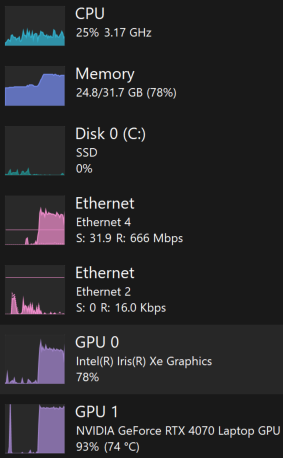
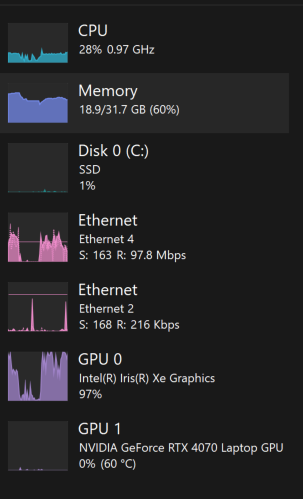
Context – Before this problem, when I rendered “in to out” and looked in my task manager, it would show that both my Nvidia GPU and Intel GPU were being used to render the sequence (often peaking at 100%). This was extremely fast rendering compared to what I’ve had on previous machines. Here is a screenshot of what that looked like.
*See screenshot 1
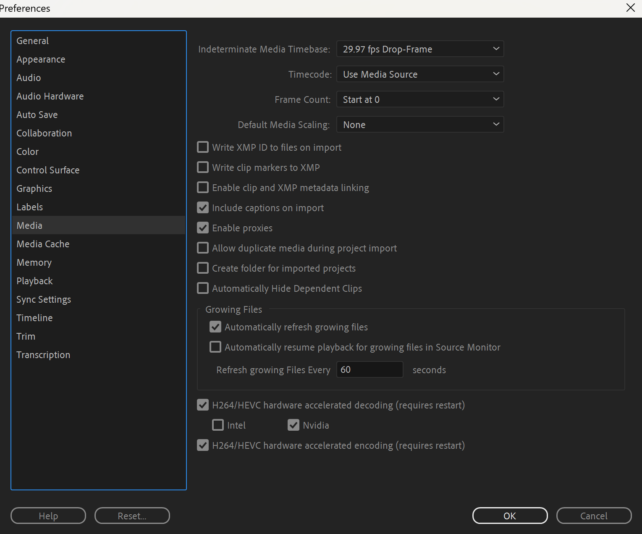
The below are the settings of before there were any problems/changes.
*See screenshot 2
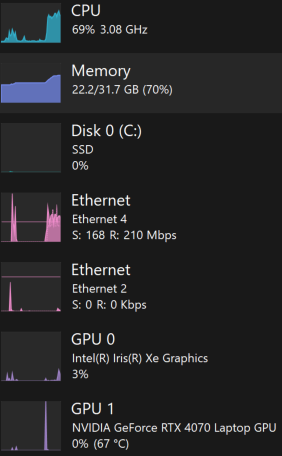
I opened up PP a few days ago and felt that the render speed was much slower than it normally was and discovered that now the CPU and the Intel GPU were being used to render (the Nvidia GPU was at 0%) the speeds of rendering in these conditions are very noticeably slower. The below screenshot shows what the task manager looks like now when doing the same thing with same settings.
*See screenshot 3
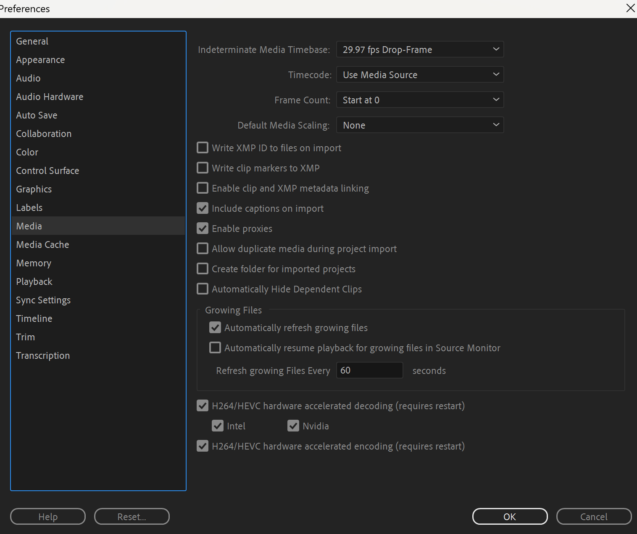
When I change to these settings (below) the task manager looks like this (also below).
*See screenshot 4
*See screenshot 5
It might be worth mentioning that these “symptoms” are present on two identical laptops.
Essentially, I want to get back to where both GPU’s are being used as seen in screenshot 1.
I contacted adobe support who went through the usual troubleshooting things and below are the steps taken to try to fix this issue – none of them worked –
– It is not project/media based – this problem happens on all projects and all types of media I’ve tried.
– Restarting the laptop
– Removing PP and reinstalling it
– Reinstalling the Nvidia graphics driver
– Allowing all the permissions for PP
– Rolling back to a previous windows version
– Yes, I’m using CUDA!!
Here are the details/specs of my machine:
– Windows 11 Pro – 10.0.22631 Build 22631
– System manufacturer – Dell
– Model – XPS 15 9530
– RAM – 32
– GPU0 – Intel® Iris® Xe Graphics
– GPU1 – NVIDIA GeForce RTX 4070 Laptop GPU
– Processor – 13th Gen Intel Core i9-13900H, 2600 Mhz, 14 Core(s), 20 Logical Processors
– Premier pro version – 24.1
– We have a Qnap NAS which we use for all media storage, and where we edit off.
This is a really frustrating problem, as we have invested considerable amounts of money into hardware and it’s not at all being used optimally.
Please let me know if you need any other info or context.