

Activity › Forums › Adobe Premiere Pro › Whats better for color grading? davinci resolve or Premier pro?
-
Whats better for color grading? davinci resolve or Premier pro?
Posted by Soman Ahmed on February 28, 2024 at 10:42 pmWhats better for color grading? davinci resolve or Premier pro?
please share your experience and reasons
Mads Nybo jørgensenreplied 2 years, 6 months ago 4 Members · 3 Replies
-
3 Replies
-

Rob Ainscough
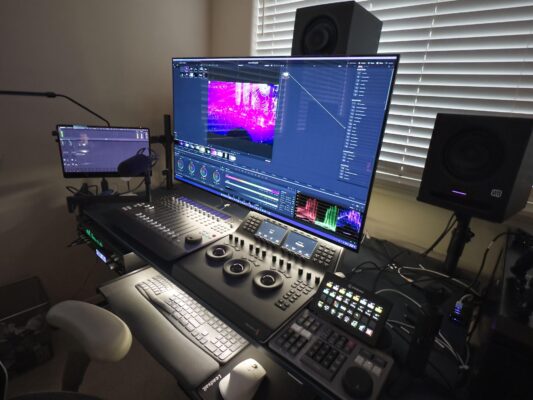
February 28, 2024 at 11:51 pmHaving done both, DaVinci Resolve I found to be easy and more efficient. But I did BMD color grading panel. However, if I take that out of the compare, I still think Resolve has a better color grading workflow. Both can produce desired results, but I just find Resolve easier and more stable.
– shot-matching where one can analyze the color profiles across a variety of shots
– tracking for highlight/shadow adjustments to specific areas
– team projects are super easy to manage with multiple colorist on the same project
– simple click on color tab and all is setup efficiently (much better than Pr Workspaces)
– node based so easy to go in/out of RAW profile to Rec709 (or whatever you desire and HDR)
– working with LUTs are very easy
– again nodes, they just help me visually (so much better than Pr stacked layers)
– all the scopes one could possibly need
– performance (so much more responsive than Pr) in any medium
Cheers, Rob.
EDIT: the Mic in my pic is mostly for my own notes … rather than type in notes or use a notepad I just record my verbal notes inline (sequence) for reminders and or ideas and mute as needed … my big secret to efficiency, just don’t tell anyone 😉

-

Tom Morton
February 29, 2024 at 8:23 amI have 10 years experience in Premiere Pro…
I have 10 hours experience in Davinci Resolve…
Recently I struggled to color grade a shot in Premiere Pro… after 40 minutes of tweaking, it looked ok but definitely not perfect… I thought I would try it in Davinci Resolve, and after 10 minutes, I had the shot looking exactly how I wanted it.
I imagine with experience and better setup I could have done it in 5 minutes or less, so it’s a huge time saving. Premier Pro color tools are not intuitive and often the controls don’t translate well to the image.
-

Mads Nybo jørgensen
February 29, 2024 at 9:40 amHey Soman,
It really depends?
If you are doing some quick colour corrections, or matching up cameras, then there is not much difference in what package you use – except where you feel most comfortable.
Like Rob, but more recent for me, I’ve invested in the Blackmagic Mini panel, which comes with Davinci Studio. My thoughts around that, is that there are more high-end colourists that uses Davinci, simply because it originated as a professional tool for creative grading. And, Blackmagic has got a dedicated hardware solution that allows the “operator” to work more accurately, at speed, than your mouse or third party panel can perform on Premiere Pro.
Where as Adobe, they move their “boxes” around a bit on the screen + throw you scraps of improved tools, but is not really serious about the high-end users – they are currently putting most of their R&D cash into Adobe Expres and A.I. Further evidenced by Adove C-Level smashing up the Creative Cloud, by removing Cloud usage with their video tools for freelancers, SME’s and students.
It really comes down to what you are happy and best with using, and your future requirements. As if Adobe’s low-end offerings are hitting you harder as a professional editor, you either have to move up, or change your role.
Atb
Mads
Reply to this Discussion! Login or Sign Up