Forum Replies Created
-

Phil Loarie
December 20, 2021 at 4:57 am in reply to: Hub Explorer mobile upload crashes Vegas Pro 19 consistently.If you are running a VPN on your machine or router or both, try turning it off and and see if that makes a difference in reaching the cloud. Also, check your programs file via the control panel to see what recent windows updates may coincide with when the issue started, if you find one, try to uninstall it and see if that is the issue.
-
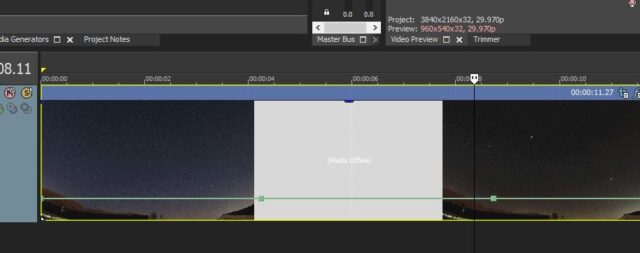
I am sorry I don’t know of a way to move the default position of the 100% line of the velocity envelope or if it is possible to move it, but here are two possible work arounds:
1) you can give yourself more room to work with by simply adjusting the vertical height of the track. Hover over the bottom portion of the left margin of the track where all the track buttons are, and an equal sign (with up and down vertical arrows attached) will appear, pull down to make the track taller or up to make it less tall.
2) you can also add a point on the velocity line then assign it a particular velocity. Right click on or below the 100% line after adding the envelope, a menu will appear to add a point. Right click on the point and another menu will appear offering different standard values or the option to “set to” your own custom value as well as delete and other options.
Sorry my screen capture can’t show these menus but here’s what an expanded track with a couple of points looks like.

-
Phil Loarie
November 22, 2019 at 7:01 am in reply to: Recommendations for Best GPU to use with Vegas Pro 17Thank you so much Wayne for your kind attention. deeply appreciated.
All the best,
-PhilCuriosity is the tension in the spring that moves us forward.
-
Phil Loarie
September 16, 2016 at 9:16 pm in reply to: recommendation for USB audio interface for Vegas Pro 13 in WIN10 i7 64 Bit OS Dell XPS 8900Thank you for the reference, I will be sure to check it out. A few years ago ProSonus was recommended do you have any thoughts on this?
Break a rule only when it serves a better end.
-
Phil Loarie
October 23, 2012 at 10:36 pm in reply to: How to engage multiple track motions to work together?Thank you John,
These helped enormously. BTW: You have some awesome tutorials, nice work.
-Phil -
Phil Loarie
October 8, 2012 at 8:08 pm in reply to: How to engage multiple track motions to work together?Thank you John.
-
Phil Loarie
October 5, 2012 at 10:09 pm in reply to: How to engage multiple track motions to work together?Sounds like a plan, I’ll give it a whirl over the weekend.
Thank you Graham.
-
Phil Loarie
August 28, 2012 at 6:34 pm in reply to: Using crop/pan with multiple tracks and having a drop out issue.Hey John,
Thank you for your kind attention. I did some troubleshooting last night and have the following update.In my first post I omitted the effects I had for the these shots thinking the issue was else where–not so. All the composites have the following effects added:
1) HSL: desaturate
2) Brightness and Contrast: B near 0, C at about 15
3) Gradient Map: Sunset
4) at least one mirror (left) and in some two mirrors (left and bottom).What I learned was that if I turned off the Gradient Map effect the problem went away. So there is some weird interaction of Gradient Map with the Crop/Pan feature.
Workarounds:
1) use of track motion instead of crop/pan–works but there I need to add more tracks to get the sliding door effect.2) A better one is to not use either crop/pan or track motion but to use a transition called Barn Door (Horizontal or Verical, in or out)
Summary: Novice compositor unfamiliar with the many flavors of Vegas Pro Transitions tries to due an effect the hard way and runs into trouble. After some troubleshooting he quickly learns that he can do this with far fewer tracks with the right transition(s).
Only one nit: How is the Gradient Map effect messing with the Crop/Pan feature and causing a brightness issue?
ASCII version of composited timeline:
track 1: ======+++
track 2: ……=========+++
track 3: …………============+++
track 4: ………………===================>Each track has a clip that overlaps the track below it. The periods are just space fillers, there is no clip there. The equal signs and plus marks are clips. Where the plus marks are represents the transition where crop/pan moves the upper screen off frame. This is the area where the bottom clip is less bright than it should be, as soon as the upper track terminates its clip, the lower clip has normal brightness.
Please note by using a left mirror and pan/crop together gets a kind of barn door opening effect.
-
Phil Loarie
December 5, 2011 at 7:03 pm in reply to: Resolved issue with Nikon .mov files with Vegas Pro 10 and 11:Hello John,
Excellent overview and I agree with you totally. I would not have ventured into the S9100 camera had I known these facts before buying.SCS is mainly saying that the OS is not my friend here, would Vegas Pro 10/11 handle these .mov files any better if I changed my OS to Linux?
I am ok to continue to use the Nikon S9100 now that I know what limitations I have in editing. I have had several editing success stories with this camera as long as I keep the shot count down and the over all time under 3 or 4 minutes. Generally, with my system (Quad Core Win7 32 bit w/4GB of ram) if I keep the overall media total under 1.2 GB I will be ok. Workarounds: Cine Forms Neo-scene was successful in the case I tested, however not all Nikon .mov files converted, but I managed to edit and render the converted files ok.
Another workaround, by simply changing the extension from .mov to .mp4 did make a difference in getting another project to work. In both workarounds I was able to exceed the limitations but not by much before Vegas barfed in the render process.
Yes, I have a new camera in mind. How does the Sony NEX-5N AVCHD™ 1080/60p files do in Vegas Pro 10 or 11? I would think this should work nicely.
I can’t afford a Canon 5d MkII yet, by the time I do, there will be comparable lighter and cheaper versions available. What I think most independents like me want is a full sensor camera, with a huge piece of glass, like a Zeiss 30:1, and manual control everything on a remote–I must be thinking of a RED.
:>Thanks for taking a look John.
-Phil -
Phil Loarie
December 3, 2011 at 12:34 am in reply to: Resolved issue with Nikon .mov files with Vegas Pro 10 and 11:Hi Steve,
I appreciate the humor.I think I was kind to them on my reply which I will include at the bottom. Over the duration I was getting a bit frustrated with all the hoops they wanted me to dance through so I let them know a couple of weeks ago that there was room from improvement on the process. I had to chide Nate a bit to come up with a 32 bit machine that better matched my target machine at home (the one that initially had the issues) so he could actually copy the problem. That worked ! There were tons of workarounds I tried before this. At one point, SCS had me review a 25 page thread from their forum regarding the “blink3times” workaround (from 2009) …directions:
“I reset the memory flags in
vegas80.exe
m2tsplug.dll
mcstdh264dec.dll
sonymvd2pro_xp.dll”This work around did not work for me. So I was totally worn out by the end of this round. And my own conclusion by this time was that it was resource based anyways.
——————————– snip —————————-
Thank you Nate and your team,
As you know I still had issues using another machine, 64 Bit i7 Core Win7 w/4Gb of core memory, albeit I was able to include more clips before the render went black while you were successful with a 64 Bit i7 Core Win7 w/8Gb. So this leaves me to believe that both a 64 bit machine and more than 8Gb should be able to accommodate the Nikon .mov file based Vegas projects.
Last question: I know for a fact that Adobe Premiere has no problems with these Nikon .mov files whether we are talking about 32 bit or 64 bit, so why can’t Vegas do this?
If you can not provide an answer it’s ok, but if you can, I sure would like to understand the difference in how Vegas and Adobe deal with .mov files. Short of that, we are done here and again I thank you and your team on working with me on this for the past 3 months.
-Phil
————————————So for now, I can only make HD videos with my Nikon in Vegas that do not exceed 1 GB of total media. However, I have plenty of Sony AVCHD files from my Sony Camcorder that need editing so maybe by the time I catch up, I will want to upgrade to a new 64 bit i7 w/16 GB. Perhaps by that time, they will have a i7^2 core or maybe I will tryout AP and love it too much to change.
:>-Phil