Nick Kennedy
 5
AE Expressions Coins
5
AE Expressions Coins
 6
COW Coins
6
COW Coins
Forum Replies Created
-

Hi Tomas, thanks for answering. I think that’s a good suggestion, I have actually OMG been able to solve this myself using the following If / else …/else…./else…. kind of expression. Like if the name at position 1 is team A (is the same as Badge A) then use Position 1 Here is the expression I used for all 18 Teams in the Bundesliga
x = transform.position[0];
y = transform.position[1];
a = thisComp.layer(“Bundesliga 22_23 – Sheet1.csv”)(“Data”)(“Outline”)(“Manschaft”)(“Manschaft 0”);
b = thisComp.layer(“Bundesliga 22_23 – Sheet1.csv”)(“Data”)(“Outline”)(“Manschaft”)(“Manschaft 1”);
c = thisComp.layer(“Bundesliga 22_23 – Sheet1.csv”)(“Data”)(“Outline”)(“Manschaft”)(“Manschaft 2”);
d = thisComp.layer(“Bundesliga 22_23 – Sheet1.csv”)(“Data”)(“Outline”)(“Manschaft”)(“Manschaft 3”);
e = thisComp.layer(“Bundesliga 22_23 – Sheet1.csv”)(“Data”)(“Outline”)(“Manschaft”)(“Manschaft 4”);
f = thisComp.layer(“Bundesliga 22_23 – Sheet1.csv”)(“Data”)(“Outline”)(“Manschaft”)(“Manschaft 5”);
g = thisComp.layer(“Bundesliga 22_23 – Sheet1.csv”)(“Data”)(“Outline”)(“Manschaft”)(“Manschaft 6”);
h = thisComp.layer(“Bundesliga 22_23 – Sheet1.csv”)(“Data”)(“Outline”)(“Manschaft”)(“Manschaft 7”);
i = thisComp.layer(“Bundesliga 22_23 – Sheet1.csv”)(“Data”)(“Outline”)(“Manschaft”)(“Manschaft 8”);
j = thisComp.layer(“Bundesliga 22_23 – Sheet1.csv”)(“Data”)(“Outline”)(“Manschaft”)(“Manschaft 9”);
k = thisComp.layer(“Bundesliga 22_23 – Sheet1.csv”)(“Data”)(“Outline”)(“Manschaft”)(“Manschaft 10”);
l = thisComp.layer(“Bundesliga 22_23 – Sheet1.csv”)(“Data”)(“Outline”)(“Manschaft”)(“Manschaft 11”);
m = thisComp.layer(“Bundesliga 22_23 – Sheet1.csv”)(“Data”)(“Outline”)(“Manschaft”)(“Manschaft 12”);
n = thisComp.layer(“Bundesliga 22_23 – Sheet1.csv”)(“Data”)(“Outline”)(“Manschaft”)(“Manschaft 13”);
o = thisComp.layer(“Bundesliga 22_23 – Sheet1.csv”)(“Data”)(“Outline”)(“Manschaft”)(“Manschaft 14”);
p = thisComp.layer(“Bundesliga 22_23 – Sheet1.csv”)(“Data”)(“Outline”)(“Manschaft”)(“Manschaft 15”);
q = thisComp.layer(“Bundesliga 22_23 – Sheet1.csv”)(“Data”)(“Outline”)(“Manschaft”)(“Manschaft 16”);
r = thisComp.layer(“Bundesliga 22_23 – Sheet1.csv”)(“Data”)(“Outline”)(“Manschaft”)(“Manschaft 17”);if (a==thisLayer.name) [x,y];
else if (b==thisLayer.name) [x, y+thisComp.layer(“Controll”).effect(“Slider Control”)(1)];
else if (c==thisLayer.name) [x, y+(thisComp.layer(“Controll”).effect(“Slider Control”)(1)*2)];
else if (d==thisLayer.name) [x, y+(thisComp.layer(“Controll”).effect(“Slider Control”)(1)*3)];
else if (e==thisLayer.name) [x, y+(thisComp.layer(“Controll”).effect(“Slider Control”)(1)*4)];
else if (f==thisLayer.name) [x, y+(thisComp.layer(“Controll”).effect(“Slider Control”)(1)*5)];
else if (g==thisLayer.name) [x, y+(thisComp.layer(“Controll”).effect(“Slider Control”)(1)*6)];
else if (h==thisLayer.name) [x, y+(thisComp.layer(“Controll”).effect(“Slider Control”)(1)*7)];
else if (i==thisLayer.name) [x, y+(thisComp.layer(“Controll”).effect(“Slider Control”)(1)*8)];
else if (j==thisLayer.name) [x, y+(thisComp.layer(“Controll”).effect(“Slider Control”)(1)*9)];
else if (k==thisLayer.name) [x, y+(thisComp.layer(“Controll”).effect(“Slider Control”)(1)*10)];
else if (l==thisLayer.name) [x, y+(thisComp.layer(“Controll”).effect(“Slider Control”)(1)*11)];
else if (m==thisLayer.name) [x, y+(thisComp.layer(“Controll”).effect(“Slider Control”)(1)*12)];
else if (n==thisLayer.name) [x, y+(thisComp.layer(“Controll”).effect(“Slider Control”)(1)*13)];
else if (o==thisLayer.name) [x, y+(thisComp.layer(“Controll”).effect(“Slider Control”)(1)*14)];
else if (p==thisLayer.name) [x, y+(thisComp.layer(“Controll”).effect(“Slider Control”)(1)*15)];
else if (q==thisLayer.name) [x, y+(thisComp.layer(“Controll”).effect(“Slider Control”)(1)*16)];
else if (r==thisLayer.name) [x, y+(thisComp.layer(“Controll”).effect(“Slider Control”)(1)*17)];A bit long perhaps but it works well
-
Hello Christian, I realise your post is a bit older now, but I am facing a similar problem with a MOGRT, where I change the CSV file in the Essential graphics tab of premiere pro but no values are being updated. I, too, wanted to keep my editors out of after effects. Have you found a solution to this problem? Or a workaround? I’d be grateful to hear from your experience. Best regards, nick
-
I just wanted to thank again Filip and Andrei for helping me out on this project. Creative cow is such a great place to get help, I hope one day to be knowledgeable enough to help people out on these forums as well, but until then, I’ve attached a copy of the final project in case anyone would like to take a look at this. I actually wanted to create a MOGRT for premiere pro, so that the editors could simply swap out the CSV file but unfortunately it doesn’t seem to work well. I may well open another Forum Thread over on the Premiere Pro Forum. In the meantime we are using direct link to the AE Comp and simply saving the new CSV file over the old one. Anyone who sees this and has experience working with CSV files in MOGRTS, any tips would be appreciated. Thanks again Creative Cows everywhere!
-
Hi Filip, yes!!! this appears to work just right! Many Many Thanks for your help.
-
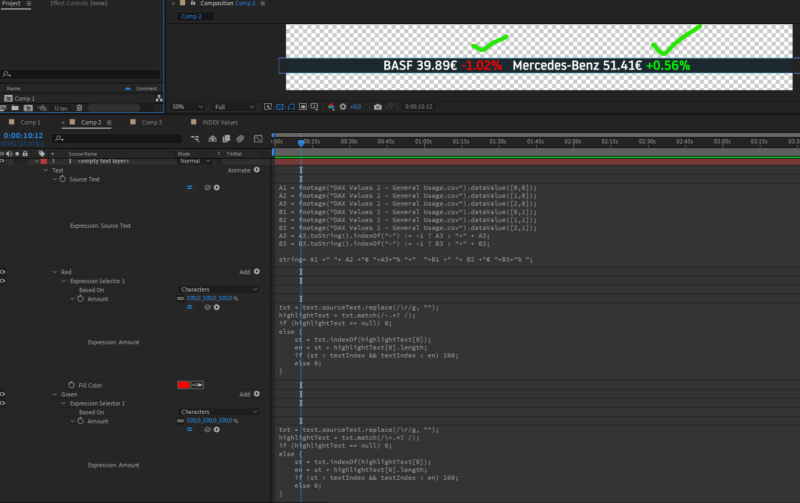
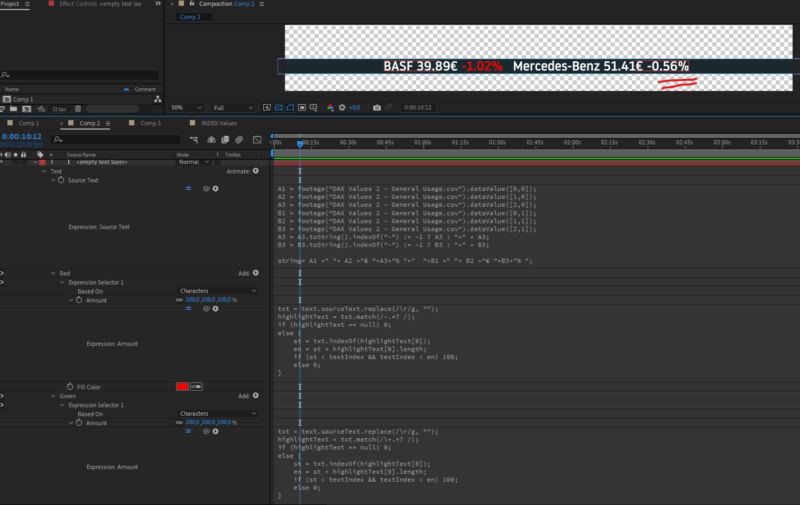
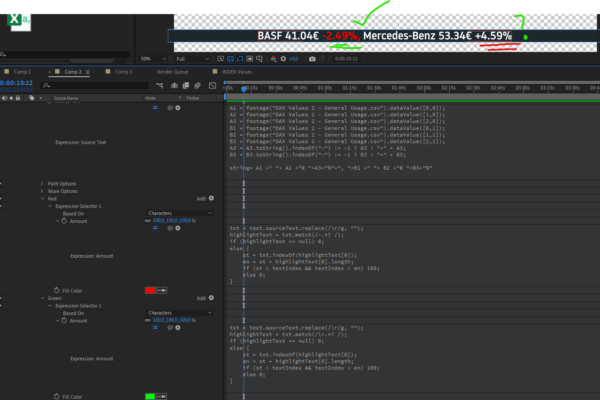
Hi Filip, many thanks for your help! This did the trick but now I have run into a new problem! Please could you take a look. The first screenshot everything is working as it should, i put the space after the %-sign and it worked. But then I changed the price in the csv File to a negative value and this wasn’t colored red. Will the exression selector only find one text to highlight and not look any further? I want to eventually put several stock prices and the % change from previous day in one text layer. Is it possible that the expression selector can find all incedences of negative and positive values and color them red and green respectively? I greatly appreciate you guys taking the time to help, Thanks!

-
Wow Andrei, once again, great work thanks! I’m getting so close now- Unfortunately I really don’t understand whats going on in the expressions on the animators Red and green. When I try to do the same, the red works fine only the green is not working. Please, I have to ask for your help one more time cause I really don’t see whats going wrong. Thank you so much
-
Wow, yes!!!, this is it, great, thanks a lot. I’m still struggling with the green and red text. Can you please describe how I should go about doing this? Thanks again for taking the time. This has been a great help!
-
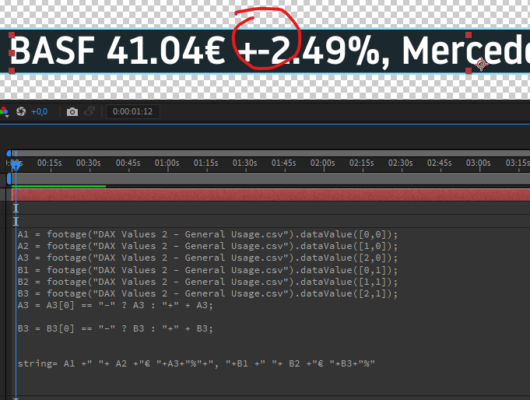
OOpps not quite, now I’m getting both symbols
-
Hi Andrei, thanks for the quick reply, but I don’t think this will work.
The percentage change in Price (A3, B3 etc shows a – when it is a
negative value, but no positive when it is a positive value. I want my
expression to look at the value and decide if it is negative or positive
and only in the case of a positive value it should then add the + sign.
Then your solution to the color will also not work because for example
the price will change from day to day and if it changes from, for
example, one figure to two figures, then the character index of the
price change will also move. This is why I ask if it is at all possible
to change the colour of only part of a string. Can I define which part
of a string should change color? Thanks for trying. I’m going a bit
crazy with this and am now thinking about instead of trying to pack
everything on one line of text, to make one seperate text layers for
Stock and its price and another for the %price change. Then I could
perhaps achive the desired result with if else statement. -
Hi Jean, thank you so much for taking the time to try this out. I had hoped to be able to provide the editors with one input for full name but I don’t think this will be possible. I will have to create, like you did in the precomp, input fields for First and last Names. Thanks again for helping, Cheers, nick