Forum Replies Created

Page 2 of 3
  • Nick Kennedy

    June 22, 2021 at 2:11 pm in reply to: Source Text Split() method

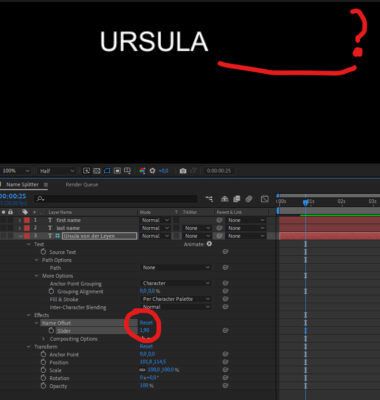
    Wow! Thanks for taking the time to try this out, but its not quite working. First of all if the expression takes the name from the Layer name, how can I incorporate that into an essential graphics template. and when I change the offset value things start disappearing. Any idea whats going on? Thanks again for your help

  • Nick Kennedy

    June 22, 2021 at 12:29 pm in reply to: Source Text Split() method

    Hi Trent, thanks so much for your quick answer! If i use your first solution would the editors always have to use an underbar to seperate also 2 names? And if you have time could you please expand on your second solution cause I didn’t understand. Thanks again for your help!

  • Nick Kennedy

    February 22, 2021 at 1:43 pm in reply to: Masks+sourceRectAtTime

    Hallo Kevin, thanks for the reply. Unfortunately in my case the text had also a text box(also Photoshop Layer with a mask) and the reveal was the same Photoshop Layer(with a mask) I ended up recreating everything as a shape layers so I could use sourceRectAtTime expression. So now its all working. Thanks for your expression there I’ll try it out sometime. All the best, cheers, nick

  • Nick Kennedy

    October 24, 2019 at 8:52 am in reply to: Decimal Numbers ( remove .0 )

    Hi Dan,

    Thanks for the quick reply. This works great even when I added this

    n = effect(“Slider Control”)(“Slider”).value.toFixed(1);
    n[n.length-1] == “0” ? n.substr(0,n.length-2) : n.replace(“.” , “,”)

    I work in Germany so the decimal point is actually a comma. I then wanted to add a percentage sign (%) to this and I got stuck again. Simply adding +”%” messed up the comma and the removal of the zero decimal. I tried

    n = effect(“Slider Control”)(“Slider”).value.toFixed(1).replace(“.” , “,”);
    n[n.length-1] == “0” ? n.substr(0,n.length-2) : n +”%”

    which works well untill there is a decimal zero but the decimal zero and the % dissappear

    Any Ideas? I’m sure I’m overlooking something simple.

    This is actually one of several improvements I’m making on a german election after effects project which you helped me out with a couple of years ago! Back then after recieving so much help from the creative cloud forums I offered the project to anyone who wanted it and a couple of people got in touch, so I sent it to them. If I manage to get this sorted out again, anyone who needs an “election rig” can get in touch and I’ll send it out.
    Thanks again for your help

  • Nick Kennedy

    July 11, 2019 at 12:18 pm in reply to: Interpolating animation

    SOLVED !!!

    Wow Andrei, many many thanks for your help. Everything working fine.
    Cheers, Nick

  • Nick Kennedy

    July 11, 2019 at 11:41 am in reply to: Interpolating animation

    Hallo Andrei

    this is getting very close to what I want, thanks a lot for you help. The x position is always correct no matter how long a name I type in.
    There is, however, still a problem with the y position, it lands kind of halfway down and after the 2nd keyframe the y position jumps too. See the photos

    These first two show that when the name changes the x position is correct. The y position is not?

    Here is the expression

    This picture shows the first frame after the 2nd Keyframe. The y position jumps up and then moves to the end position. in the middle of the Lower third. I’ve now tried a few things but cant get the y position correct. Any ideas here what might be going wrong? Thanks for your help so far, cheers, nick

  • Nick Kennedy

    July 5, 2017 at 8:42 am in reply to: Input monitoring during Punch-In Problem

    Yes its definately been a Firmware problem with the DNxIO. I updated and now everything is working fine.

  • Nick Kennedy

    July 4, 2017 at 12:19 pm in reply to: Controlling an animation/expression with markers

    Wow!
    Dan, many many thanks for your quick answer. This does the job just fine! And after staring at this expression for some time I think i understand whats going on. Thank you for your help. I’ve still got a few things to polish off in this project but if anyone out there would like to have a copy of the project, just let me know.
    Cheers,

    nick

  • Nick Kennedy

    May 23, 2017 at 12:08 pm in reply to: Input monitoring during Punch-In Problem

    I’ve just heard on another Forum that it could be the DNxIO Firmware which needs updated. I’ll try this soon and post the results. Thanks

  • Nick Kennedy

    August 31, 2011 at 10:57 am in reply to: Interlaced TGA’s

    Hallo Alan,

    I’m talking about TGA sequence (I think!) I mean they are each individual TGA files with the end 0001.tga up to 0250.tga. I have set the import still frame size to 1 frame in FCP then I import all the frames (or rather the folder with all the frames) and place them on the
    timeline. They then form a complete animation 10 seconds long. I’m unsure if each frame of the animation (each 0001.tga for example) really has two fields or is there an extra setting in FCP so that each TGA is properly displayed with two fields. At the moment on import the browser shows that each TGA(of the animation) is a progressive Frame.
    Thanks for joining the conversation.

    Cheers

    Nick

Page 2 of 3

We use anonymous cookies to give you the best experience we can.
Our Privacy policy | GDPR Policy