

Activity › Forums › Adobe After Effects Expressions › Text string problems
-
Text string problems
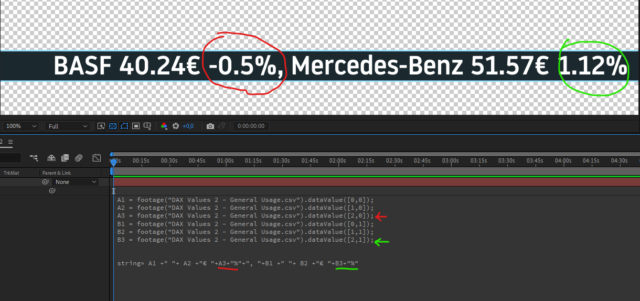
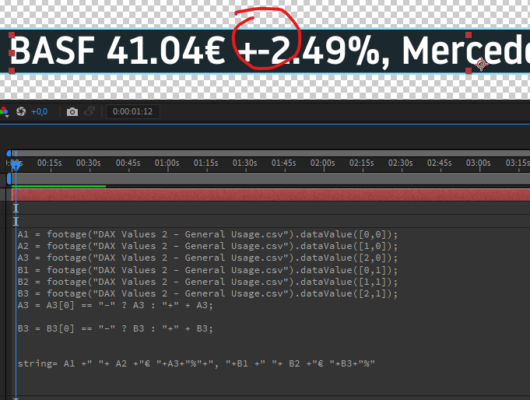
Posted by Nick Kennedy on July 7, 2022 at 6:50 amHallo, I’m trying to create a kind of stock market ticker. I’m using a spreadsheet to collect the daily data and export this as a .csv file. In After effects this works quite well. My problem is the third value I am trying to display for each stock is the percentage change from the previous days price. When this is a negative number then the minus symbol appears, when it is positive there is no plus sign. How could I ensure a plus sign appears? Then the second problem I have is if the value is negative I would like to color this red and if it is positive color green. Is it at all possible within a string to change the color of only part of the text? I had kind of hoped to be able to do this for 36 stocks within one text layer. Any help would be greatly appreciated. Thanks
 Nick Kennedy replied 4 years, 1 month ago 3 Members · 13 Replies
 -
13 Replies
-

Andrei Popa
July 7, 2022 at 9:42 amTo add the “+” sign I think you should add this at the end of the declaration block:
A3 = A3[0] == “-” ? A3 : “+” + A3;
B3 = B3[0] == “-” ? B3 : “+” + B3;
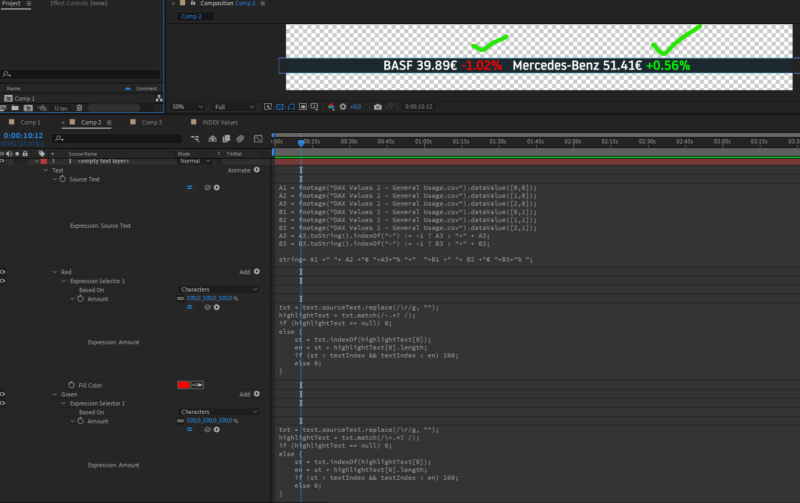
To highlight the texts, you need to add 2 text animators. One with green fill and one with red fill. Add an expression selector to each. I think you need to use some regular expressions to determine which one to be highlighted. I am not really good with regex stuff, but I think that you should decide what is the first and the last char of the highlighted part, and use those to determine the string. Then use indexOf to see from where you start the highlight. Something like this maybe, for red (similar for green, but with + instead of -):
red
txt = text.sourceText.replace(/\r/g, "");
highlightText = txt.match(/-.*? /);
if (highlightText == null) 0;
else {
    st = txt.indexOf(highlightText[0]);
    en = st + highlightText[0].length;
    if (st < textIndex && textIndex < en) 100;
    else 0;
}
green
txt = text.sourceText.replace(/\r/g, "");
highlightText = txt.match(/\+.*? /);
if (highlightText == null) 0;
else {
    st = txt.indexOf(highlightText[0]);
    en = st + highlightText[0].length;
    if (st < textIndex && textIndex < en) 100;
    else 0;
} -

Nick Kennedy
July 7, 2022 at 10:26 amHi Andrei, thanks for the quick reply, but I don’t think this will work.
The percentage change in Price (A3, B3 etc shows a – when it is a
negative value, but no positive when it is a positive value. I want my
expression to look at the value and decide if it is negative or positive
and only in the case of a positive value it should then add the + sign.
Then your solution to the color will also not work because for example
the price will change from day to day and if it changes from, for
example, one figure to two figures, then the character index of the
price change will also move. This is why I ask if it is at all possible
to change the colour of only part of a string. Can I define which part
of a string should change color? Thanks for trying. I’m going a bit
crazy with this and am now thinking about instead of trying to pack
everything on one line of text, to make one seperate text layers for
Stock and its price and another for the %price change. Then I could
perhaps achive the desired result with if else statement. -
Andrei Popa
July 7, 2022 at 10:41 amHi Nick.
Have you tried this though?
A3 = A3[0] == “-” ? A3 : “+” + A3;
This adds a + sign if there is not already a -. So if the text is -1, it remains -1. If it is 1, it becomes +1.
So the whole expression of your text should be:
A1 = footage("DAX Values 2 - General Usage.csv").dataValue([0,0]);
A2 = footage("DAX Values 2 - General Usage.csv").dataValue([1,0]);
A3 = footage("DAX Values 2 - General Usage.csv").dataValue([2,0]);
B1 = footage("DAX Values 2 - General Usage.csv").dataValue([0,1]);
B2 = footage("DAX Values 2 - General Usage.csv").dataValue([1,1]);
B3 = footage("DAX Values 2 - General Usage.csv").dataValue([2,1]);
A3 = A3[0] == "-" ? A3 : "+" + A3;
B3 = B3[0] == "-" ? B3 : "+" + B3;
string = A1 + " " + A2 + "E " + A3 + "%"+", "+ B1 + " " + B2 + "E " + B3 + "%";
The other 2 things are expressions. They calculate the index of the text to be highlighted every frame. So every time you change the text, the index of the price will be calculated again.
I don’t really know which part of these will not work.
-
Andrei Popa
July 7, 2022 at 1:34 pmMaybe AE reads it as number. Try it like this instead:
A3 = A3.toString().indexOf("-") != -1 ? A3 : "+" + A3;
Same for B.
If this does not work either, then it may be a different sign for minus. Try to copy paste the character from the text layer.
-
Nick Kennedy
July 7, 2022 at 4:52 pmWow, yes!!!, this is it, great, thanks a lot. I’m still struggling with the green and red text. Can you please describe how I should go about doing this? Thanks again for taking the time. This has been a great help!
-
Andrei Popa
July 7, 2022 at 6:03 pmFor the highlight you need to add a fill color text animator. After you have added that, go to the animator, click Add>Selector>Expression. And write the 2 expressions that I have provided.
Here is a project that contains a text layer with 2 animators, named Red and Green, that do this highlight.
Edit: I don’t know why adding files doesn’t work. Here is a dropbox link for the file.
https://www.dropbox.com/s/32doaas4d9jfghd/Highlight.aep?dl=0
-
Nick Kennedy
July 7, 2022 at 7:16 pmWow Andrei, once again, great work thanks! I’m getting so close now- Unfortunately I really don’t understand whats going on in the expressions on the animators Red and green. When I try to do the same, the red works fine only the green is not working. Please, I have to ask for your help one more time cause I really don’t see whats going wrong. Thank you so much
-

Filip Vandueren
July 8, 2022 at 9:21 amTry changing the last line of the sourceText expression to this:
string = A1 + ” ” + A2 + “E ” + A3 + “%”+”, “+ B1 + ” ” + B2 + “E ” + B3 + “% “;
(just an extra space after the percentage)
The textanimator-code is looking for the end of a word by looking for a space, but the string just ended with a percentage.
-
Nick Kennedy
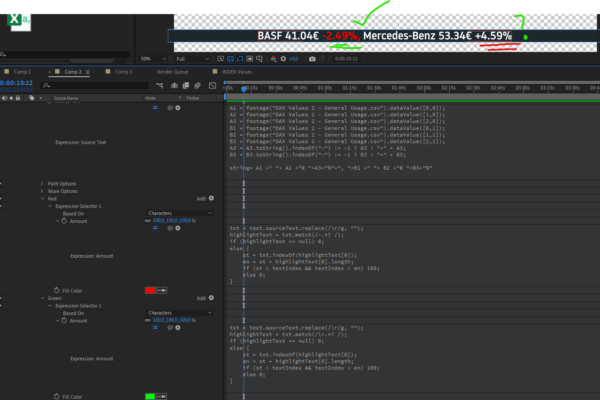
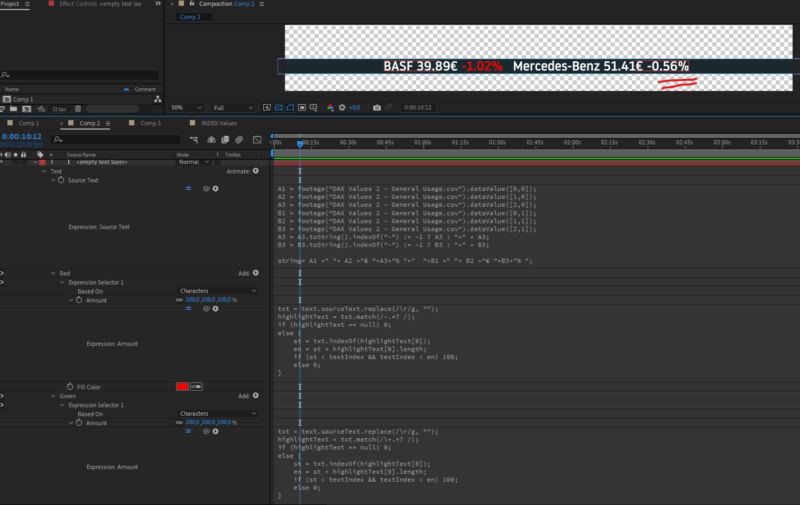
July 8, 2022 at 11:12 amHi Filip, many thanks for your help! This did the trick but now I have run into a new problem! Please could you take a look. The first screenshot everything is working as it should, i put the space after the %-sign and it worked. But then I changed the price in the csv File to a negative value and this wasn’t colored red. Will the exression selector only find one text to highlight and not look any further? I want to eventually put several stock prices and the % change from previous day in one text layer. Is it possible that the expression selector can find all incedences of negative and positive values and color them red and green respectively? I greatly appreciate you guys taking the time to help, Thanks!
Reply to this Discussion! Login or Sign Up