Forum Replies Created

Page 2 of 548
  • Michael Szalapski

    December 6, 2023 at 10:16 pm in reply to: After Effect Element 3D

    Go back to VideoCopilot.net and re-download the plugin. They’ve put out updated versions that work with Multi-Frame Rendering.

  • Michael Szalapski

    November 24, 2023 at 10:54 pm in reply to: Images Responding To Animated Grid Lines

    That looks an awful lot like a creative use of Flex. Flex – aescripts + aeplugins – aescripts.com

  • Michael Szalapski

    November 16, 2023 at 3:20 am in reply to: Cartoon Effect – plug in or Ai

    I wouldn’t say it knocks my socks off, but Sketchify in Red Giant Universe can get some pretty nice looks. Depending on what you’re going for, it might be perfect paired with Universe Texturize Motion. (There are a ton of tools in Universe, so if you do get it, be sure to have a look at all of them so you can really get your money’s worth. There’s a getting started series that runs through them all on the Maxon learning portal Cineversity.)

  • Michael Szalapski

    September 29, 2023 at 5:45 pm in reply to: Working in AE at 4K for film @ 1:85?

    For what it’s worth, you might not even need to work at that resolution. A LOT of films (including Marvel movies) usually work at 2k and then upscale.

  • Michael Szalapski

    August 22, 2023 at 8:31 pm in reply to: Red Giant Shadow – No Axis

    Do you have the toggle to show masks and layer controls off? Try toggling it.

  • Michael Szalapski

    May 3, 2023 at 4:20 am in reply to: Help me find this preset please

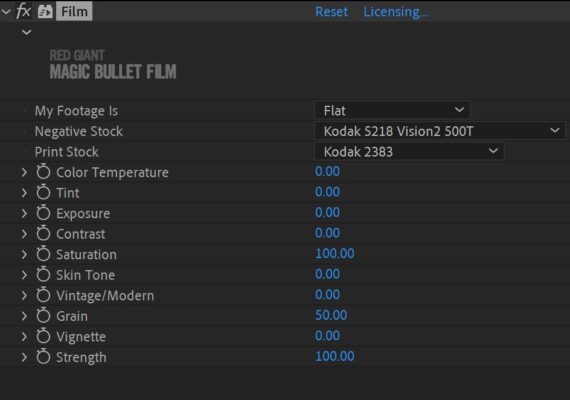
    That looks to me like Film from Red Giant’s Magic Bullet Suite.

    It’s not a preset; it’s a third-party plugin. Here’s a screenshot of it in use in an older project of mine.

    You can find out more about it at https://www.maxon.net/red-giant/magic-bullet/film

    That said, I usually use those film tools inside of Magic Bullet Looks because I also like using Optical Diffusion, Halation, and Renoiser (the film grain simulation tool) inside Magic Bullet Looks together with Film Negative and Film Print to really get a good film look going.

  • Michael Szalapski

    April 26, 2023 at 12:10 am in reply to: Changing Camera Distortion on Tilting Camera

    The Lens Distortion Matcher from Red Giant’s VFX Suite can do some magical things if you’ve got it. It’s extremely handy for working with wide-angle shots like you describe.

    If you don’t have it, sometimes using Mesh Warp and manually creating the lens distortion grid can solve things, but it takes a lot of tedious work to match the distortion. Try to find a distortion grid online to help you instead of eyeballing it.

  • I’m really not sure what you’ve got going on in your project. Generally speaking, it is faster for AE to deal with pre-rendered things rather than having to calculate everything fresh.

    That said, a lot can vary depending on what content you’ve got in your project, the storage your pre-rendered files are sitting on, and even what format you pre-rendered them as.

  • Instead of painting and tracking, have you considered using Content Aware Fill for Video? It might work just fine. Alternatively, you could just grab a few stills from the video and use tools in Photoshop to make your clean plate (don’t forget to renoise!)

  • If it’s just a one-off, you can subscribe to RG for just a month which is really cheap for such a powerful collection of tools (while you’ve got it – might as well use Magic Bullet Looks to juice up your project too).

    But, if not, you can try it manually with the Optics Compensation tool in AE or even more manually with Mesh Warp.

Page 2 of 548

We use anonymous cookies to give you the best experience we can.
Our Privacy policy | GDPR Policy