Creative Communities of the World Forums

The peer to peer support community for media production professionals.

Activity Forums Adobe After Effects Red Giant Shadow – No Axis

  • Red Giant Shadow – No Axis

    Posted by Glenn Tak on August 18, 2023 at 7:44 pm

    I have used Red Giant Shadow over the years. Lately, the Axis control lines are not showing up. I can’t find any info on this. I can’t see any option to turn on or off.

    Changed the color. Turned the plugin on and off.


    Very annoying.

    On the most current version of After Effects, Maxon/Red Giant plugins are all up to date.

    Anyone have any ideas.?

    Thanks in advance.

    TR

    Glenn Tak replied 2 years, 8 months ago 3 Members · 3 Replies
  • 3 Replies
  • Hector Vera

    August 21, 2023 at 9:42 pm

    This sometimes happened to me in Sony Vegas when there is no pointer, axis or anchor point in order to control the size and shape of the words or images I am trying to edit. It usually goes away once I close the program, end all process related to the application in Task Manager and then reopen the app, then it shows up again. Its weird when it happens, hopefully thats the case with you in After Effects. Have you tried exiting the program and reopening it? Or restarting the computer to see if you have the axis appearing again?

  • Michael Szalapski

    August 22, 2023 at 8:31 pm

    Do you have the toggle to show masks and layer controls off? Try toggling it.

  • Glenn Tak

    August 23, 2023 at 9:16 pm

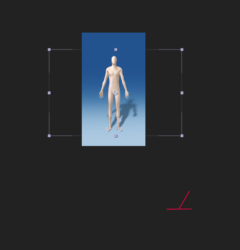
    Turns out the Lines are there, but WAYYY offset from the control points.

    You can see the red lines way off the screen.

    I am in touch with Maxon… they seem baffled as well.

We use anonymous cookies to give you the best experience we can.
Our Privacy policy | GDPR Policy