Forum Replies Created

Page 4 of 5
  • Meng Zhiqun

    November 1, 2021 at 10:01 am in reply to: exchange precomps in multiple comps (1500 comps)

    You can try this! For this to work, you need to have the following created.
    “diffusion” layer, “0” layer, “Master” layer.
    I’ve also parented the new comps to the folder that you are already using, “Unbenannt 1”.

    var totalCompToCreate = 100;//Change this number to whatever number you like. var proj = app.project;

    var itemTotal = proj.numItems;

    var projComp = proj.activeItem;

    for (var i=itemTotal; i > 0; i--){

    var curItem = proj.item(i);

    if(curItem.name == "Unbenannt 1"){

    if(curItem.typeName == "Folder"){

    var compFolder = curItem;

    }

    }

    if(curItem.name == "diffusion"){

    if(curItem.typeName == "Composition"){

    var diffComp = curItem;

    }

    }

    if(curItem.name == "0"){

    if(curItem.typeName == "Composition"){

    var indexComp = curItem;

    }

    }

    if(curItem.name == "Master"){

    if(curItem.typeName == "Composition"){

    var masterComp = curItem;

    }

    }

    }

    function createComps(){

    for (var i=1;i<=totalCompToCreate;i++){

    var newComp = proj.items.addComp(i, indexComp.width, indexComp.height, indexComp.pixelAspect, indexComp.duration, indexComp.frameRate);

    newComp.parentFolder = compFolder;

    newComp.layers.add(indexComp);

    var diffLay = newComp.layers.add(diffComp);

    diffLay.collapseTransformation = true;

    var masterNewLayer = masterComp.layers.add(newComp);

    masterNewLayer.startTime = i/masterComp.frameRate;

    indexComp = newComp;

    }

    }

    app.beginUndoGroup("createComps");

    createComps();

    app.endUndoGroup();

  • Meng Zhiqun

    October 31, 2021 at 5:00 pm in reply to: exchange precomps in multiple comps (1500 comps)

    Hi Gerald,

    When you say you need to change the precomp layer, may I know what exactly do u need changed on that layer?

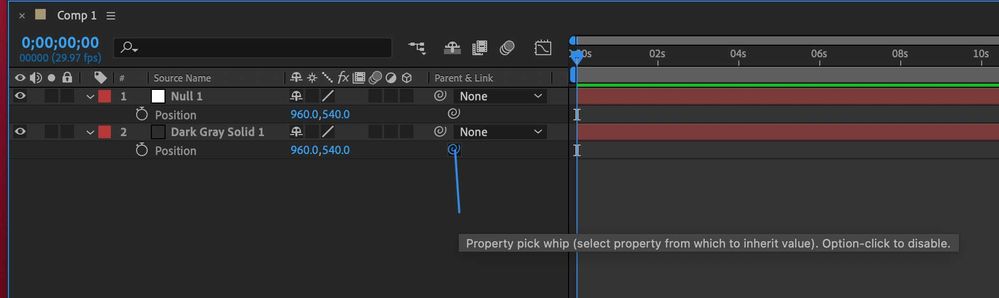
  • Besides the parent pickwhip method, if you open the dropdown for each of the transform properties, like position, you can see that each property has its own pickwhip, just like on the layer.
    pickwhip.jpgexpand image

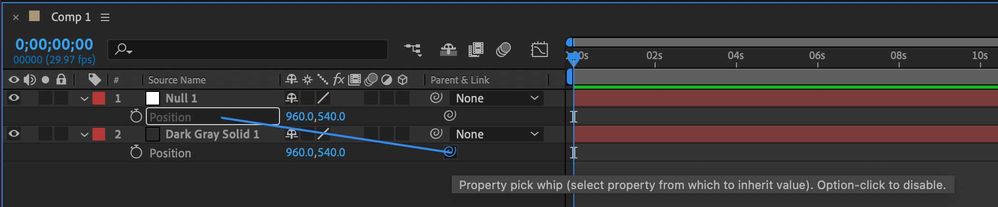
    To link properties easily, you can click drag this pick whip to another property of another layer. Take note that this is not the parent pickwhip, but the pickwhip of the property itself.link.jpgexpand image

    After that, you can see that an expression will be generated. This is how to “parent” properties, instead of the layers itself. Hope this helps!expression.jpgexpand image

  • Meng Zhiqun

    October 30, 2021 at 3:28 pm in reply to: Add Keyframe??

    There are no hotkeys for that. However, I’ve done a script to set a key at the current time to any selected properties. You can set a shortcut key to this script. So in a way, this shortcut key adds keyframe to any properties that you want. You can save this as a .jsx and place it in the ae, scripts folder.

    var proj = app.project; var projComp = app.project.activeItem;

    var selProp = projComp.selectedProperties;

    app.beginUndoGroup("Add Key");

    for(var i = 0; i < selProp.length; i++){

    var curProp = selProp[i];

    curProp.addKey(projComp.time);

    }

    app.endUndoGroup();

    Hope this helps!

  • Meng Zhiqun

    October 30, 2021 at 2:48 pm in reply to: Scripting – Puppet Layers

    Have you tried Redefinery’s gimmeproppath script? Their site is down now though, not sure if it’s due to the latest ae update. But I hope you can locate it once the site is up.

  • For a simple way to turn on/off effects of a nested comp, you can use this after selecting that comp in your mastercomp.

    var proj = app.project; var projComp = app.project.activeItem;

    var selLay = projComp.selectedLayers;

    var foundFx = 0;

    for(var i = 0; i <= selLay.length-1; i++){

    var curLay = selLay[i];

    curLay.selected = false;

    if(curLay.source.typeName == "Composition"){

    var curSNumLay = curLay.source.numLayers;

    for(var ci = 1; ci <= curSNumLay; ci++){

    var curSLay = curLay.source.layer(ci);

    if(curSLay.effectsActive == true){

    foundFx = 1;

    break;

    }

    }

    if(foundFx == 1){

    for(var ci1 = 1; ci1 <= curSNumLay; ci1++){

    var curSLay = curLay.source.layer(ci1);

    curSLay.effectsActive = false;

    }

    }else{

    for(var ci1 = 1; ci1 <= curSNumLay; ci1++){

    var curSLay = curLay.source.layer(ci1);

    curSLay.effectsActive = true;

    }

    }

    }

    }

    However, this turns All effects on all layers off and on. To keep a history of which layers in which comp has effects turned off/on before switching them, you can write a tmp text file to read later. Hope this helps!

  • Meng Zhiqun

    October 30, 2021 at 1:08 pm in reply to: I have a problem about loop and array

    I tried hard to understand what did you want to do with your script. With the best of my ability, I think what you need, is to get an array of layers that has a certain string in the layer’s name.

    Here’s a function you can use instead.

    var proj = app.project;

    var projComp = app.project.activeItem;

    var selLay = projComp.selectedLayers;

    function getLay(searchNameForthis){

    var getLay = [];

    for(var i = 0; i <= selLay.length-1; i++){

    var curLay = selLay[i];

    if(curLay.name.toLowerCase().indexOf(searchNameForthis) != -1){

    getLay.push(curLay);

    }

    }

    if(getLay.length > 0){

    return getLay;

    }else{

    return 0;

    }

    }

    alert(getLay("solid"));

    You can replace the “Solid” in getLay(“Solid”); with any string that you wish to find the names by and this function will give you the layers. Hope this helps.

  • Yup. There are a couple of things to be done.

    Your script needs to loop through your precomp’s maker, get the key.comment and keytime and pass it as an array or two, to the next part of the script which creates the marker on your chosen layer.

  • Meng Zhiqun

    October 30, 2021 at 7:34 am in reply to: Trigger “position” with markers

    You can try this. Put this expression in the position. 🙂

    var aniTime = 10/30;// Change this to change the timing it takes to go up/down.

    n = 0;

    if (marker.numKeys > 0) {

    n = marker.nearestKey(time).index;

    if (marker.key(n).time > time) {

    n--;

    }

    }

    if (n == 0) {

    var y = value[1];

    }else{

    var y = value[1] + linear(time, marker.key(n).time, marker.key(n).time+ aniTime, newY().split(",")[0] , newY().split(",")[1] );

    }

    function newY(){

    var curYVal = 0;

    var newYVal = 0;

    var target = thisLayer;

    var tNumKeys = target.marker.numKeys;

    if (tNumKeys > 0) {

    for (var i=1;i<=tNumKeys;i++){

    var curKey = target.marker.key(i);

    if (curKey.time <= time) {

    newYVal+= Number(curKey.comment);

    try{

    curYVal+= Number(target.marker.key(i-1).comment);

    }catch(e){

    curYVal = 0;

    }

    }

    }

    }

    return curYVal + "," + newYVal;

    }

    var x = value[0];

    [x,y];

    Hope this helps!

  • Meng Zhiqun

    October 30, 2021 at 5:11 am in reply to: Expression for text following text in height

    Hey Kieran,

    When you said you want it to follow but not scale, do u mean position? If that’s the case, does linking up their position help?

Page 4 of 5

We use anonymous cookies to give you the best experience we can.
Our Privacy policy | GDPR Policy