

Activity › Forums › Adobe After Effects Expressions › exchange precomps in multiple comps (1500 comps)
-
exchange precomps in multiple comps (1500 comps)
Posted by Gerald Gutberlet on October 31, 2021 at 2:24 pmI am working on a reaction diffusion simulation in AE.
My Problem is that i would need a script to change one precomp Layer in each of the 1500 Comps beside the First comp (0).
So in comp1 i would need comp 0, in comp2 i would need comp1, in comp3 i would need comp 2 and so on. Replacing them with alt by hand is a bit of a pain and too time consuming.
The comps just contain 2 layers, both Precomps one with the Reaction Diffusion Controll and one with the previous diffused Comp. The comps just have a duration of 1 frame and for the timeremap expression on the diffuse layer are named 0,1,2,3,4,5 ect ect.
Oh and it dont have to be exactly 1500 it could be 3000 or just 750.
Many Thanks in advance you would save my Weekend with any help
Meng Zhiqun replied 4 years, 10 months ago 2 Members · 26 Replies -
26 Replies
-

Meng Zhiqun
October 31, 2021 at 5:00 pmHi Gerald,
When you say you need to change the precomp layer, may I know what exactly do u need changed on that layer?
-

Gerald Gutberlet
October 31, 2021 at 5:42 pmI will try to explain I make let say 1 hundred copys of my first comp wich has a control precomp layer and a Baseshape precomp layer.
all the comp are named 0,1,2,3,4,5,6,7,8,9 and so on
and I need to replace the Baseshape precomp in comp1 with the comp 0 and in comp 2 with comp 1 and in comp 3 with comp2 and in comp 4 with comp 3 and so on.
maybe my first test will help.
-
Meng Zhiqun
November 1, 2021 at 10:01 amYou can try this! For this to work, you need to have the following created.
“diffusion” layer, “0” layer, “Master” layer.
I’ve also parented the new comps to the folder that you are already using, “Unbenannt 1”.var totalCompToCreate = 100;//Change this number to whatever number you like. var proj = app.project;
var itemTotal = proj.numItems;
var projComp = proj.activeItem;
for (var i=itemTotal; i > 0; i--){
var curItem = proj.item(i);
if(curItem.name == "Unbenannt 1"){
if(curItem.typeName == "Folder"){
var compFolder = curItem;
}
}
if(curItem.name == "diffusion"){
if(curItem.typeName == "Composition"){
var diffComp = curItem;
}
}
if(curItem.name == "0"){
if(curItem.typeName == "Composition"){
var indexComp = curItem;
}
}
if(curItem.name == "Master"){
if(curItem.typeName == "Composition"){
var masterComp = curItem;
}
}
}
function createComps(){
for (var i=1;i<=totalCompToCreate;i++){
var newComp = proj.items.addComp(i, indexComp.width, indexComp.height, indexComp.pixelAspect, indexComp.duration, indexComp.frameRate);
newComp.parentFolder = compFolder;
newComp.layers.add(indexComp);
var diffLay = newComp.layers.add(diffComp);
diffLay.collapseTransformation = true;
var masterNewLayer = masterComp.layers.add(newComp);
masterNewLayer.startTime = i/masterComp.frameRate;
indexComp = newComp;
}
}
app.beginUndoGroup("createComps");
createComps();
app.endUndoGroup();
-
Meng Zhiqun
November 1, 2021 at 10:04 amAlso, keep in mind that with this script, you can’t have any items with the same name. To prevent problems caused by the same name, more checks need to be added to this script too.
-
Gerald Gutberlet
November 1, 2021 at 10:50 ammany many thanks Meng i will give it a try and will tell you how it worked. I am at 300 comps by hand but as i said maybe i need 3000 comps or more, so this will be verry helpfull.
Greetings from Germany🤩
-
Meng Zhiqun
November 1, 2021 at 11:16 amWelcome! Hope this helps! Greetings from Singapore! Just a note, you need to delete whatever you have done for the script to work since it starts from layer”1″. So whatever work you have done, might be wasted.
It took a few seconds for my machine to produce 300 comps, and I’m already on intel i9 10900k with 64gb ram. If you are looking at more than that, I hope your machine can take the hit! 😀 -
Gerald Gutberlet
November 1, 2021 at 12:28 pmHi Meng dont worry about the work that if have done no problems nothing is ever realy wasted.
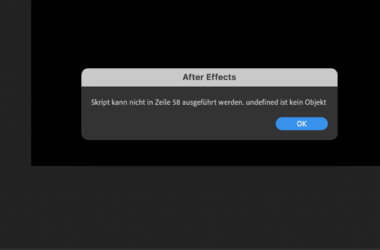
I tried to run your script but i get an error massage in AE. line 58 undefiened is not an object
maybe because i dont have the AEscript editor installed dont know but thanks for trying.
AND the script actualy dont has to generate or copy new Comps, that is easyly done by Hand.
it just would have to replace the precomps as i have discribed above, if that is possible
-
Gerald Gutberlet
November 1, 2021 at 12:47 pmBut i have VS Code on my Mac ??? With wich i stored your code as JSX but as i said i get the error message
-
Meng Zhiqun
November 1, 2021 at 1:16 pmHey Gerald. My script only has 47 lines, are you sure that’s my code? Alternatively, why dont you try giving this a try? I saved it as a .jsx for you, you can run it via, File, Scripts, Run script file.
Reply to this Discussion! Login or Sign Up