Forum Replies Created

Page 1 of 2
  • Melissa Franch

    April 25, 2024 at 11:52 am in reply to: Layer movement in expression

    Woow!

    You are the best. It works perfectly!

  • Melissa Franch

    April 24, 2024 at 2:02 pm in reply to: Layer movement in expression

    I want that if the curve has an in ease of 50% and an out ease of 50%, the ball travels the curve with those speeds, and that when the curve changes, the ball takes that information and moves along the curve with that curve of movement .

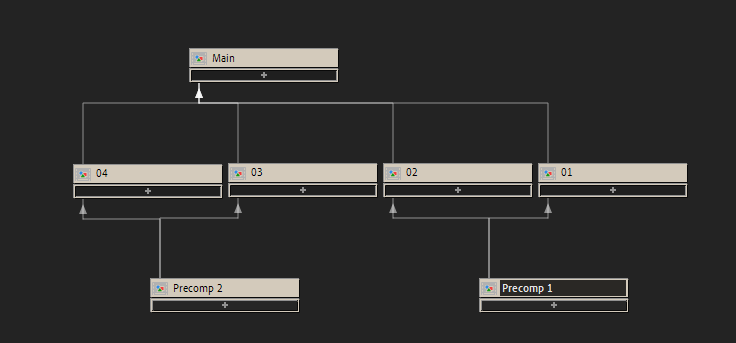
  • Hello!This works perfectly, thank you!But there is a problem, the same composition is inside several Precomps1. So by naming Precomp1 I limit the expression to that precomposition, and in the example that I have given you, precomp 1 is within 01, 02 and precomp 2 is within 03 and 04.

  • Melissa Franch

    June 21, 2023 at 12:02 pm in reply to: Distance traveled

    there are no negative values ​​in the slider. The slider starts at 0, goes to 80, goes down to 50, goes up to 90 etc… until it goes back down to 0.

  • Melissa Franch

    June 21, 2023 at 11:10 am in reply to: Distance traveled

    Hello! The problem was the javascript legacy, you were right!

    But.

    Although it does seem to work, at first it goes to 0.01, returns to 0.00, goes up to 0.03, returns to 0 and then it always goes up.

  • Melissa Franch

    June 20, 2023 at 1:36 pm in reply to: Distance traveled

    Hello!

    Everything happens in real time, it is a driving simulation that lasts approximately a minute and a half.

    I have tried the expression and it gives me an error.

    It tells me that the timefactor is redeclared.

  • Melissa Franch

    June 19, 2023 at 1:25 pm in reply to: Link counters between compositions

    You are the best!

  • Melissa Franch

    April 25, 2023 at 7:51 am in reply to: Rotation with Opacity

    You are magic! Thanks!

  • Melissa Franch

    February 15, 2023 at 9:59 am in reply to: Animate two directions

    Sorry! I’ll explain better 🙂
    They all move proportionally backwards at the same time until the smallest one passes below the zero mark. The biggest one always stays in the same place and the smallest one is the one that proportionally oscillates and drags the others up and down, as if it were chewing gum.

  • Melissa Franch

    December 12, 2022 at 1:07 pm in reply to: Markers call animations

    Auch! I’m silly!

    Works perfect, but I realized that if I have two properties that I want to animate, like scale and color, by putting the two markers almost next to each other to call the animations, the second marker stops the first. This is too complicated for me! grgrgrgr

Page 1 of 2

We use anonymous cookies to give you the best experience we can.
Our Privacy policy | GDPR Policy