Creative Communities of the World Forums

The peer to peer support community for media production professionals.

Activity Forums Adobe After Effects Expressions Link values ​​between precompositions

  • Link values ​​between precompositions

    Posted by Melissa Franch on August 10, 2023 at 3:16 pm

    Hello!

    I have a problem relating a text layer that returns the value of a slider in another composition.

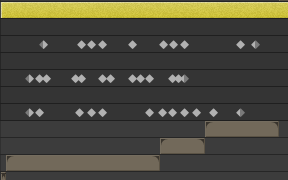
    The structure is this: in the final composition there is the animated slider and there are several compositions that are distributed in the composition in time. Within these compositions there is another composition with some bars, this is the one that has to launch the values ​​of the slider of the final composition. The problem is that the things I’ve tried always start the animation every time a layer of the final compo starts. And it’s hard for me to do that because the layer that I want to follow the values ​​is precomposed inside each precompose of the final compo.

    The first photo is of the final composition, where you can see the animated slider and the compositions.

    The second photo is inside each preset, where there is another composition, which is common to all of them, in addition to other layers.

    Dan Ebberts replied 3 years ago 2 Members · 4 Replies
  • 4 Replies
  • Dan Ebberts

    August 10, 2023 at 3:57 pm

    Any time you have a pre-comped<font color=”rgba(0, 0, 0, 0)” face=”inherit”> expression referencing a keyframed control in the main comp and the precomp doesn’t start at time = 0 in the main comp, your expression needs to compensate for that time difference. It sounds like you may have two levels of pre-comping, which could complicate things. It would help if you could post a screen shot that shows layer names and start times for all the elements in the </font>hierarchy<font color=”rgba(0, 0, 0, 0)” face=”inherit”>.</font>

  • Dan Ebberts

    August 10, 2023 at 5:43 pm

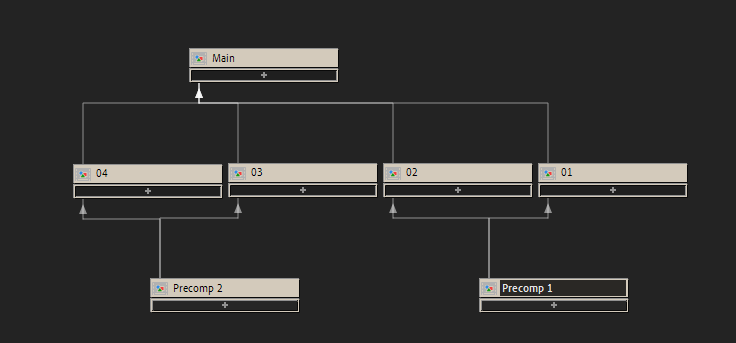
    Here’s an example. Say you have a main comp (named “Main”) with a keyframed slider on a layer named “Control”. Main also has a precomp layer named “Precomp 1”. Inside Precomp 1 is Precomp 2, which has a layer with an expression that needs to reference the slider in Main. This is what that expression would need to look like if the precomp layers don’t start at time=0:

    s = comp("Main").layer("Control").effect("Slider Control")("Slider");
    t1 = comp("Precomp 1").layer(thisComp.name).startTime;
    t2 = comp("Main").layer("Precomp 1").startTime;
    s.valueAtTime(time + t1 + t2);
  • Melissa Franch

    August 11, 2023 at 6:00 am

    Hello!This works perfectly, thank you!But there is a problem, the same composition is inside several Precomps1. So by naming Precomp1 I limit the expression to that precomposition, and in the example that I have given you, precomp 1 is within 01, 02 and precomp 2 is within 03 and 04.

  • Dan Ebberts

    August 11, 2023 at 4:50 pm

    That does complicate things. I think you need to either duplicate Precomp 1 and Precomp 2 in the project panel so that each copy can have a different expression, or maybe somehow rig them up with Essential Properties so each instance can have its own values (not sure about that one).

We use anonymous cookies to give you the best experience we can.
Our Privacy policy | GDPR Policy