-
Layer movement in expression
Hello!
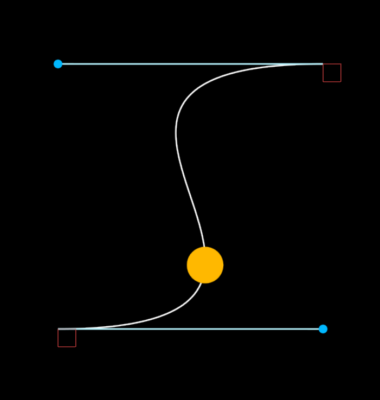
I want to make a graphical representation of an after curve.
I have achieved this part, I have a shape layer with this expression in the path:
var margen = thisComp.layer(“Controls”).effect(“Margen”)(“Slider”);
var compSize = thisComp.width – margen;
var point01 = thisComp.layer(“Point 01”).transform.position;
var point02 = thisComp.layer(“Point 02”).transform.position;
var handle01 = thisComp.layer(“Handle 01”).transform.position;
var handle02 = thisComp.layer(“Handle 02”).transform.position;
var hX01 = thisComp.layer(“Controls”).effect(“Handle 01”)(“Slider”);
var convertX01 = linear(hX01,0,100,0,compSize);
var hX02 = thisComp.layer(“Controls”).effect(“Handle 02”)(“Slider”);
var convertX02 = linear(hX02,100,0,0,-compSize);
var points = [
fromComp(point01),
fromComp(point02)
];
var inTangents = [
[0,0],
[convertX02,0]
];
var outTangents = [
[convertX01,0],
[0,0]
];
createPath(points, inTangents, outTangents, false)
There are some variables that are used to control the size of the graph or other things, but I want to focus my question on the curve that I have generated.
This curve controls with two sliders that I have converted to values from 0% to 100% to make it more comfortable, but I could still convert them to values from 0 to 1 (cubic-bezier)
The problem that I cannot solve is that now I want a ball to go along the path of the curve to show what movement that curve has, for this I have a layer with a ball that pays attention to a trim paths that I have in the layer of the curve:
var linesLayer = thisComp.layer(“Lines”);
var path = thisComp.layer(“Lines”).content(“Curve”).content(“Path 1”).path;
var progress = thisComp.layer(“Lines”).content(“Trim Paths 1”).end / 100;
var point = path.pointOnPath(progress);
linesLayer.toComp(point);
But I need the movement information of this ball to be in the expression and not in the keyframes graph, so that when configuring the curve the ball automatically reflects that movement.