Forum Replies Created

Page 1 of 3
  • Great!

    One more thing. I don’t believe I corrected the chassis rotation within the rig itself. After baking, I simply opened the Animation Editor and dragged every key that was above 5 degrees down to normalize the animation. If not, you might encounter the same motion blur issue I experienced in my initial render in this post.

  • You’re right. I’m not a rigger myself, so I overlooked those mistakes.

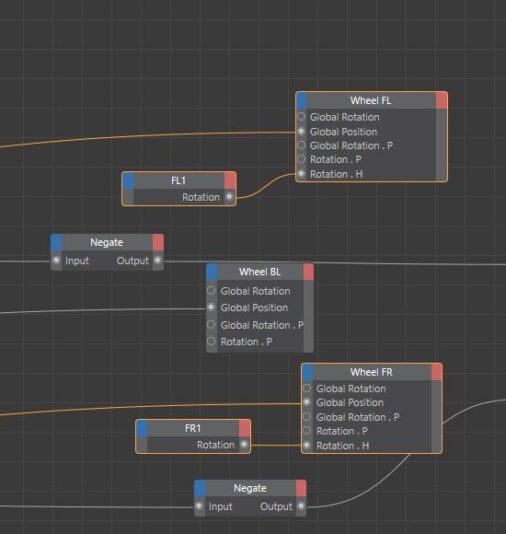
    Upon closer inspection, I realized that “FL1” and “FR1” should output “Rotation.H” rather than just “Rotation”. 😅

  • Oh man… this is a bit embarrassing. It doesn’t work on my car either, and I never noticed because I used a relatively straight road for my animation.

    I realized I had to connect the rotation of FL1 to the “rotation H” of Wheel FL, not “P”. After making this adjustment, the controller constraint is functioning correctly again. However, when animating on a spline, automatic steering still isn’t working. I’m not sure if this feature was included in the default rig or if it needs to be enabled somewhere.

  • I’d be glad to assist you.

    Hmm, did you create a new XPressor tag or modify the existing one?

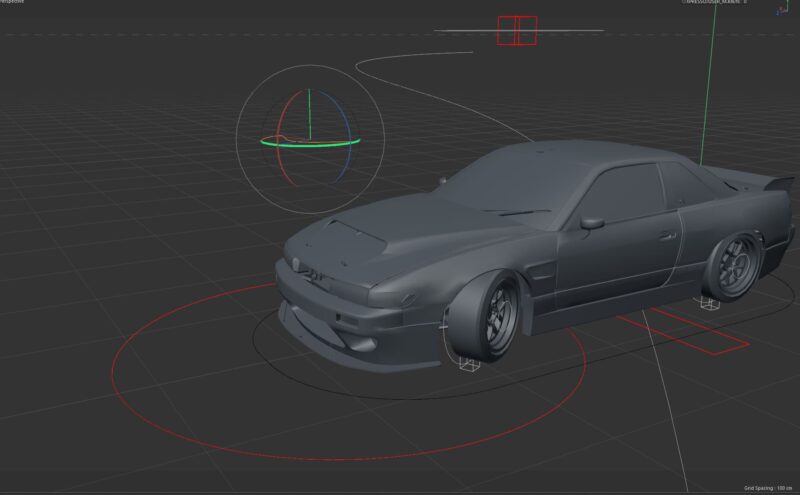
    I recall encountering issues with positioning the controllers on the wheels. I believe I disconnected the controllers from the rig, adjusted their placement, and then reconnected them.

    Regardless, if you’re still experiencing difficulties, I could send you my project.

  • Hi Ryan,

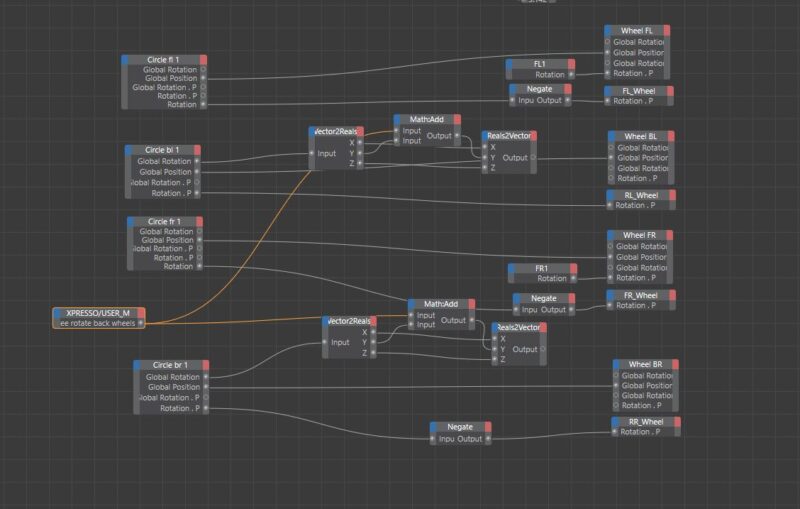
    In the end, I found it necessary to add some extra nodes in the XPressor. For instance:

    By default, the “Wheel FL” null, containing the mesh, had a global rotation constraint with the “Circle fl 1” controller. This controller manages both the rolling and steering rotations, but it’s limited to global rotations, causing issues with motion blur.

    To address this, I separated the steering rotation from the rolling rotation.

    In XPressor, I added a transform rotation to the “Circle fl 1” and connected it to the rotation P of the “FL_Wheel” null. This ensures that the rolling rotation matches the controller. If the rolling direction needs to be reversed, you can add a “Negate” node to invert the rotation.

    For the steering, you can add the “FL1” null to XPressor with a transform rotation and connect it to the rotation P of “Wheel FL”.

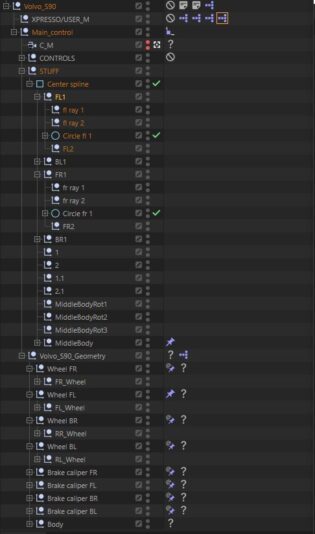
    I hope this solution proves helpful. I’ve also attached a screenshot of my outliner and the XPressor.

    Cheers,
    Maxim

  • Maxim Fischer

    January 24, 2024 at 12:58 pm in reply to: Baking Expression – Rotation values jumping around

    I took a closer look and noticed that the Xpresso rig controlls the wheel controller with local rotation coordinates but transfers global rotation coordinates to the mesh. It works great until you bake it. At the end I had to adjust a few things in rig and now it works.

  • Thank you Brian!😃

  • Maxim Fischer

    January 22, 2024 at 11:25 pm in reply to: Car Rig – Inconsistencies in Wheel Spinning

    Okay, I had still these issues. I think the rig system is somehow buged. (Cinema 2023.2.1)

    I choosed to buy a car rig from Gumroad and it works much better:
    https://matteoforghieri.gumroad.com/l/carrigc4d

  • Maxim Fischer

    January 22, 2024 at 4:21 pm in reply to: Car Rig – Inconsistencies in Wheel Spinning

    Hi Kouraib,

    Thank you for the suggestion. But after hours of troubleshooting, I discovered that the spline controlling the car animation is the main issue. As the spline is beneath the displaced surface, the wheels sometimes don’t make contact with the surface.

    Therefore, I attempted to project the spline on top of the displaced surface and added a lot more vertices to the spline. After making these adjustments, the wheel spinning looks much better, though not yet perfect.

    Weird that nobody had this issue before. I even rigged a different car and had the exact same problem.

    Cheers.

  • Maxim Fischer

    January 22, 2024 at 1:05 am in reply to: Car Rig – Inconsistencies in Wheel Spinning

    What do you mean by “bump”?

Page 1 of 3

We use anonymous cookies to give you the best experience we can.
Our Privacy policy | GDPR Policy