Creative Communities of the World Forums

The peer to peer support community for media production professionals.

Activity Forums Maxon Cinema 4D Car Rig – Inconsistencies in Wheel Spinning

  • Car Rig – Inconsistencies in Wheel Spinning

    Posted by Maxim Fischer on January 21, 2024 at 11:02 pm

    Hello everyone,

    I’ve completed a car animation, but during a test render, I observed inconsistent spinning of the back wheels (see attachment). I utilized the car rig system in Cinema 4D, and it works as intended. However, when I define a ground collision mesh for the car, this spinning issue arises. I also noticed that the collision detection is not very precise. When I go frame by frame and click on some geometry, the car shifts to a more accurate position.

    I’m wondering if there’s a way to increase the step time of the collision for better accuracy.

    Maxim Fischer replied 2 years, 6 months ago 3 Members · 5 Replies
  • 5 Replies
  • Ben Balser

    January 22, 2024 at 12:06 am

    bump

  • Maxim Fischer

    January 22, 2024 at 1:05 am

    What do you mean by “bump”?

  • Kouraib Abdmalek

    January 22, 2024 at 9:26 am

    Hi Maxim,

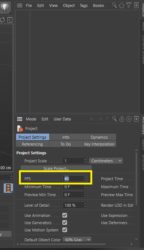
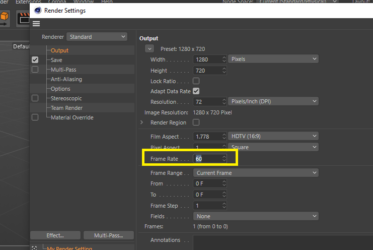
    Regarding raising the time steps to make the collision more accurate, I think you could do that by raising the FPS in the render setting as well as in the project setting editor. but before that, you have to make sure that all the rigging points are in the right place, especially the rigging points on the back wheels. Zoom in to make sure they are exactly in the center. Also, if you are using Landscape for the ground, it is preferable to make it editable because the Collision is more compatible with polygons mesh, you could also use the Subdivision Surface on the floor mesh this will improve the Collision detection. I hope that these steps will be sufficient to solve the problem.

    thanks!

  • Maxim Fischer

    January 22, 2024 at 4:21 pm

    Hi Kouraib,

    Thank you for the suggestion. But after hours of troubleshooting, I discovered that the spline controlling the car animation is the main issue. As the spline is beneath the displaced surface, the wheels sometimes don’t make contact with the surface.

    Therefore, I attempted to project the spline on top of the displaced surface and added a lot more vertices to the spline. After making these adjustments, the wheel spinning looks much better, though not yet perfect.

    Weird that nobody had this issue before. I even rigged a different car and had the exact same problem.

    Cheers.

  • Maxim Fischer

    January 22, 2024 at 11:25 pm

    Okay, I had still these issues. I think the rig system is somehow buged. (Cinema 2023.2.1)

    I choosed to buy a car rig from Gumroad and it works much better:
    https://matteoforghieri.gumroad.com/l/carrigc4d

We use anonymous cookies to give you the best experience we can.
Our Privacy policy | GDPR Policy