Forum Replies Created

Page 1 of 2
  • Matthew Rozzi

    April 28, 2026 at 10:52 pm in reply to: Object Handles Don’t Show Up

    Thanks John! However, I must let you know that video shows up as private.

  • Matthew Rozzi

    April 28, 2026 at 10:45 pm in reply to: Animate Complicated Arm Shape

    I am playing around with the other puppet pin tool options now. I wasn’t even aware of those options before! They seem to be making my work more manageable, I just need to practice with them. Thank you.

    As far as Duik goes, isn’t that just taking parenting, and allowing to manipulate the appendage from the end, rather than its base?

  • Matthew Rozzi

    April 27, 2026 at 11:43 am in reply to: Animate Complicated Arm Shape

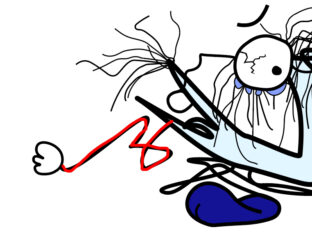
    I don’t need the line to completely untangle. This character model is actually temporary, when he is in a “crushed” state, and he uses his arm to claw the floor to help him move.

    The blue point should be the only normal anchor point that freely rotates. The purple points would be where some degree of bending is allowed. The rest would just stretch along with everything. The hand however, should not stretch, while still remaining attached to the arm end (this is a problem I ran into using puppet pin, as right now the arm and hand are one shape so everything just stretches along one axis, undesirable; having the hand as a separate object avoids that problem, but then the hand doesn’t remain attached to the end).

    I could turn the purple points into simply more blue points (which I mentioned before is a last resort) but that kind of solution would give me an animation that looks too stiff.

    Thank you John!

  • Matthew Rozzi

    April 26, 2026 at 8:17 pm in reply to: Animate Complicated Arm Shape
  • Matthew Rozzi

    February 17, 2026 at 12:41 pm in reply to: Object Handles Don’t Show Up

    I figured it out. Toggle mask and shape path visibility was turned off somehow for that comp.

  • Matthew Rozzi

    June 14, 2024 at 5:00 am in reply to: Weird Export Issue Dealing with Masking

    I kept trying exporting from AE and it finally worked with the mask…I didn’t change anything or close the programs, I have no idea what was going on. If anyone might know I’d appreciate it, it’d be nice to be aware of what to avoid going forward.

  • Matthew Rozzi

    March 2, 2024 at 12:24 am in reply to: Weird Glitch Concerning Layers & Nesting

    Thanks, I’ll try these things and see what happens. Appreciate the help.

  • Matthew Rozzi

    September 30, 2023 at 1:38 am in reply to: Roto Brush Not Working

    I figured it out. Essentially all those tools are brushes; you need to double click the layer you want to apply the brush to so that it opens in its own layer panel. For all others who run into this brain fart problem.

  • Matthew Rozzi

    March 11, 2023 at 2:47 am in reply to: Copying and pasting a mask

    Thanks guys. This was really helpful. I’ll see what option works best.

  • Matthew Rozzi

    August 12, 2021 at 7:51 pm in reply to: Automating Arrangement of Layers?

    Alright, all of these options sound great to choose from. Thank you Walter and Terry for your help.

Page 1 of 2

We use anonymous cookies to give you the best experience we can.
Our Privacy policy | GDPR Policy