Creative Communities of the World Forums

The peer to peer support community for media production professionals.

Activity Forums Adobe After Effects Animate Complicated Arm Shape

  • John Martin

    April 26, 2026 at 7:54 pm

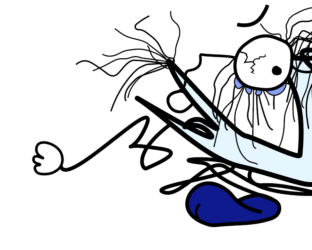
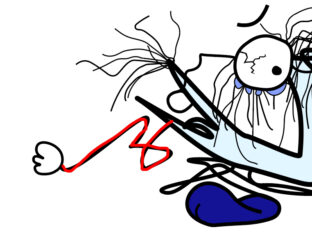
    Hey Matthew, no panic, this issue will be solved today. But before i show you a super powerful method to achieve this, can you help me figure out where the said “arm” is in the picture? Unfortunately, to my eyes, it seems like a Picasso, looks like a mess of lines, help me help you! 😁

  • Matthew Rozzi

    April 26, 2026 at 8:17 pm
  • John Martin

    April 27, 2026 at 2:58 am

    Thank you, can you please clarify exactly how do you need do animate it? I’ll give you some options so we ultimately get on the same page:

    -the arm straightens and becomes a straight line, tense, the anchor point is attached to the right and rotates clockwise and back a little bit,
    -the arm stays as is, contorted, but rotates

    -the arm straightens and returns contorted back and forth, no rotation, just a yo-yo type animation

    in case, please draw a second visual note so we get on the same page more easily.

  • Matthew Rozzi

    April 27, 2026 at 11:43 am

    I don’t need the line to completely untangle. This character model is actually temporary, when he is in a “crushed” state, and he uses his arm to claw the floor to help him move.

    The blue point should be the only normal anchor point that freely rotates. The purple points would be where some degree of bending is allowed. The rest would just stretch along with everything. The hand however, should not stretch, while still remaining attached to the arm end (this is a problem I ran into using puppet pin, as right now the arm and hand are one shape so everything just stretches along one axis, undesirable; having the hand as a separate object avoids that problem, but then the hand doesn’t remain attached to the end).

    I could turn the purple points into simply more blue points (which I mentioned before is a last resort) but that kind of solution would give me an animation that looks too stiff.

    Thank you John!

  • John Martin

    April 27, 2026 at 3:50 pm

    Have you tried puppet pinpoints in “Starch” mode?
    Have you tried the Duik plugin method?

    Have you tried with AI video animation?

  • Matthew Rozzi

    April 28, 2026 at 10:45 pm

    I am playing around with the other puppet pin tool options now. I wasn’t even aware of those options before! They seem to be making my work more manageable, I just need to practice with them. Thank you.

    As far as Duik goes, isn’t that just taking parenting, and allowing to manipulate the appendage from the end, rather than its base?

  • John Martin

    May 1, 2026 at 9:05 am

    with duik you can do whatever you want, here’s a tutorial i recorded myself that shows how to use it, hope you like it!

    https://youtu.be/t19pqyLkd70

We use anonymous cookies to give you the best experience we can.
Our Privacy policy | GDPR Policy