Forum Replies Created

Page 1 of 2
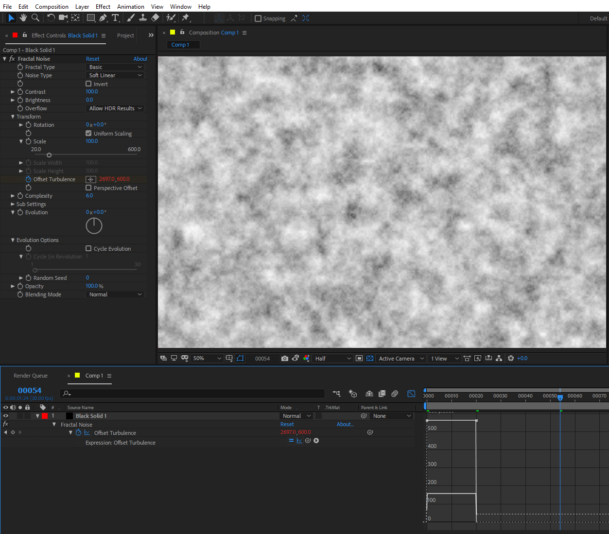
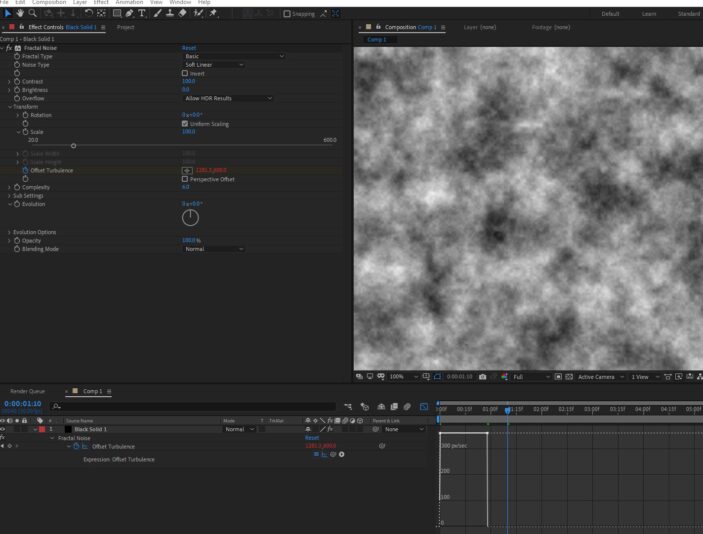
  • I checked the spatial interpolation and when set to linear it wouldn’t work either. I was intrigued by your message saying that you cannot replicate the error, so I went to a different version of AE and it worked. At the office where I’m working, we have to use AE 2018 still for some projects and the error is showing up in that version, the current version of AE work as expected, I’ll upload two images, the first one is the graph editor of AE 2018, the second one is AE 2020 (17.6)

  • the null option would work that’s true. I know it because when using the expression with position properties works well, and just to be sure you can separate dimensions to make it work perfectly. However, I am intrigued if there’s a way to say loopOut to only one dimension inside the expression or if there’s a tweak to make the expression work directly in the property.

  • Mateo Mazzini

    April 15, 2018 at 2:58 pm in reply to: Change with Placeholder and use proxy

    Hi Dan, thank you for your help! I tried the .selection method and it’s more optimized indeed. it does the iteration better without any miss elements.
    The problem with the UNDO feature remains though. this script works perfect the first time. but if you undo and apply it again, it won’t make the setProxy part on any video element you have on your project file and it will give you the error “unable to call setProxy because of parameter 1. Value is undefined”.

    This is the code as I have it now with the .selection property.

    app.beginUndoGroup("placeHolderAndProxyToSelf");

    var pItem = app.project.selection;

    for (i=0 ;i

    Matz

  • Mateo Mazzini

    April 14, 2018 at 1:09 pm in reply to: Change with Placeholder and use proxy

    I reduced the script so it’s easier to read and tried to remake the FOR sentences to be cleaner… I save the sources in an array first and then convert everything to a placeholder. finally I set the proxy for the placeholder based on the sources array.
    But the problem still there and is the same error… If I apply the script on a new file with some files imported, it works the first time, but if you UNDO and try to apply it again… doesn’t work.

    Could it be that After effects doesn’t update correctly the sources files after undoing?

    also… the base code to set proxy always work… the problem is just when I try to add the feature of replacing with placeholder.

    app.beginUndoGroup(“setproxytoself”);

    var allSelectedSources= new Array();

    for (i=1 ; i <= app.project.numItems ; i++){ var pItem=app.project.item(i); if (pItem.selected==true){ var pSource=pItem.mainSource.file; allSelectedSources[i]=pSource; }; }; for (a=1 ; a <= app.project.numItems ; a++){ var pItem=app.project.item(a); if (pItem.selected==true){ pItem.replaceWithPlaceholder('placeHolder',1920,1080,30,3) pItem.setProxy(allSelectedSources[a]) }; };

  • Mateo Mazzini

    May 3, 2017 at 11:30 pm in reply to: Voronoi Fracture and edges

    That looks great! if you can share that I will really appreciate it! it does looks more organic than the standard cuts.
    Thanks mate!

    Matz

  • Mateo Mazzini

    December 2, 2016 at 6:32 pm in reply to: c4d R18 Shadow catcher –> floating shadows

    Thank you very much! I didn´t see that. I was punching my head because all the time I thought that the problem was the shadow catcher.
    Thank you again!

    Matz

  • Mateo Mazzini

    October 21, 2016 at 1:17 pm in reply to: How to link with relative values?

    these two codes are amazing! thanks a lot Dan!

    Matz

  • Mateo Mazzini

    October 20, 2016 at 4:39 pm in reply to: How to link with relative values?

    Thanks a lot Dan! that does exactly what I needed.
    Is there a way to go further and make this expression work when you link at the middle of an animation?.
    I was playing with nearestKey(time) but I didn’t accomplish anything so far.

    Matz

  • Mateo Mazzini

    October 14, 2016 at 1:43 pm in reply to: inner light and subsurface scattering

    Thanks! this technique is great! although it doesn’t allow to place the gradient whatever you want, it’s great to generate an effect of gradient going from the center of the object to the edges. Nevertheless I used a simple gradient placed in the the polygon and so far it works… the only thing is that doesn’t look exactly like the reference because it overrides the edges of the object, painting all along the geometry as if were outside, not inside.

    Thanks.

    Matz

  • Mateo Mazzini

    September 23, 2016 at 3:46 pm in reply to: Transparency, absorption distance, and coloured shadows

    Thank you for your response! turning the shadows on for the button lights really changes the way they interact, it is very interesting. you are correct about the tint on the shadow from the transparent part of the buttons. although this is for a client which doesn’t want that. So I guess I´ll do a different material for the buttons when they are off, and then combine the renders as I like how they look turned off right now.
    Thanks a lot.

    Matz.

    Matz

Page 1 of 2

We use anonymous cookies to give you the best experience we can.
Our Privacy policy | GDPR Policy