Mark Suszko
 12
Apple Final Cut Pro X Coins
12
Apple Final Cut Pro X Coins
 15
COW Coins
15
COW Coins
 2
Premiere Pro Coins
2
Premiere Pro Coins
 4
Apple Motion Coins
4
Apple Motion Coins
Forum Replies Created
-

Mark Suszko
August 1, 2022 at 12:10 am in reply to: Options for non-video people to record themselvesSmartphones are simple and ubiquitous but they aren’t all of equal quality. Even among the same cameraphone models, the cameras on the back are often superior to the ones on the selfie screen side, which your users are going to utilize. If I was going to do, say, a “real” documentary with correspondents all over the map, using their phones, I would mail them a tripod, wired lav, and a goof-proof soft lighting package, and include a prepaid shipping box to send it on to the next correspondent.
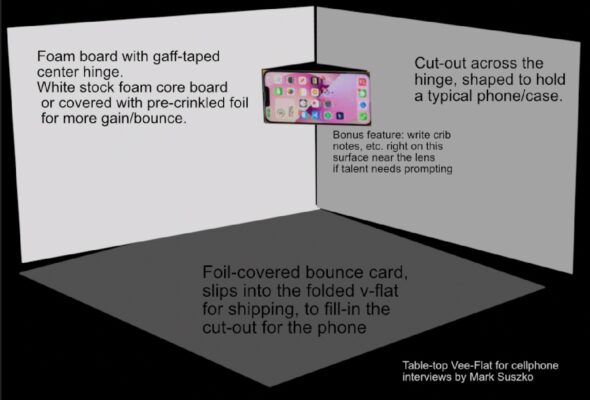
Assuming everyone is putting the phone on a desk or kitchen table and sitting at arm’s length from it, lighting becomes the biggest quality-affecting issue. Making a lighting setup that a completely unskilled “civilian” can deploy successfully, on a budget, is just the kind of challenge I like. In the past I’ve recommended a Miniature “V-Flat” made of two sheets of white foamboard, optionally with crinkled aluminum foil contact-glued to the talent-facing side, as a passive bounce-lighting system. This leverages the lighting already in the room and makes it softer and flattering. You can even attach a bracket to the v-flat to hold the phone instead of needing a tripod. Go one step cheaper and cut a horizontal hole across the joint of the v-flat, and the phone fits into that hole snugly, eliminating the need for the bracket. You can get fancier and add a glued-on strip of LED lights to the far left and right sides of the v-flat; such strips are available at discount places like Five Below as well as Walmart and Big Lots, for five bucks, running on USB or a AAA battery pack. Mount them with a layer or two of diffusion made of clear frosted scotch tape. 10 to 12-foot-long USB extension cables are a common find at gas stations near me. Adding a USB wall wart is another twelve dollars. The cheap ones *might* introduce flicker at anything but their brightest setting, ergo, the layers of frosted scotch tape to soften and attenuate. You could also punch white Christmas tree bulbs thru the foam to get a pleasant softlight effect, but that’s extra.
The V-flat could in theory be built using sturdy, folded cardboard sheets, clad on the inside with foil that’s been balled-up, smoothed back out, and glued-on with contact cement. <font face=”inherit”> In a way, that lets it be its own shipping package; just by inserting the separate third bounce card between the two hinged ones, taping-up the side opposite the hinge of the “V”. Slap the shipping label right on the outside. True, it would be oversize. But not heavy at all. Might be cheap enough, depending on your budget, to mail out one to every participant instead of having each participant forward it to the next one. They’re basically disposable. Or send them the instructions to build the V-flat locally and only mail them the lav mic, if you’re choosing to lav them. Then you could just have the participants mail the wired lav mic to each other, with prepaid mailing envelopes from </font>Fedex<font face=”inherit”>, DHL, or etc.
Audio-wise, kitchens aren’t generally the best places to record good sound because of refrigerator noise, and it’s a burden to ask people to unplug the fridge just to record. So a dining room table would be my first choice: it gets the camera and subject up close to each other in the room most folks take some trouble to make look good. Lighting will generally be from right above, or a side window, but by guiding their seating based on a still shot of the room, you could get the on-site practical lighting as good as possible, and you can lay a separate bounce card on the actual table to add a fill-in up-light under their jawline. It’s important that this v-flat setup doesn’t count on any additional lighting, though of course you can add some table lamps left and right of it, just out of frame, to help.
Here’s a quick and dirty visualization attached. The center hole for the phone can be a single rectangular hole, or two vertical slots that can accommodate any width. The whole thing folds up flat, with the tape hinge on the back, the loose bottom bounce card in between the outer panels. Tape the edges closed with a colored tape and instruct recipient to cut the colored tape to open (not the black gaffer tape hinge). Insert the phone to lock it all together.
To use the better-quality rear camera sensors, the interviewee or a friend can operate the camera control start/stop from behind the unit, then sit the person down and start the testimonials… let me know if any of you folks try this out for a shoot. This is the same rig I suggest to my beginning ukulele video-making friends because it’s so easy and cheap to make with local materials from the dollar store. The cheapest it costs to make is about $5. Less, if you have Reynolds wrap foil, tape, and large used amazon cardboard boxes at home already.

-
Yeah, “animated” is too broad a way to describe what you want, even in 2-d. Are we talking stop motion cut-up paper, inked cel type animation, or flash-like vector graphic animation, and at what levels of detail and realism: Hanna Barbera did Flintstones- level detail and realism vs. Jonny Quest level detail and realism. One takes longer to draw than the other. How articulated must the characters be? A static drawing with just an animated head and mouth and eyes? Does it have to move across the screen and do things? Are there moving backdrops, props or effects like laser beams? Is there lipsynch to voices, is there music and sound effects synched to anything? $1500 a minute might be lowball or overcharging, depending on your answers but we have no way to know from what you’ve given us here. The more detailed you define the need, the more accurate the time and cost estimate can be.
(Some Quest trivia for you: the dog, “Bandit” was drawn by a Flintstones artist because the artist that art directed the Jonny Quest show hated the dog, which had been forced onto the show by marketing types, and that’s why it never quite fits the art style of the rest of the show. Both shows were Hanna-Barbera productions, different budgets and timelines.)
-
Mark Suszko
July 11, 2022 at 9:36 pm in reply to: Looking for a tutorial to make animated wedding flourish titles.The curlicues can be bought from font/typography sellers, hand drawn and scanned by you, or modeled on public domain samples off the internet and customized by you. Calligraphic artists are easily found locally as well, if you just don’t have the time/ patience to learn it or make it yourself. Then you’d bring the samples into Motion and trace them as I described before.
-
Mark Suszko
July 11, 2022 at 9:26 pm in reply to: Looking for a tutorial to make animated wedding flourish titles.It takes a little practice, but, basically you will draw a path and then keyframe how it uncovers itself over time. One way to start is to hand-draw what you want on paper first, and scan it in as an image file. Then you can bring that into Motion as a background layer, and trace over the lines with your mouse or pen cursor, in the vector line drawing mode. Then delete or make the guide layer invisible. Doing stuff with particles will be very similar, the particles will emit from whatever path you draw. As you get more sophisticated you might bring in vector files made in other applications and apply parameters to those as well. Start slowly, just draw and animate one large letter, and play around with the settings.
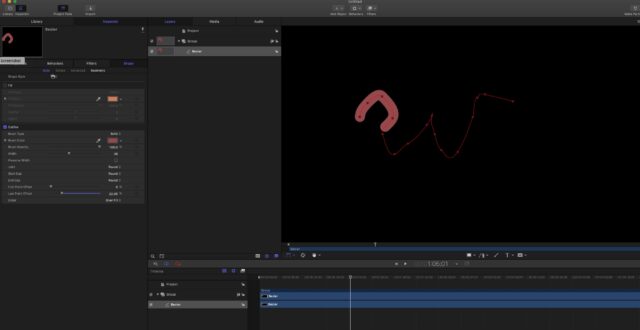
Here, let’s animate a crude letter W. Create a new project in Motion, grab the bezier pen tool and sketch out the letter W.
Now, go to the inspector pane, turn off “fill color”, we only want an outline color. The next part is the secret sauce they wouldn’t tell you for free, but I will: See the controls for “first point offset” and “last point offset”? To get the “w” to write itself onto the screen, you just pull down the last point offset to zero, set a keyframe, go a second or so down the timeline, and advance the last point offset to whatever the end limit is, and as you drag that control you can already see the line “writing” itself. Play that back; it should draw out the line for you. Now go back and play with the other attributes in that control box for the thickness of the line, and what the ends look like. If you understood all this so far, you know everything those people charging you money wanted you to pay for, the rest is just practice and experimentation.
Did that help?
-
My entire career of event videography for live and tape-delayed /edited coverage of News conferences, weddings, business conferences, social gatherings, the number one problem to solve first is getting good audio; getting tapped into the “house” system, avoiding hums and buzzes, and getting my own mics placed wherever I need them most. Lighting comes second.
I wrote at length before about all my tricks for capturing clean audio before, if you want to do a search. My preference is always for hard-wired sound solutions and I look at wireless as a second-best option only, because RF-based solutions have let me down enough times to make me not trust them.
Lighting, you don’t always get a say on, but always try to talk to the people putting the event on about windows at the venue and what the back-lighting issues might be.
-
Frame IO is not the same thing, or used the same way, not really. If you were using Vimeo as a point to point source for an audience of one client, Frame IO is a much better solution anyhow. Vimeo was a quality platform for a wider audience than Frame IO is meant for. Their niche was quality over size, and it built a loyal brand on that. It’s just not financially sustainable for them now. Unless they let someone bigger take them over. Like YouTube could buy them and help them with the scaling problem, funding their infrastructure. But YouTube isn’t going to be interested in charity work. They have to get something out of it as well. If you can make the case that adding a “premium tier” service to YouTube is a plus for them? But they’re not hurting for business now.
I don’t know that I have an answer. This is the kind of situation where a white knight venture capitalist billionaire buys out the company as a vanity project. Maybe a movie studio, or a group of studios pooling some resources, to create a platform that’s a walled garden and a farm club for growing their own talent pools. I can imagine Netflix creating a special branch for this, which they then mine for content for the main Netflix service. Something like the DUST sci fi streaming channel.
Just dreaming out loud: not sure any of these ideas are viable.
-
That sounds easy enough to build once in Motion and then export to FCP as a permanent effect plug-in. I suggest you ask someone in the Motion forum to build it for you. I hated every second of working in AE though I acknowledge its power. I find Motion more my speed and intuitive.
-
My take on the situation is that if your machine is tied up for this client, you can’t be doing something else with it, or making additional money with it, and so that is billable time; aka “opportunity cost”… however, if the machine is doing all the rendering unattended, that’s not the same as the billable time you track for the actual creative work you do, assembling the program. So, if it was me, I’d bill it, but at a lesser rate. Or at least track it, then decide on an upcharge for it when your project is done and you’re working out the rest of the billing. For example, if you’re out hustling up more work while the render is going on, doing something to advance the business, maybe you comp it. Or build it into future billings as a percentage markup. Hopefully your annual budget has a line item for equipment upgrades, where you put away some of the income to build a fund for more and faster drives, bigger and more powerful processors, etc. That’s just one area that distinguishes pros from talented amateurs or hobbyists.
We can talk about how you set your hourly and day rates, and if they are truly “correct” rates, in a separate conversation: it’s a topic that has been covered here a million times, but it’s worth perusing those previous discussions, especially if you’re relatively new to the game.
-
I see the streak, it almost looks like and afterimage or reflection of the light bar behind her, making a corresponding yellow bar across the face.
I’m not a pro colorist or even a davinci owner (yet) but I have ideas:
Idea one is to sample the yellow region, mask above and below it (and perhaps to the right of it), and make the rest of the frame match using a color matching tool. Once the whole frame has the cast, you can then got thru new color correction/white balance steps to fix the whole thing. Test this idea by sampling just the light bar and dropping it in somewhere else on the shot, see if the yellow bar appears next to it there too.
Something we don’t know from you yet is; does the yellow bar change position in the frame like it’s tracking with that light bar… or does it stay in one part of the frame while everything else moves, as if it’s a smudge on the lens? Is this bar on ALL the footage, or just this scene?
Idea two is, you hand roto each bad frame to color correct the shot, using color matching tools I’m sure DaVinci has. Back in my Discreet Logic days, what I’d have done was export the bad few seconds of footage as a frame movie of individual targas and then take that into Discreet paint or later, into Adobe photoshop, and set up a recorded action or droplet, recording the steps I did to mask and color correct one frame, and applying that to all the other frames with the automator.
Idea three is to apply a tracker to the yellow bar, and then track color corrected footage into it, derived from undamaged pixels nearby.
Of all these methods I think your best luck will be method one. it would be easiest if the camera was locked down on the shot and not moving. Apply a tracker to it, maybe, if the camera has motion or lens changes, mask it off top and bottom, for sure, apply color correction to the stuff above and below, then when the yellow is consistent across the whole shot and nut just one strip in it, you cN rapidly correct everything as one from there.
I am old enough in this business to remember using and watching analog plumbicon tube and image orthicon imaging tube cameras, and the flares and burns you could experience with bright lights or anything really bright like jewelry, etc. – the dark comet tails and squiggles that were left behind, like when you accidentally look at the sun with your own eyeball… and if you were lucky, you could clear that tube burn away by pointing the camera into a white card for a while, which didn’t really fix the burn so m ch as make the unburned field of view match it, thus degrading the image a bit more every time you had to do that…. I think I remember a U2 at Red Rocks concert, or a concert from that era, where the imaging tubes got burned so bad by the stage lighting and choice of shot, the cameras were write-offs by mid-show. They’d have had to be re-tubed, which was like a third or more the price of the camera back then. Tube burns could get you fired. Your problem reminds me of those days a little bit. I don’t know if this yellow stripe is the camera sensor freaked out by the bright wall light tube, or if the tube is reflecting a ghost image off other camera optics in some way and the reflection doesn’t match the color correction of the rest of the scene. If we could see a few seconds of the shot in motion, it would narrow the possibilities.
-
We’re going to need details on the camera settings. If you’re very lucky, you just made some codec setting that your system can’t see. Didn’t you check any playbacks in the field?