

Activity › Forums › DaVinci Resolve › Remove Light Streak?
-
Remove Light Streak?
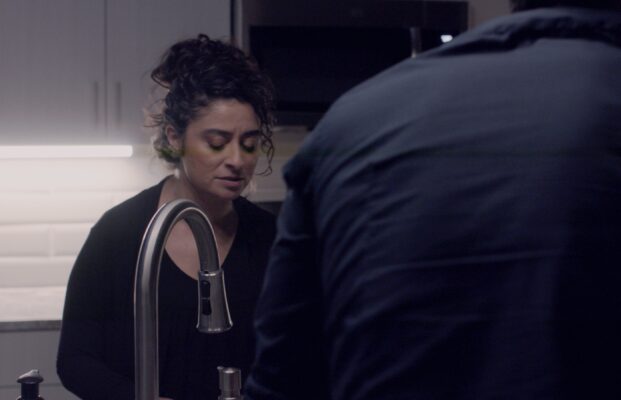
Posted by Shaheer Naqvi on February 18, 2022 at 5:42 amHi everyone, need help removing this strange yellow light streak from the attached shot. Any suggestions?
 Mark Suszko replied 4 years, 6 months ago 4 Members · 3 Replies
 -
3 Replies
-

Eric Santiago
February 18, 2022 at 4:18 pmBy her ear?
I guess I would need to see the moving plate.
-

Mark Suszko
February 19, 2022 at 7:02 amI see the streak, it almost looks like and afterimage or reflection of the light bar behind her, making a corresponding yellow bar across the face.
I’m not a pro colorist or even a davinci owner (yet) but I have ideas:
Idea one is to sample the yellow region, mask above and below it (and perhaps to the right of it), and make the rest of the frame match using a color matching tool. Once the whole frame has the cast, you can then got thru new color correction/white balance steps to fix the whole thing. Test this idea by sampling just the light bar and dropping it in somewhere else on the shot, see if the yellow bar appears next to it there too.
Something we don’t know from you yet is; does the yellow bar change position in the frame like it’s tracking with that light bar… or does it stay in one part of the frame while everything else moves, as if it’s a smudge on the lens? Is this bar on ALL the footage, or just this scene?
Idea two is, you hand roto each bad frame to color correct the shot, using color matching tools I’m sure DaVinci has. Back in my Discreet Logic days, what I’d have done was export the bad few seconds of footage as a frame movie of individual targas and then take that into Discreet paint or later, into Adobe photoshop, and set up a recorded action or droplet, recording the steps I did to mask and color correct one frame, and applying that to all the other frames with the automator.
Idea three is to apply a tracker to the yellow bar, and then track color corrected footage into it, derived from undamaged pixels nearby.
Of all these methods I think your best luck will be method one. it would be easiest if the camera was locked down on the shot and not moving. Apply a tracker to it, maybe, if the camera has motion or lens changes, mask it off top and bottom, for sure, apply color correction to the stuff above and below, then when the yellow is consistent across the whole shot and nut just one strip in it, you cN rapidly correct everything as one from there.
I am old enough in this business to remember using and watching analog plumbicon tube and image orthicon imaging tube cameras, and the flares and burns you could experience with bright lights or anything really bright like jewelry, etc. – the dark comet tails and squiggles that were left behind, like when you accidentally look at the sun with your own eyeball… and if you were lucky, you could clear that tube burn away by pointing the camera into a white card for a while, which didn’t really fix the burn so m ch as make the unburned field of view match it, thus degrading the image a bit more every time you had to do that…. I think I remember a U2 at Red Rocks concert, or a concert from that era, where the imaging tubes got burned so bad by the stage lighting and choice of shot, the cameras were write-offs by mid-show. They’d have had to be re-tubed, which was like a third or more the price of the camera back then. Tube burns could get you fired. Your problem reminds me of those days a little bit. I don’t know if this yellow stripe is the camera sensor freaked out by the bright wall light tube, or if the tube is reflecting a ghost image off other camera optics in some way and the reflection doesn’t match the color correction of the rest of the scene. If we could see a few seconds of the shot in motion, it would narrow the possibilities.

Reply to this Discussion! Login or Sign Up