Mark Suszko
 12
Apple Final Cut Pro X Coins
12
Apple Final Cut Pro X Coins
 15
COW Coins
15
COW Coins
 2
Premiere Pro Coins
2
Premiere Pro Coins
 4
Apple Motion Coins
4
Apple Motion Coins
Forum Replies Created
-

Andre’ everyone starts somewhere. I’d suggest a little schoolwork in history and theory first will make your later training and learning go faster and make more sense. It will also either confirm or disprove your level of interest. That will also save you time if you find out this isn’t really what you wanted to do.
So, try Amazon and Ebay for used college video production textbooks, doesn’t matter if they are a few years out of date; the basic principles don’t change. You might find one of my old production books by Zettl, even, I think they were on papyrus scrolls or cuneiform tablet… Unlike random walks thru YouTube at this stage, it’s better for you to have it all in one place, with some kind of structure made by a pro. Read up a little bit on the history of editing: Wikipedia is also a good place. Read about Kuleshov, Eisentein, Melies, Griffith, Edwin Porter, Margaret Booth, Thelma Schoonmaker, Walter Murch. There’s a heck of a lot more, but these are a start. Understand what the Theory of Montage Means, because it’s going the be the foundation of what you do. Understand the names of the various camera shots, not just wide and tight, but medium, xcu, and pan, tilt, zoom, dolly, high angle, low angle, dutch angle, etc. These are the punctuation that comes with your grammar.
At the same time you are book-larnin’, get your hands dirty actually doing the things you read about: get any cheap or free editing software you like, and using camcorder or phone footage, start practicing the Art Of The Cut; that is, knowing where and why to cut, to advance the story but also create more meaning than the original shots alone had.
I had six years of schooling in TV, from junior high and college, and 34 years of making TV for a living, and I’d be a liar if I told you I knew everything there is about making the best cut every time. I’m still learning my craft, every time I do something… and I’m retired!
So, don’t get bogged down in fancy stuff: your editing exercises should be really, really simple stuff you can shoot around the house, of yourself, or if you’re shy, of others, and if nobody’s handy or you want to practice in private, you can even use toys and dolls or action figures, doesn’t matter, just get the shots from every possible angle, and start cutting together dialogue and action scenes. Nobody is going to see these but you. Your scripts can be downloaded from the web, or made up by you, they can even just be an audio recording of a random conversation. Just so you have words said by 2 or more people, and shots to match up to the words. Or music. But that’s more advanced….
As you get more familiar with the “grammar” of various shots, what they mean or imply, you will see common stuff on TV and web with a new eye. The exercise I give you is, watch one of each of these, with the sound off. By observation, note how many different cameras there are to get the shots, what the order of shots are. As you get the feel of it, just by watching the actors, try to out-guess the director and editor, snap your fingers and call out what you think the next shot is going to be.
Do this for an hour of news, for an interview show, for any soap opera, any game show, any sports event, and thirty minutes of commercials. In your head, what you have read, and what you experienced while playing with the phone and action figures, and what you watched with the sound off, is all going to suddenly make a lot of sense to you. It is going to feel like the clip from The Matrix when Neo is beginning to “see” the code the Agents are made of.
You will understand the power of the right cut and how it can change emotions, create ideas.
And now, you are ready to start doing classes, watching the online videos from Ripple Training, Larry Jordan, This Guy Edits, and a bunch of others…or getting together with others around you to make something fresh from scratch. You’re young, so you can do all these things somewhat simultaneously… but first, I’d start with the books, and the cheap or free NLE editing software. Cuts, fade, dissolves, a wipe or two, that’s all you need to start, and all many of us ever use, our whole careers. Not because they’re easy, but because they are so very powerful.
Best of luck to you, and come back if you have more questions.
-
You say this deal is valuable… I’d disagree, and suggest you close it down. In the end, it’s going to cost you more to keep chasing it. You are trapped in the “sunk cost fallacy”. Don’t take it for an insult: it isn’t. It happens to people every day in all walks of life, from business deals to creative projects to car and boat repairs to bad personal relationships, and usually it’s an un-involved, impartial stranger with the outsider perspective, who will point this out to the person trapped by the fallacy. That’s me.
They have told you by their behavior who they are. If it happened one time, it could be forgiven. You gave them rope, they took it time and again, and now you’re the belayer on the side of the cliff, with no more pitons. They are never going to get better. This is costing you lost time you could be applying to better or at least different clients, building your business in other ways, or to do anything more productive. The situation is beyond saving and it’s time to walk away. There’s no shame in this. They were the abuser, not you. This next part is too late to help you on this gig, but I post it here for people who might fall into your situation in the future.
What I tell people about working for charities is to not bill them, because once they have put any money down, all clients think they own you, even charity clients. ESPECIALLY charity clients.
But…
If you don’t bill the charity, you are free to walk at any time, and that may not seem important to you, but believe me when I say it makes a huge psychological difference in how the client feels they can treat your charitable contribution of time and talent. It’s a known phenomenon in sales psychology that people respect a freebie less than something they believe cost them something. Even if that “cost” is made up. Crazy? Yes. But absolutely this is human behavior you can count on. The way I suggest you do it, is to hand the charity an invoice up-front at the beginning of the project, for what you think is fair, marked: ” Total value of work: $xxx dollars, no charge”.
“Mark, that’s a bill that doesn’t bring in cash, why would I do that!?!”
Because first off they are all going to brag to everyone that they got (billed and comped amount) of work done for them, “free”. It establishes the value of your time and ability. It gives you credibility. Everyone loves a deal. They are going to brag and that’s free advertising for James’ work for other gigs that are payable gigs, and it’s coming not out of nowhere, but from the lips of people the other customers will find credible, versus someone they don’t know. This coincidentally scares off some of your competition that would have billed real money, because they needed to… But the best part comes next:
When they tell you it’s great, but they wanna make a tiny change to three little things,… just the beginning, middle, and end… you can say: “You’ve used up all your free credit for this year already: I can only comp so much before it interferes with my paying client’s work and they have deadlines I’ve committed to. I could do what you want, but I’d need to get paid real money to interrupt the paying gigs and proceed.” And you are free to walk away. And they know it, so they will tend not to try to press. If they don’t come back at you with money, you escaped the wasted time catering to them, because they were never going to pay anyway. If they dawdle on deliverables, then complain to you, you can point back to the billing and explain again that cash makes the difference. Or not. You can just say you’re out of time. And mean it. There is a difference between comping a billing, and working for free. Get the distinction? Because James here, started with an actual billing, but due to the extra hours, he’s now not just working for free to finish the damn thing, he’s probably in negative income over it due to time stolen away from paying gigs with a future. Not his fault; he’s trying to be the good guy. But they don’t see it that way, in -their- heads.
When they know they only have one shot at the beginning to control what you do, they won’t keep trying to tinker afterwards. You set the deadlines, not them, when you do the advance billing with the comp marked right on the bill.
Why are you doing the charity work in the first place? I’ll tell you my philosophy on it. It’s not to try and get money off the charity. You are leveraging your contacts with the charity on this current project, to create future opportunities that DO pay well, not just with them directly, but ancillary contacts. You can use the charity work as a way to get close to other donors, patrons, and supporters, get known by those. You’re auditioning in front of the decision-makers instead of the gate-keepers. Think of it as using the kitchen entrance to get directly into the club and talk to the head guy, without wasting time at the front door full of bouncers and intermediaries and the like in your way. Next time the friends of that charity need a video, you are in their heads already. “Hey, I already know this guy that could do the project; his name is James, did a great deal with my favorite charity”. This assumes, of course, you did a great job on the charity project, worth the “virtual billing” you gave them.
<i style=””>”There is a difference between comping a billing, and working for free.”- Mark Suszko
-
Mark Suszko
November 10, 2021 at 2:27 pm in reply to: Does anyone use camcorders for weddings anymore?Greetings from a dinosaur of the trade. I’ve been out of the wedding game a long time so take my opinions for what you think they’re worth. I’m still a fan of camcorders for wedding work over DSLR rigs today. Particularly if you work short-handed, with multiple cameras. Of course you wanna shoot in 4K but as you’ve sort of indicated in your post, by the time you assemble a DSLR rig that can do everything a dedicated camcorder can do, (audio, long record times, long capacity, ease of use when hand held for long periods – ) you’re spending more money.
What I would be doing if I was in the game today is, use a 4K camcorder, but also plant 4k gopro type action cams around the church where I could get away with that.
As far as freelance jobs that “demand” a DSLR, well, you have to decide what your niche is and your “right price” for the level of service you provide is. That means you sometimes let an opportunity slip by that’s not a good fit, or you turn down a gig that doesn’t pay enough for the time you have to put in. That’s what uncle Harry and his wobbly hand-held iPhone shots are for. Part of why the event forum is slow I think is, the gear has gotten so much better and cheaper, it democratized the process for a whole lot more people, to DIY, and a large number of peopler who might have hired a wedding shooter before, now think they can do “good enough” with iPhones. They’re wrong, of course, but that’s a value decision they made.
-
Mark Suszko
November 7, 2021 at 7:12 am in reply to: Use bass audio beat to drive opacity on/off for blinking video to beat.

-
Short answer: no.
Longer answer: if you have a recorded shot of your weather reporter on green, and a recording of whatever the map has to show, that also has the same audio as the weather person, FCPX can automatically synch those tracks up by their audio, You drop the chromakey effect plug-in onto the green screen shot, bam, that’s done, more or less (can need some minor tweaking). Then as you play back in real time, you can hit the number keys like a live video switcher to cut from the composite to just the map, as if they were cameras on a switcher. But no, it’s not a live switcher.
There are free and shareware software-based switchers out there.
-
Add a very inexpensive camera control app to the phones, and you’d be surprised how well they will work out. I suggest filmic Pro for this. You don’t necessarily want to do a “crummy” initial capture, just to seem authentic: rather, you want to capture really good quality, then degrade it to taste in post with filters and plug-ins.
It’s much simpler to coordinate authentic-looking game play if the two family teams are actually in the same space where they can overhear each other, but if you don’t have the wherewithal to create two living room sets, on your budget I have two ideas. One is to “rent” an hour of time at a furniture showroom, where they already have demonstration “rooms” or sets standing right next to each other. Tight camera framing hides that fact. Pick two displays close enough so you can hear each other clearly, set your cameras and lighting, get busy recording. You’ll want to pay the furniture place something for the time, of course, and maybe give them screen credit for promo purposes.
Low budget idea 2 is, they are actually in two different houses, you set up the scenes and they just play along in real time to an actual audio-only Skype call or hardline three-way call on speakerphone. You match everything up by audio later. While that “seems” cheap and easy, you risk the Skype call audio bleeding into the mic’ed audio on the player’s mics. So if it were me, I’d really first try to get the furniture store showroom, or “build” two cheap sets in one studio for this.
-
Some of that is the sensei-enabled content-aware fill.
-
Mark Suszko
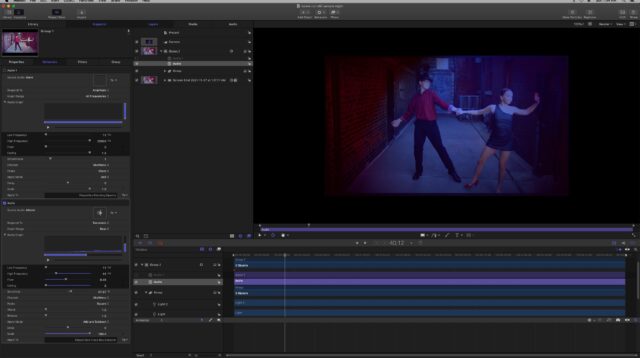
October 15, 2021 at 3:59 pm in reply to: Seeking tips on using Motion for Day-For-Night scenesI might try AE if I owned it at home, but I don’t. And my home machine’s not got enough room to add Resolve right now. I did a test with a background plate in Motion, and it looked promising. I added 3-d lighting, made a diffuse blue light for my moon/key. Added some spotlights overhead with tight cone angles to create what look like motivated streetlights grazing the brickwork, where there weren’t any. I’m probably not going to try to make a 3-d floor plate for this.
My character is just standing in place, screen-left, playing and singing without movement for 95 percent of the shots, so I think it’s going to work with a couple of simple masks to put me in the “shadow” of one of those fake top lights. I can even greenscreen myself into the plate later, If I need to. There’s supposed to be a dancing couple in the shot, over my shoulder, soft focus; they will stay mostly in one spot while they do their thing. If I get ambitious, I might try to add a neon sign behind them on the brick alley wall.
Getting a pair of dancers for this project has been a struggle: I offered 100 bucks cash for fifteen minute’s work, which isn’t a lot, but is all my budget for this can take. I’m not asking for choreography, jumps, lifts, or stunts, just a couple, doing some ballroom and salsa moves, as you might in a bar or nightclub. No takers so far. I expected I could have located amateurs who would do it for a goof, but no. I’ve tried everywhere in my town but Craigslist (because I don’t want to get stabbed).
-
You may not need plural eyes if you use Final Cut or Premiere for your editing: they can automatically synch multicam projects by the audio, makes it super-convenient to then play the show in real-time and use the 1,2,3,4 keys like a live switcher.
(“1, 2 ,3…..4? But Mark, I only have -three- cameras!” Well, Keith, your full-screen graphics of the quiz questions or the scoreboard would be *camera four*, if you recorded an iso of that with something like a screen recording app that has audio. This will make the edit go by super-fast, almost in real-time)
If your cameras are at 2k or better resolution, you can center one camera each on a family for full-family shots, then re-frame the shot in post, tightening it artificially with the scale controls, to simulate cutting to close-ups. That makes your three cameras seem like five, and it adds more visual interest to the show than just banging from one wide shot to another.
I’m confused by the “online” part you mentioned. Is this two families in your studio, competing, or two families, each in their own homes, competing thru a webcam interface, online?
Or, is the “online” part just your distribution of the show, once it’s been built?
Addendum: Even without synch tools, as long as the recordings are uninterrupted, synching them up manually by ear is no big deal at all, especially if you have some kind of clap or synch flash or anything like that before the actual start. Even without those, if there’s a quiet pause before the first person speaks, you can easily see the waveform in the audio track and start getting a close alignment by lining up the waveforms of two tracks. Then, you play the pair of tracks and listen to the echo or reverb that tells you they are close, but not perfect.
Highlight one of the two source tracks. Play. Use the comma and period keys, (or whatever the keys are on your system that bumps your track a frame ahead or behind…) play the tracks and just bump that key as you go, and listen to hear if the echo is getting shorter or longer. Go in the direction that shortens the echo, two or three taps at a time, until the echo is very short, then go one key at a time. and you’ll know you’re in synch by ear, when the reverb stops and you are hearing a bit of phase cancellation. That means you are one frame out, forwards or back; fix that, now you’re synched. Repeat this with each track you add. With practice, you can do it in about ten seconds per track. Once all the tracks are synched, I tend to mute most tracks and get my audio from the one “best” source in the stack.
-
From where I’m looking, down and more down. Looking at places like Fiver, where they’ll cut for you for less than minimum wage, the only market left is super-high-end.