Forum Replies Created

Page 2 of 5
  • Mark Grance

    August 2, 2024 at 8:19 pm in reply to: Speed Change vs Premiere Pro

    No optical flow or frame blend. Just a simple speed change (no ramp). Timecode at edit point matches, and several frames match within the clip, just not everyone.

    Noticeable without difference matte? Depends.

  • Mark Grance

    August 1, 2024 at 2:09 pm in reply to: Frame.io downtime

    Down again, naturally. Twice in a week.

  • Mark Grance

    July 15, 2024 at 3:36 pm in reply to: Slow-mo frame rate math help!

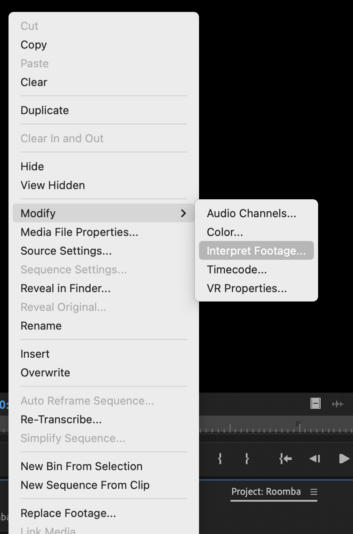
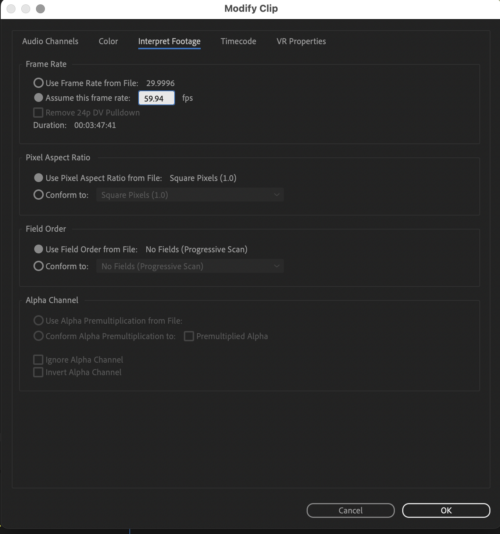
    Wouldn’t another solution (if you know the capture rate) be to Modify>Interpret footage…

  • We actually have our old Cache-A system so we use that.

    But YoYatta can read TAR tapes (on Intel Macs) and we were able to do that.

    But we discovered that putting LTO-5 tapes in our LTO-7 library had a tendency to wear out or clog the heads, so when we did use that method, we needed to have our library serviced.

    So now we just run the Cache-A system when we need it. Which is pretty rare.

  • We went from Cache-A to YoYotta and LTO-7 several years ago. It was a great move.

  • Mark Grance

    July 4, 2024 at 2:07 am in reply to: Smooth dissolve in Premiere?

    Is your sequence set for “Composite in Linear Color” in sequence settings?

  • You could always nest the clip, then in the nest add the frame hold and extend.

    (not that I like nesting much)

  • Mark Grance

    May 8, 2024 at 3:00 pm in reply to: I scratch your back, you scratch mine

    I would comment that you started talking about your “content” and then you referred to it is “data”. There is a big difference.

    Does any of your content involve rights managed material: music, talent, imagery (both for hire and stock)?

    If so, do you have the rights to give that content to another company for their use?

    (Make no mistake they are using that content.)

    Are you able to prove you have the rights for each file in that 70TB?

  • Mark Grance

    April 18, 2024 at 2:47 pm in reply to: transform motion blur repositions footage

    (bugs – 😀)

    Yes nesting is a workaround but I try to avoid nesting unless I really need it. (helps with other workflows, render time and dealing with various social resolutions and aspect ratios)

    I only see this when I am placing a different resolution clip into the timeline. (lower or higher resolution)

  • Mark Grance

    April 18, 2024 at 2:41 pm in reply to: Transform effect problem premiere

    (I know old post) but for people saying they never see this, it only happens if the clip is a different resolution than the timeline (UHD clip in an HD timeline). Yes nesting seems to be the only workaround.

Page 2 of 5

We use anonymous cookies to give you the best experience we can.
Our Privacy policy | GDPR Policy