Marc Franklin
 42
COW Coins
42
COW Coins
Forum Replies Created
-

Hi Anthony,
It would seem that all my contacts from 5 years ago are no longer there. I found 1 press contact, but I got an auto reply that she was out of the office until Monday. Hopefully she can point us in the right direction.When I did the review, I believe they sent the SSD caddy with the SSD already in it, so I don’t remember if I knew what they gave me.
If I get more info, I will pass it on. In the mean time I’d look for that back up camera.
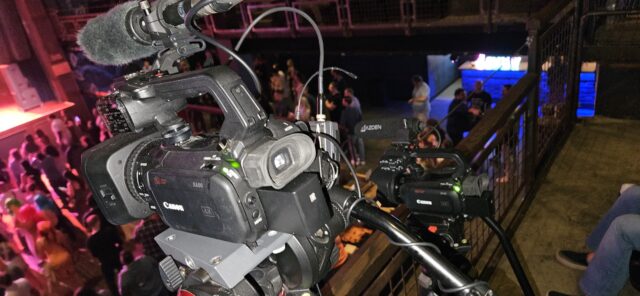
This was my set up last night at the House of Blues in Anaheim, CA. Canon XA50 following the dance leader on stage, Canon XA40 on a static wide shot.

-
Hi Anthony,
I did a full review of the camera about 5 years ago when I was at Streaming Media Magazine. I did have some issues during the review. I did have at least one failure on a shoot, and I think another on a test. This was with the JVC supplied SSD. A JVC tech had to help me do a full factory reset of the camera. What is the rating of your SDXC cards? They come as V30, v60 and v90. Make sure they are V90. If you don’t have a JVC person that you are working with, I can try and look up who I worked with. You can see the review article and video here: https://www.streamingmedia.com/Producer/Articles/ReadArticle.aspx?ArticleID=148946&PageNum=1
One thing that I do, even on a 1 camera shoot, is have a back up camera ready to go, if not running concurrently. You can also get a Blackmagic Design Video Assist, to make a back up recording from the SDI or HDMI out of the camera if the recording stops.
My main camera right now is Canon’s XA50. I picked it up used for $1000. It also has a 1″ sensor and 4K 30p recording, can use V30 cards for the 4K 30p recording, but it does not have many of the advanced features that the JVC does. The Canon is also cleaner in low light. I hope this helps. Let me know if you have any more questions.
Marc
streamingmedia.com
Review: JVC HC-550 4K Camcorder - Streaming Media Producer
The JVC GY-HC550 will do very well in news production, corporate video, and event production. The ability to store a station or other logo on the camera for streaming is very useful.
-
Marc Franklin
January 27, 2026 at 1:01 am in reply to: Any tape-era editors know this deck Sony PVW 2800? Stuck in record mode.I have a bunch of Beta SP machines including the UVW-1800 and BVW-75, and never had that problem. What happens when you put it into remote mode? If it goes back to normal, then you may have a short somewhere, possibly the control panel. The ribbon cables can wear out from opening and closing the panel. Where are you located?
-
Hi Steve,
There are a lot of variables when using old cameras and old software. I would try putting it into another more recent editing program to see if it opens properly. Sometimes when using older software, when the PC updates the OS, things get broken. You can download Blackmagic Design’s Resolve for free, or a Premiere Pro free trial. FXhome has a free version called “hitmovie,” and there’s another free editor called Shotcut, but it doesn’t read timecode which is a pain. See if any of these read the audio. I hope this helps.
Marc
-
In “cinema mode” you may need to add LUTs to the footage in post. I had a friend get in some footage from a Sony camera he never worked with before. He had me take a look and I said, “this is raw, and we need to add LUTs.” Premiere pro has them in the effects pallet. Find the camera that best matches yours.
If you don’t want to deal with LUTs, then shoot Rec 709, where the color info is baked into the video file, like the “good old days.”
Another solution for extended record time is get a Blackmagic Video Assist or Atomos recorder. They both record Pro Res. The BMD uses SDXC cards and Atomos uses SSDs in caddies.
-
I haven’t used either camera, but generally it comes down to what you want to shoot, and how much room you have on the P2 cards for it. For a cinematic look many used the 1080 24p setting. For fast action, some used 1080i 60/50 Hz. Others used 720 60p/50p and some upscale the final up to 1080p in post. What are you shooting?
-
You Have a lot going on there Patrick! What are you trying to accomplish by going standard def, composite out to an HD switcher? By using an HD capable camera, going out SD using an analog composite / S-Video to HDMI converter, to an HD switcher, you introduce a lot of possible signal issues.
I only used this camera once 15 years ago. I do have a Sony camera if the same vintage, that in order to use the composite, analog out you need to flip a switch that lets you choose between the LCD screen and the composite out. You can’t use both. If not a switch, you may have it in a menu for output if that is the issue. It may also have you chose between the component and composite out activated. I would look for that.
-
You have the gain set to whatever you have “M” set for. Gain can do funny things to the picture, if you don’t need it. What is your white balance for “A” set to?
-
If you want to post the pics, I’ll look. I never used that camera though. I have used the XF405, XF705, XF605, XC10, XA15, XA40, and XA50, but they were all from a different generation of cameras. I believe your XF300 is MPEG-2 based files, and the ones I use are MP4, using different color science and compression.
-
Hi Kacey,
The XF300 Is a pretty old camera, about 15 years old. I would suggest that you go in to the set up menu and see if the previous owner played with the camera’s image. Some owners tweak the color matrix and how it reacts for certain scenes. I believe there are some youtube videos about this.Marc