Forum Replies Created

Page 84 of 126
  • Mads Nybo jørgensen

    March 1, 2023 at 11:11 pm in reply to: Timecodes not synching up

    Hey Lena,

    What a mess – so sorry to hear this, as this is not how it should have been.

    Many years ago I was the Post Production lead on one of the first ever Features shot on Digital HD – very similar problem with time-codes not matching. I got hired to fix it in the On-Line post. Back then my team were using HD-Cam Tape-deck(s) to find the right shot and in-point.

    If it helps, I can jump on a call with you to discuss, hopefully suggest options based on experience – find a way as to how you can quickly, but not entirely painless get through the sync process.
    There may also be an option on how you can address the financial situation.

    Atb
    Mads

  • Mads Nybo jørgensen

    March 1, 2023 at 6:12 pm in reply to: Timecodes not synching up

    Hey Lena,

    Did you pay the DP money for this job?
    If so, I would ask for a partial refund.

    When it comes “sync” there is never such thing as a “second or two out”.
    It either is locked, or not – in your case, sadly, it is not.
    If there is no guide audio on the video, then your DP has totally screwed you over.

    Regardless, this is a manual job.
    Did you use a hand-clap or similar at the front of each recording?
    Using that, will make life very easy for you.
    Otherwise, you’ll need to use your eyes and ears to do the sync.

    Only hope is that you are not on a tight deadline.

    Atb
    Mads

  • Mads Nybo jørgensen

    March 1, 2023 at 2:16 am in reply to: Timecodes not synching up

    Hey Lena,

    Adding to jerry’s advice.
    Have you tried to drag both into a timeline, and checked the info panel to whether the timecode matches? (You may have to drag, one or the other clip, to get them to match up.

    But if the time-codes are vastly different, they’ll not match up.

    Atb
    Mads

  • Hey Dylan,

    What a great idea, but question is how they did it – might be worth emailing BBC News graphics and ask them directly.

    However, Ravensbourne University has got an archive of all BBC idents (or most of them).

    The one you are looking for, is here:
    https://www.ravensbourne.ac.uk/bbc-motion-graphics-archive/bbc-breakfast-2012
    (You can download the video)

    “Concept and creative process

    Title graphics from the flagship morning programme from BBC News which presents a daily mix of news and studio interviews. Breakfast production relaunched from Salford in 2012. The titles were an evolution of the previous set of titles which incorporated some of the key branding elements from BBC news (the globe, radio waves and cats cradle). This was combined with a light bright colour palette and light rays evocative of the rising sun.

    Production: After Effects, Cinema 4D.”

    Without the above info I would have suggested:
    Knock up graphics plates in PhotoShop.
    Map/wrap them onto a sphere in After Effects.
    Rotate at a suitable speed.
    Extrude and do other fun stuff to give it depth.

    Looking forward to seeing what you can create!
    (Don’t forget to give credit to BBC where due, and do not use their logo)

    Have fun.

    Atb
    Mads

  • Mads Nybo jørgensen

    February 23, 2023 at 5:04 pm in reply to: Pre Render Issues

    Hey Ricardo,

    Have you rendered out a test file?
    If they appear on that, it is likely to be those layers.
    In which case you’ll need to look at them individually for stray key-frames, or maybe a plugin that are not registered/subscribed to.

    If they don’t appear on the render out, then it is your software/workstation that is unhappy – could be an upgrade gone wrong, or too heavy a lift. If you are able to ignore the problem, finish the job. Otherwise you’ll need to either fix your system, or find a new one.

    Atb
    Mads

  • Mads Nybo jørgensen

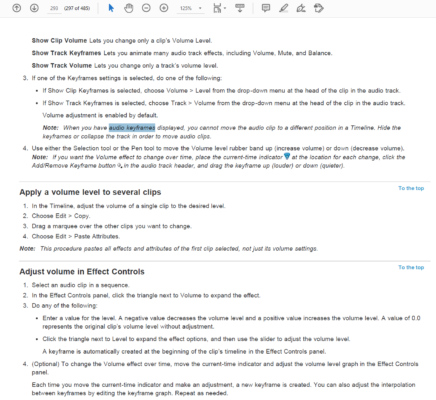
    February 23, 2023 at 4:51 pm in reply to: Audio Track Keyframes CS6

    Hey Kevin,

    CS6 – that made me reach for a manual.
    Keep in mind that it is not PPro v2023, so it will not have the functionality. But paste attributes might do it for you.
    I tore out a page for you.
    Alternatively, you can get the whole manual here:
    https://help.adobe.com/archive/en/premiere-pro/cs6/premiere_pro_reference.pdf

    Alternatively, if the edit is finished, and you just need to raise the overall level.
    Export the whole thing to a wav file, and do it that way (it is not the most aesthetic way of doing it, but it will work). Adding, I’m sure that there is a way of making a sub-mix track – but that will involve a smarter person than me.

    Hope this helps?

    Atb
    Mads

  • Mads Nybo jørgensen

    February 23, 2023 at 4:38 pm in reply to: FCPBUNDLE Backed up to ISO problem

    Ben, good call on consolidating.

    On bigger projects, and FCPX libraries, yes, BluRay might not be optimal.
    Better get some SSD/hard-drives – although they too comes with their own set of issues.

    I do use BluRay on my PPro projects and slow digitization of my Betacam SP masters, and with up to 50GB discs, I can store most of the rushes for short-form edits too.
    Should add that I always do two discs of each backup.
    So far that has worked fine.

    Atb
    Mads

  • Hey Bill,

    There are plenty alternatives out there, whether they will open your PSD files is questionable.
    But then you can either rebuild in another app, or pay just a monthly fee Photoshop only.

    But why are you paying $60 a month, that sounds excessive.
    Particularly if you are not using most of the apps, such as After Effects?
    Have you tried to reach out to Adobe accounts?

    I have my own reasons, which I have raised with Adobe directly.
    And, continue to discuss with them.
    You’ll find if you hit “cancel” on their website, that they will want to know why, and to encourage you to stay.

    Atb
    Mads

  • Mads Nybo jørgensen

    February 16, 2023 at 10:03 pm in reply to: Avid won’t launch

    Hey Annu,

    Have you tried to un-install, and then re-install Avid MC?
    I would also suggest that you log into your online account to see if by choosing “first”, if Avid has taken that as you cancelling your subscription – although unlikely, worth checking.

    Alternatively, you might need to call Avid directly.

    Atb
    Mads

  • Mads Nybo jørgensen

    February 16, 2023 at 2:34 pm in reply to: Creating a new Library combining several others

    You should be able to copy individual clips across.

    Or, just create a timeline where all of your footage is included, in the original library, then drag that across.

Page 84 of 126

We use anonymous cookies to give you the best experience we can.
Our Privacy policy | GDPR Policy