Forum Replies Created

Page 82 of 126
  • Mads Nybo jørgensen

    March 20, 2023 at 11:41 am in reply to: Looking for movement in part of a frame?

    Hey Brian,

    As Ben suggests, using a motion triggered camera can save you time and hard0disk space – also, quite common in CCTV products. Some of the modern CCTV cameras comes with features where it can balance out the parts of the image, where there might be strong sunlight mixed with very dark shadows.
    One example that I saw a few years back was a garage door opening,camera placed on the inside. The camera adjusted so you could clearly see what was happening inside and outside of that door simultaneously.

    The other alternative is to upload your rushes for an A.I. to analyse your footage. It may, depending on how you train it, be able to recognise different birds of same species. both by look and song – no promises, but the technology are evolving fast.

    Atb
    Mads

  • Hey Neil,

    Like you I’ve got a 1 TB drive on my Mac Mini.

    As useless as it is as a “Cloud” storage only, I use the Adobe Creative Cloud to store all my PPro Project and Auto-Save files on (This will be synced to Cloud, but not able to be Cloud only).

    Then I have separate Media folder on the main drive (outside Adobe Creative Cloud), or running on an external SSD drive (I like the Samsung T7, who have just dropped the price on their 2 TB drives).
    For long term storage I used a mix, or both, HDD and BluRay.

    For some of my After Effects projects I use Microsoft OneDrive, as it allows me to “Free up Space” and have the files in Cloud only – this is particularly good for library of client logos, branding and other files, that I will need on/off over time – Google Drive and DropBox should give you same functionality. (Why Adobe Cloud cannot exist in Cloud only, is a mystery – sorry, I keep banging on about, but I don’t think that Adobe care much for the size of our local drives…😉)

    I operate across both Mac and HP, with most of my plug-ins being on the PC.
    (Only reason for having the Mac, is that several clients are moving over to FCPX)

    But like others, it is ridiculous that Time Machine does not work with iCloud Drive. And, a mystery too as to why Apple with all their brilliant people cannot find a way to make that happen.

    Atb
    Mads

  • Mads Nybo jørgensen

    March 14, 2023 at 10:32 pm in reply to: Hard Limiter Equivalent CS6

    I was going to suggest Audition, but Dennis beat me to it 😀

    Just wondering whether the “tube-modeled compressor” inside CS-6 would do the job for you?

    Atb
    Mads

  • Hey Lopici,

    You can change the MotionArray template within one project, to have different text elements.

    However, to tell you how in detail, would just take too long. Sorry.

    But keep this in mind, you need to investigate how the Template is layered.
    Then you need to duplicate the relevant layers, throughout the template, and change those (or duplicate layers within), before returning back to the top view (which you also might need to duplicate.

    I have done it in the past, not with text, but where I had to change the motion of a time-line template.
    It is painful and not quick to do + you just need to get lost in one layer before the whole thing falls over.

    Hence why, you are better off using a separate numbered template (but same) for each instance – provided your hardware can handle it, you should be able to do this within one project. Or have a new project for each time-line – one of the nice features with PPro, is that you can have multiple projects open simultaneously – as long as you keep a close watch on what time-line that you are making the changes in…

    Hope this helps.

    Atb
    Mads

  • Hey Lopici,

    What happens if you copy “new” timeline into a new (separate) project and make the changes there?

    Atb
    Mads

  • Hey Lopici,

    Not sure, but a few suggestions that might help you:
    1) Have you named your Sequence (time-lines) different names?
    Looks like that they have identical names, which may confuse PPro.

    2) Lasso (Select) the text clips that you want to copy -> Lasso -> Hold [alt] down whilst dragging and making a copy in the same timeline. Then Take the new text clips across. (You can place the two time-lines above one another, and just move them from one to the other.

    3) Copy the MotionArray project on your drive, and import version 2 into the new 2nd time-line.

    Hope this helps.

    Otherwise, if you throw me the name of the MotionArray project that you are using, I am happy to try and replicate on my set-up.

    Atb
    Mads

  • Yes, I hear you.

    I have a love/hate relationship with Adobe, as their charges for extras are simply not transparent. And, when you talk with Adobe support people (Twitter), they make promises, which they don’t keep.

    Setting aside that Premiere Pro can not import project data from most of the low end Adobe editing products, of which there are several. Thereby having a siloed development pipeline, which creates a barrier for high-end PPro users to offer help and services to those who is using the lower end of Adobe products.

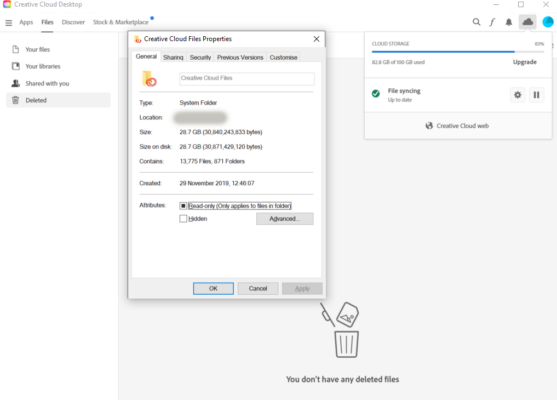
    More frustratingly, the Adobe Creative Cloud can only exist if it is installed on your local drive. There is no way, like with most other “Cloud” storage products to have it in the Cloud only. Which is a barrier for to take up more Adobe storage space, as I would not have the space locally. But worse, if you look at the screen shot below, Adobe cannot give me a location, or even an explanation for why my “Cloud Storage” is showing 82.8 GB used, where on the local drive it is only 28.7 GB. Let alone show me where all these hidden files are based?
    There is no single space to show where the more than 50 GB data is, and more worryingly, what all those files are.

    When I ask support, they either send me to a random Adobe page, or promise me that they will find out and tell me.

    And then there is, as you have found out, a total lack of transparency on charges for the optional extras such as Stock and Frame.io – not least as we, the early users helped pave the way for the Adobe to afford the purchases of those companies, but also to rub it in, Adobe has just recently spent $ 20 Billion on buying yet another company. Rather than fixing the broken items in the engine room.

    Sorry, that was my late night moan on a very late Saturday night.

    When it works, I really love working with Adobe Premiere Pro and After Effects – but I also have clients who are switching away, so I’ve had to buy my first Mac for FCPX work, and pick up Avid again – soon it will be resolve. (I don’t mind, as I am fluent in most non-linear editing “languages”).

    I’m not complaining about that, but merely making an observation that the Adobe support, UX, and R&D pipeline is in a mess – and when a company is complacent, not keeping direct promises to get answers on product issues*. And, behave like your firm are untouchable at the top, then there is only one way, and that is down…

    *Am I the only one who think it ridiculous that every-time my Adobe software crashes they ask for my email, but Adobe don’t have to courtesy to even send me an automated email to let me know that my fault report has been received?

    Atb
    Mads

    PS: If we don’t complain when it is bad, Adobe will never know what to fix, let alone be encouraged to fix what is not working, right? 🙂

  • Hey Tad,

    Some of the Adobe stock is free to use – but it is not clear whether Audio is included.
    However, rather than charge you for it, it should be “water marked” or similar, for you to unlock once you do the final master.

    Like you, I’ve not gone for the Adobe Stock option – either I use other libraries (MotionArray etc), or my client will supply cleared footage.

    Atb
    Mads

  • Hey Tom,

    Unless the Excel file has been formatted correctly, there is potentially a lot that can go wrong.

    I often get spreadsheets from my clients, with I/O points.
    My workflow is that I get the file that they want to work with. Pop it in a time-line and export that to MP4 with BITC for them to work from. That way I control the Time-Code.

    Then I start from the end of my time-line, by punching in the time-codes in PPro. And delete out what I don’t want – this is not going to take as long as you think that it will as soon as you get started on it + it also allows you to add that extra 10 frames when audio get cut short etc.

    Key point is “from the end” or you’ll lose position as soon as you do the first edit.

    Atb
    Mads

  • Hey Tom,

    EDL is the earliest version of a time-line, before the time-line even existed.

    You need to identify whether the timecodes are matching between excel sheet and media file?
    Then there is the accuracy of the media file name – if that doesn’t match, you’ll need to “force” a match on relinking the files to time-line.

    Fastest way around this might be to set up new project -> import edl -> link clips to media – copy linked time-line across into your master project.

    But first, you have to ensure that the timecodes are a match.
    The next fun thing, is whether your client have given you what they want to keep (In/Out points)?
    Or, as some do, only tell you what they want you to cut out…

    Atb
    Mads

Page 82 of 126

We use anonymous cookies to give you the best experience we can.
Our Privacy policy | GDPR Policy