Forum Replies Created

Page 1 of 38
  • John Bolton

    November 25, 2024 at 8:29 am in reply to: Silent Movie Captions

    You could record your commentary on the timeline and this program will change it to subtitles.


    joelsonforte.br
    wrote on 11/21/2024, 8:52 PM

    Auto Captions for Vegas is a tool that fully integrates Whisper (Open AI Artificial Intelligence) to transcribe audio and generate automatic captions in Vegas Pro. Auto Captions is capable of transcribing audio into captions in a wide variety of languages. Download the installer and test the audio transcription in the language of your choice.

    • Compatible with Vegas Pro 14 or higher
    • No internet required to function
    • No character limits on transcription
    • Automatic language recognition
    • Support for CPU and GPU (Nvidia CUDA)
    • Batch transcription support
    • Transcribe only timeline selection
    • Transcribe only region markers
    • Translate audio to english
    • Create Highlight active word
    • Create One Word per line
    • Import Captions to Timeline
    • Import Captions as Video to Timeline
    • Export Captions as SubRip (*.srt), Text files (*.txt) and DVD Architect Subtitles (*.sub)
    • Find and Replace Texts

    Here is a small demonstration of how Auto Captions works, where automatic captions are created from the audio of three videos. One video is in German, another in English, and another in Portuguese.

    Download the Trial Version: You can download Auto Captions to test via this link: Auto Captions for Vegas Trial Version

    The Trial Version is limited to 50 usage sessions. After using 50 sessions, the TRIAL version expires.

    The Full Version is lifetime. Has no limitations. Activated with a serial number sent via email after the payment of 40 dollars is confirmed through PayPal. Support and updates are completely free.

    Contact and Support: If you like Auto Captions and are interested in purchasing the Full Version, please email: joelsonforte.br@gmail.com

  • John Bolton

    March 6, 2024 at 9:09 am in reply to: Launch Screen Sadness

    You are not wrong,.. I also do the same, make sure Vegas is launched before allowing Clients to see it.. I think Magix calsl it diversity, but does not look professional.

  • John Bolton

    August 2, 2023 at 7:39 am in reply to: moving dash line box

    HI, like all things with editing and when you need something a bit out the normal then somewhere on planet earth there will be an expensive Plugin…

    Anyway, did not take long but lots of things can be done in Vegas. The more you try the more things you can do and I enjoy doing it.

    Green screen attached

    It was a fun challenge

    Regards

    John

  • John Bolton

    August 1, 2023 at 4:18 pm in reply to: moving dash line box

    Hi, yep, have moved the line to correct position from drifting. I don’t see any rounded edges on the original video you posted. Only spent a few minutes on it as busy with other projects but always like to challenge myself 🙂 Have corrected the timing. Once I worked out the Maths if become clearer….

  • John Bolton

    July 29, 2023 at 1:26 pm in reply to: moving dash line box

    Hi, had another play. Think it is getting close?

  • John Bolton

    July 28, 2023 at 2:56 pm in reply to: moving dash line box

    HI, yes as you say it s not far off.. but I just thought I would have play. Will investigate some more just to be curious

    Regards

  • John Bolton

    July 28, 2023 at 8:20 am in reply to: moving dash line box

    Hi, Just noticed this and I thought I would have a play in Vegas ,, Can be done but not quite as good but only spent 10 minutes putting it together so could easily be improved with different shapes, colour, etc .

    Regards

  • John Bolton

    November 14, 2022 at 8:34 am in reply to: Vegas Pro 20 Volume Envelope

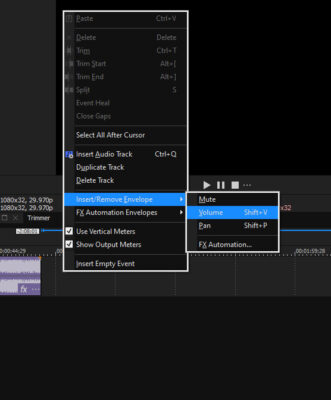
    Just tested mine and Shift V works fine. Also tried the Opposite mouse click just passed the end of the Audio track and selected it from there are also works fine.

    But have no idea why yours is not working, so something specific to your system. Have you tried the Reset to default?

  • Hi Steve, bit annoying. I am testing V20 but dare not install the AI as the version for V20 does not work on V19 or V18 and you can only have one version installed for all , So I will keep well away at the moment,,,,,

  • John Bolton

    July 4, 2022 at 2:48 pm in reply to: move audio tracks to the bottom of timeline

    Ungroup the Audio from the Video and then Grab the Header of the audio track and drag it down to where you want it

Page 1 of 38

We use anonymous cookies to give you the best experience we can.
Our Privacy policy | GDPR Policy