Joe Marler
 22
Apple Final Cut Pro X Coins
22
Apple Final Cut Pro X Coins
 39
COW Coins
39
COW Coins
Forum Replies Created
-

I edited a large documentary on a 2017 iMac 27 using a 4-drive RAID-0 Thunderbolt array, and did not have major performance issues. It included 8,500 UHD 4k clips in a single library, about 220 camera hours, about 130 multi-camera interviews. It never took more than about 20 seconds to open.
However I did not use many compound clips. I did notice if the # of projects or snapshots is above a vague soft threshold, you can observe the “opening project…” operation, followed by a delay. This threshold varies based on project complexity and # of projects.
Internally FCPX uses a SQLite database to store edits. Within the library bundle, each project is a separate database file in /EventName/ProjName/CurrentVersion.fcpevent. Within that file are several SQL tables.
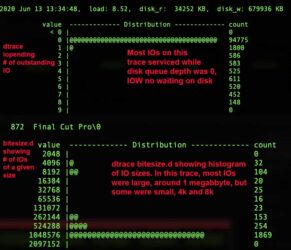
Study of FCPX I/O profile using Dtrace utilities indicates in some cases lots of small random IOs to the library database. For this reason having the library and cache on a separate SSD is a good idea. See attached capture from FCPX on Catalina. In this particular case it was doing mostly media IO which are large and sequential but other operations are dominated by small random IOs.
In theory a large # of projects need not slow things down. But according to the SQLite documentation, each open database consumes resources.
It appears FCPX may internally pre-open a certain # of projects, possibly to improve response time when one is clicked on. This is apparent because under some conditions it shifts to a deferred opening algorithm, where you suddenly see an “opening project…” status line, followed by a delay. This can happen when you *don’t* click on the project — it just does it.
I’m guessing they are trying to balance three things: (1) Cumulative overhead if all projects were internally pre-opened (2) Response time if they only opened projects on user action, and (3) A “no config” UI so it’s fully automatic as it shifts between modes.
In my experience if you make more than about 30 moderate-complexity snapshots or projects, it is more likely to slow down — mainly when opening a library or shortly afterward.
Your and Jeremy’s point about lots of compound clips aggravating this is interesting. I’ll have to examine that further whenever I have time.
-
Greg, the edits of each project are stored in a SQLite database within the library bundle in /EventName/ProjName/CurrentVersion.fcpevent. Unfortunately that cannot be meaningfully interpreted or modified, even with a SQL editor since the schema and data dictionary are not documented.
In general the data integrity of FCPX is excellent. Over the years I’ve probably had 100 FCPX crashes or abrupt shutdowns and almost never lost any edits. Only one time I had a scenario similar to what you describe – a multicam with many connected clips replaced with a “slug” clip. In that case it was a complex 1 hr timeline with thousands of edits and many clips having 8-10 effects. I just reverted to a project snapshot I made and added the missing edits by hand.
If you have already examined all the FCPX auto backups, that implies the project was damaged in the oldest of those. If you have a Time Machine or other file-level backup back to Sept 2019, that might allow recovery of it.
If you don’t have that you’ll have to recreate it from the MP4 version.
-
What is the version of FCPX and what is the codec of the clip it gets stuck on?
Transcoding takes a lot of additional space. If any of that space is on the problem drive, that could cause FCPX to hang or malfunction. Even if the library and FCPX cache are on the system drive, if media is on a problematic external drive that cause cause FCPX to hang.
By “errors” if you mean the system volume, that can only be checked & corrected by Disk Utility First Aid if the system is in recovery mode. Otherwise it is a read only test. To boot into recovery mode hold down CMD+R when powering on. Then select Disk Utility and run First Aid on the system drive. Although that should be safe, it’s best to have a backup, esp. if you suspect disk reliability problems.
Disk Utility only detects and tries to fix file system problems. It does not do a surface scan and cannot fix bad blocks.
You could try DiskWarrior but that does not work on APFS only HFS+.
-
If all the backups show the same thing, that implies something happened long ago, not recently. The library backups are closed “archive” files which are never reopened.
Going by memory, notes or anything else, do you remember seeing that fully-formed project on a date earlier than the oldest backup library? If no, maybe it just happened long ago and you didn’t notice it.
If yes, since the backups themselves cannot be damaged, that implies something is causing that problem as each backup is opened — hence my recommendation to first make a safeguard copy of all library backups.
You can examine the version of FCPX which created (or updated) the library or backups — assuming those have not been updated or opened by a newer FCPX version. To do this open the library package in Finder, then do a Quick Look (space bar) on the file CurrentVersion.plist. If the oldest untouched library auto-backup was on a previous version of FCPX, this will help verify that. It is conceivable (though not likely) if it were opened with that version it might work better.
If were a media issue you’d typically see a missing media warning. You could try exporting the project XML then loading that in another library. That causes translation of the SQLite project data to XML, then upon import it is validated and rebuilds the project database in the destination library. In a few cases it will filter out problems or at least throw a meaningful error. But in most cases it simply reconstructs whatever was in the source project.
I saw something like this happen one time, but not on any recent version of FCPX. It was a very complex project with many thousands of edits, cause was unknown and I never saw it again. I had several snapshot duplicates of the project so I just fell back to one of those.
If you have Time Machine or other file-based backups, you could pull a previous version of the library from there and inspect it. However it is likely the same as the current FCPX auto-backups.
Sorry about the problem. In general my experience with FCPX data integrity has been very good, provided both data and libraries are on locally-attached HFS+ or APFS volumes.
-
It appears something happened to the project database. If you open the multicam, select and angle and do SHIFT+F, does it find the correct parent clip in the browser? If so it is already linked so re-linking may not fix it.
The first step is safeguard your current library and all auto backups in /Movies/Final Cut Backups. That way any troubleshooting steps won’t jeopardize those.
If you haven’t already rebooted the entire machine, try that. You can also try resetting FCPX preferences (item 11 on this page): https://support.apple.com/en-us/HT203477
If that doesn’t fix it and if you’ve backed up everything as described above, you could try the undocumented commend OPT+Clip>Verify and Repair Project.
If that doesn’t work, the next step is open each auto backup of that library. I prefer doing that from Finder, first inspecting how many exist and the dates of each one. Double-click on it to launch in FCPX. Start with the newest one first, then examine that project. If still messed up, go through each backup library in reverse chronological order, inspecting that project on each one.
Once you find an undamaged project, rename the project, export the project XML for that and load that XML in your regular library. Examine it to ensure it’s undamaged and has all the expected edits and clips.
-
10.4.6 is before the Metal optimization work that began in later versions. 10.4.10 will be significantly faster on certain tasks, especially encoding and effects. Before upgrading, ideally make sure all libraries are backed up, and in Finder make a duplicate copy of the Final Cut Pro.app file in /Applications. That will allow easy rollback to the prior version if you encounter problems. Make sure all plugins (esp. CoreMelt) are upgraded beforehand. You can stay on Mojave if you want.
Make sure Chrome is not only closed but totally not running — not in memory at all. Verify with Activity Monitor. It is safer to just not run it, since it mis-uses the MacOS VideoToolBox framework and can unpredictably cause slowdowns, hangs and crashes.
A 30-second beach ball or spinning wait disc isn’t like a slow progress bar. Rather it indicates the main application thread is stuck in a code path and has stopped responding to events. It implies something is wrong such as a system-layer issue or a buggy plugin which deranges the FCPX process.
Make sure you have plenty of disk space, and try disabling background rendering, then delete all current render files via File>Delete Generated Library Files>Delete Render Files>All. Thereafter render the timeline manually as needed by doing CMD+A to select all clips and CTRL+R to render.
-
Joe Marler
October 7, 2020 at 11:05 am in reply to: How to slip sync and cut audio of a ‘sync’ clip without cutting the pictureYou can slip audio independent of video without detaching it. See MacBreak Studio #345: https://youtu.be/v1nhaFYckyo
Some contents or functionalities here are not available due to your cookie preferences!This happens because the functionality/content marked as “Google Youtube” uses cookies that you choosed to keep disabled. In order to view this content or use this functionality, please enable cookies: click here to open your cookie preferences.
-
I have Resolve Studio and it doesn’t seem to handle pulldown removal for already imported material. The manual says it can do it during capture from tape. There are several on line posts saying it won’t remove Panasonic’s advanced pulldown.
The Reverse Telecine filter of Compressor sort of handles it, IOW converts 29.97i to 23.98p with pulldown removal, but there’s something wrong with it. After about 50 frames there is some ghosting, maybe from incorrect pulldown removal or a deinterlacing error. It’s either a bug or maybe it’s not designed to handle Panasonic’s flavor of pulldown.
Premiere seems to handle it OK.
The HVX200 was a nice camera — introduced in 2005. Years ago I shot a lot of material on the DVX100p, which also could shoot 24p using advanced pulldown. However we never used that mode but 29.97i DV, for commonality with other cameras of that era.
Playing the original HVX200 file using VLC and with playback deinterlacing disabled, it visually appears four frames are progressive and the fifth frame is an interlaced blend.
Handbrake has a “detelecine” option and if I use the original clip, select 23.98 progressive output and disable deinterlacing, it seems to sort of work. But from a quality standpoint the output of Premiere seems to look better. Handbrake has a custom detelecine option but I don’t know how that works.
The HVX200 24 fps with advanced pulldown really should work in FCPX and apparently used to work in the legacy versions of FCP and Compressor back around 2010. However it doesn’t work in FCPX or Resolve. My old captured DVX100 AVI files are not supported any longer in FCPX either — if ever needed I’ll just transcode them using Handbrake or use Resolve.
-
What are your project characteristics? Is the project (aka timeline) itself 23.98 or 29.97? Is it interlaced or progressive? Does the timeline also contain other clips from different cameras with different parameters? If so what are those?
Obviously we want the HVX200 material to work OK, but we must also verify the timeline parameters and that of the other clips.
-
Phil, re Reverse Telecine being greyed out if using PR422, I’ll examine that tomorrow. If you select RT first then change the codec, it accepts it but the exported file shows a cadence problem.