Creative Communities of the World Forums

The peer to peer support community for media production professionals.

Activity Forums Apple Final Cut Pro Compound clips and library opening slowly

  • Compound clips and library opening slowly

    Posted by Mauricio Lleras on October 11, 2020 at 11:30 pm

    Hi all,

    I’ve been curious about something for a while so thought maybe someone here has run into the same issues. Sorry in advance for the long message, I do have to explain the setup…

    So I cut a feature drama film a while ago on X, and although everything worked out pretty decently in general, there was one very annoying thing that kept happening all along: that is, the library could take ages to open fully (anywhere from 5 to 20 minutes!), as it seemed to have to scan (“load”) every single “project” (timeline) present on the library. As it was a feature, there were quite a few projects present, as I like to use projects and timelines to incrementally backup the work and have a good view of all the steps in the editing process. Once the library was fully loaded, the program ran generally fine. But, every now and then, clicking on a clip or trying to open an older timeline would launch the “loading” process of projects all over again, and so would make you wait a couple of minutes before being able to continue working…Minor hitch but annoying still.

    I think I know the culprit (compound clips) but wanted your opinions and stories on this.

    So, here was the setup.

    But before, let me just say I came in a bit late on the film, so post had already begun and a general workflow decided and implemented without my being able to chip in.

    Everything was shot in 4k using Red cameras, with double system sound recorded on polywave files. Original material was ingested into Resolve, where it received Luts, got transcoded into HD proxies and then put in sync with sound, and layed on timelines by shooting day. In order to preserve audio metadata from the poly files (which Resolve tends to mess with) no synched proxies were created; rather, XML’s were then exported out of these timelines and imported into FCPX, where they appeared as timelines with separate but synched video and audio files, what would be a sync map. (I know, they should’ve used instead Sync and Link to do the sync and use fcpx to create proxies afterwards, but well…)

    Now, because FCPX does not offer the option to create proper “sync” clips from clips layed on a timeline (you can only do this from the browser), the simplest way for the assistants was to create compound clips of the synched material, and here I think is where trouble began.

    I had to cut the whole film using only those compound clips. Probably (but this is just a theory and the one that I would like to confirm or invalidate here) the problems I described stem from the fact that once you start having long timelines and moreover multiple timelines (V0,V01,V02……), every instance of the clip, because it is a compound, is permanently referenced and “tied” to all the timelines in which it is contained, hence creating the necessity for the software to scan (“load”) every single project present in the library in order to be able to load the one you are actually working on. What was annoying is that sometimes this seemingly endless loading of projects would happen in the middle of the edit session, and moreover that sometimes it would scan projects that hadn’t been open for weeks…

    Anyway, that’s pretty much it. It would probably would not have been such a pain (if a problem at all) on shorter projects with less iterations of the timelines. I don’t know if there are many of you around here cutting drama features or not, and probably very few having used such a workflow, so maybe almost nobody has run across into such behaviour from the software, but I would love to hear your thoughts on this anyway, and if you have come across this, would love to know the specifics and if they are similar or not to what I described.

    Thanks for your patience!

    Joe Marler replied 5 years, 6 months ago 4 Members · 9 Replies
  • 9 Replies
  • Jeremy Garchow

    October 12, 2020 at 12:09 am

    Yes, compounds, used in such a way, can slow some things down. Much better to use Sync N Link as you mentioned, and work from those clips.

    What kind of storage are you working from?

  • Terry Barnum

    October 12, 2020 at 9:28 pm

    I received a library from a producer that took nearly 20 minutes to open. I thought for sure it was corrupt until it finally opened and I saw all the compounds. Other projects of similar length (~2 hrs) would open in 1-2 minutes.

    Did you consider using Project Snapshots for the backup versions?

  • Mauricio Lleras

    October 13, 2020 at 12:09 am

    So it does seem to confirm compounds were the problem. I did use snapshots but even so the problem persisted.

  • Mauricio Lleras

    October 13, 2020 at 12:12 am

    Not working on it any longer, finished a while ago, but we had nothing fancy, regular HDD at 7200rpm through USB 3, was enough for HD material and sound, and generally worked fine, except for the aforementioned issue. Probably SSDs and thunderbolt would’ve helped a little but the issue did seem to come more from the way X was handling the projects.

  • Mauricio Lleras

    October 13, 2020 at 12:15 am

    But to be honest I started using snapshots only after I started noticing the problem getting worse. Maybe if I had done it from the get go it could have made things better…

  • Joe Marler

    October 15, 2020 at 12:41 pm

    I edited a large documentary on a 2017 iMac 27 using a 4-drive RAID-0 Thunderbolt array, and did not have major performance issues. It included 8,500 UHD 4k clips in a single library, about 220 camera hours, about 130 multi-camera interviews. It never took more than about 20 seconds to open.

    However I did not use many compound clips. I did notice if the # of projects or snapshots is above a vague soft threshold, you can observe the “opening project…” operation, followed by a delay. This threshold varies based on project complexity and # of projects.

    Internally FCPX uses a SQLite database to store edits. Within the library bundle, each project is a separate database file in /EventName/ProjName/CurrentVersion.fcpevent. Within that file are several SQL tables.

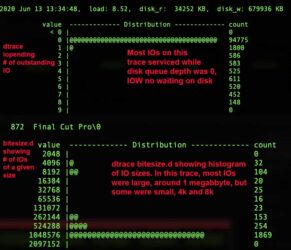
    Study of FCPX I/O profile using Dtrace utilities indicates in some cases lots of small random IOs to the library database. For this reason having the library and cache on a separate SSD is a good idea. See attached capture from FCPX on Catalina. In this particular case it was doing mostly media IO which are large and sequential but other operations are dominated by small random IOs.

    In theory a large # of projects need not slow things down. But according to the SQLite documentation, each open database consumes resources.

    It appears FCPX may internally pre-open a certain # of projects, possibly to improve response time when one is clicked on. This is apparent because under some conditions it shifts to a deferred opening algorithm, where you suddenly see an “opening project…” status line, followed by a delay. This can happen when you *don’t* click on the project — it just does it.

    I’m guessing they are trying to balance three things: (1) Cumulative overhead if all projects were internally pre-opened (2) Response time if they only opened projects on user action, and (3) A “no config” UI so it’s fully automatic as it shifts between modes.

    In my experience if you make more than about 30 moderate-complexity snapshots or projects, it is more likely to slow down — mainly when opening a library or shortly afterward.

    Your and Jeremy’s point about lots of compound clips aggravating this is interesting. I’ll have to examine that further whenever I have time.

  • Joe Marler

    October 15, 2020 at 1:15 pm

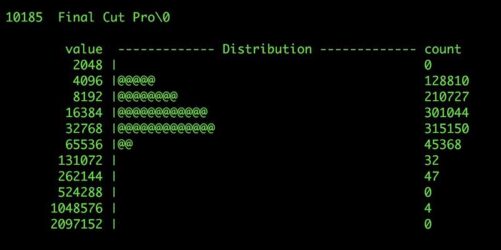
    Here is another Dtrace capture showing FCPX doing many small IOs. I don’t remember what task. When the “Opening project” slowdown happens, it might be doing something like this.

    This kind of IO profile can be inefficient on any mechanical drive, esp. a RAID due to the large stripe size. MacOS has a “unified buffer cache” which attempts to cache IO requests, and the library database is not large. In theory this would be cached, reducing physical IO even for the difficult “small random” case.

    However with databases there is a heightened need for data integrity, so it’s common for databases to bypass OS-level cache systems to ensure transactions are committed to persistent disk storage. Another possibility is since each project is a separate database file, if opening many of those the aggregate IO profile could fall out of the buffer cache’s “locality of reference”, thus becoming physical and constrained by the disk characteristics.

    The “slow open” behavior is difficult to reproduce and requires a specific data set and library config. If I had time I could try and reproduce it and gather more data, but an easy practical step is try putting the library and cache on a separate fast SSD.

  • Mauricio Lleras

    October 16, 2020 at 10:10 am

    Very interesting stuff Joe, thanks. I did keep the cache on a separate disk most of the time, but the library remained on the same drive as the media. Will keep that in mind for future projects if the problem should arise again. Still, seems like compound clips used in a massive way seem to be the main problem. I had already had that problem in another project which was similarly setup (again, prior to my joining the project)…I know it’s a pretty specific setup we had, but seems like a shame FCPX doesn’t provide the ability to create sync clips from the timeline. Well, I guess you can’t have everything…

  • Joe Marler

    October 16, 2020 at 1:41 pm

    Mauricio, I don’t know the current performance situation with large-scale use of compound clips. Years ago on early versions of FCPX it was reported poor. Maybe others with more recent experience could comment.

    My guess is your performance issue was the convergence of three items (1) How FCPX handles large numbers of projects or snapshots (2) Very large numbers of compound clips (3) Library on same mechanical drive as media.

    There can be some performance issues for #1, but usually it’s not a major problem for moderate numbers of projects. However IMO it needs some optimization.

    Given you were handed the situation you could not change #1 or #2, although maybe some of the backup projects could have been moved to a separate event, while still referencing the existing media. I can’t remember if that helps the performance issue, maybe someone could comment on that. The projects themselves are simply small SQLite databases and users sometimes group projects in a dedicated event for organization.

    Re #3, the primary FCPX IO streams are for media (or proxies), cache and library. The cache includes render files, thumbnails, waveforms and optical flow files. By default the cache is inside the library but best practice is to define a specific folder using the Library Inspector’s Storage Locations>Modify Settings>Cache. This allows placing it on a separate SSD, plus enables easy deleting of the cache in case it gets too big. All items will be automatically regenerated as needed.

    Media or proxy IO is characterized by large sequential reads. That is easy for a mechanical drive or RAID. However IO to the library is characterized by small random IOs. That is difficult for a mechanical drive or RAID, plus it conflicts with and disrupts the sequential IO for media/proxies. If at all possible put a “lean library” (meaning no media or cache) on a separate SSD.

    It’s unknown to what degree that would have helped your situation but my gut feel is it might have improved it significantly.

    All SSDs are not alike and some (esp QLC or Samsung’s QVO) can suffer major performance degradation if handling many intense writes. That is because the underlying technology has slow sustained write performance and is propped up by TLC cache.

    For editing a feature I’d consider putting the library and cache on something like 4 x 1TB Samsung 970 Pros in an OWC Thunderbolt 3 chassis in a RAID-0 config. An alternate would be 4 x 2TB Samsung 970 EVOs, which have lower sustained sequential write performance but a RAID-0 config might paper over that.

    https://www.amazon.com/dp/B07BYHGNB5/

    https://eshop.macsales.com/item/OWC/TB3EX4M2SL/

    For other info about Avid editors transitioning to FCPX, see:

    https://www.youtube.com/channel/UCZEWB-9BQ2DW-gwBlJJaWNg

We use anonymous cookies to give you the best experience we can.
Our Privacy policy | GDPR Policy