Creative Communities of the World Forums

The peer to peer support community for media production professionals.

Activity Forums Apple Final Cut Pro Transcoding never finishes

  • Transcoding never finishes

    Posted by Eric Zirk on October 13, 2020 at 4:36 pm

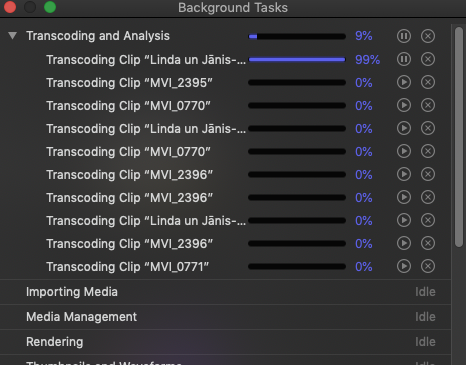
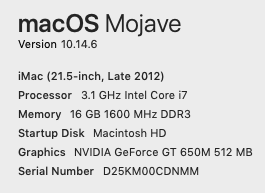
    The “transcoding and analysis” never finishes. I go ahead and export the video anyhow and it seems to be ok. This has been going on for the past few months. What are your thoughts? P.S. I can’t update the OS because the drive has some “errors”. I don’t know if that would have any bearing on this. I use a G-drive for all my video, but FCPx runs on the internal hard drive.

    Joe Marler replied 5 years, 9 months ago 3 Members · 2 Replies
  • 2 Replies
  • Terry Barnum

    October 14, 2020 at 4:47 am

    Do you need to transcode? Usually one only transcodes if FCPX is having a hard time playing the media format or the hard drive can’t keep up, like trying to play a 4K multicam, etc.

    Your drive having “errors” is worrisome and might be related to bad FCPX behavior. You haven’t installed any “disk cleaners” like Clean My Mac have you? It’s been known to cause terrible problems with FCPX.

  • Joe Marler

    October 14, 2020 at 11:00 am

    What is the version of FCPX and what is the codec of the clip it gets stuck on?

    Transcoding takes a lot of additional space. If any of that space is on the problem drive, that could cause FCPX to hang or malfunction. Even if the library and FCPX cache are on the system drive, if media is on a problematic external drive that cause cause FCPX to hang.

    By “errors” if you mean the system volume, that can only be checked & corrected by Disk Utility First Aid if the system is in recovery mode. Otherwise it is a read only test. To boot into recovery mode hold down CMD+R when powering on. Then select Disk Utility and run First Aid on the system drive. Although that should be safe, it’s best to have a backup, esp. if you suspect disk reliability problems.

    Disk Utility only detects and tries to fix file system problems. It does not do a surface scan and cannot fix bad blocks.

    You could try DiskWarrior but that does not work on APFS only HFS+.

We use anonymous cookies to give you the best experience we can.
Our Privacy policy | GDPR Policy