

Activity › Forums › Apple Final Cut Pro › Missing Video from Multicam Project
-
Missing Video from Multicam Project
Posted by Greg Ball on October 13, 2020 at 6:29 amHi All,
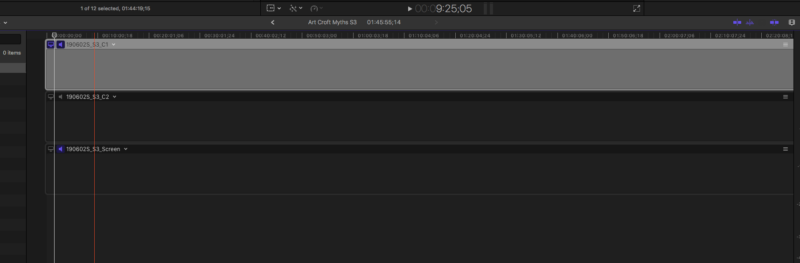
I have 21 2 camera multi-cam video edits that I’ve done over the past 6 months for 1 client. Today I wanted to output one of the projects, but there was no video associated with it all of the sudden!! The timeline was empty and and even my mult-iclip in the browser was also empty.
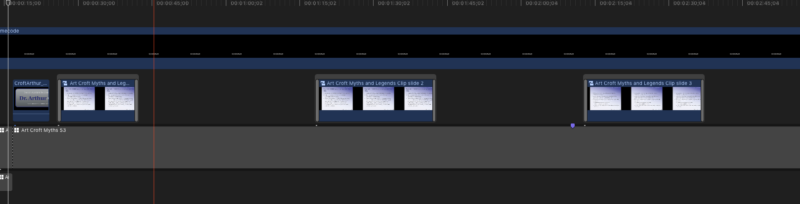
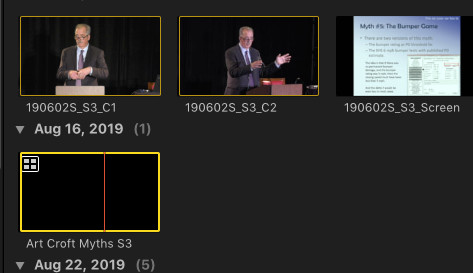
When I look at my hard drive the footage is there from both cameras, but I can’t seem to reconnect the footage. Any thoughts? I’ve attached a photo here. I’ve edited 20 other projects, and they are all there!! So there’s nothing wrong with how I imported the footage. You can see the multiclip in the browser is empty too. Thanks so much
 Joe Marler replied 5 years, 11 months ago 3 Members · 7 Replies
 -
7 Replies
-

Joe Marler
October 13, 2020 at 2:36 pmIt appears something happened to the project database. If you open the multicam, select and angle and do SHIFT+F, does it find the correct parent clip in the browser? If so it is already linked so re-linking may not fix it.
The first step is safeguard your current library and all auto backups in /Movies/Final Cut Backups. That way any troubleshooting steps won’t jeopardize those.
If you haven’t already rebooted the entire machine, try that. You can also try resetting FCPX preferences (item 11 on this page): https://support.apple.com/en-us/HT203477
If that doesn’t fix it and if you’ve backed up everything as described above, you could try the undocumented commend OPT+Clip>Verify and Repair Project.
If that doesn’t work, the next step is open each auto backup of that library. I prefer doing that from Finder, first inspecting how many exist and the dates of each one. Double-click on it to launch in FCPX. Start with the newest one first, then examine that project. If still messed up, go through each backup library in reverse chronological order, inspecting that project on each one.
Once you find an undamaged project, rename the project, export the project XML for that and load that XML in your regular library. Examine it to ensure it’s undamaged and has all the expected edits and clips.
-
Greg Ball
October 13, 2020 at 4:46 pmHi Joe,
Thanks so much. Unfortunately that project’s files in the back-ups are also blank. Am I screwed? It’s a 90 minute video with hundreds of edits.
-
Joe Marler
October 14, 2020 at 10:49 amIf all the backups show the same thing, that implies something happened long ago, not recently. The library backups are closed “archive” files which are never reopened.
Going by memory, notes or anything else, do you remember seeing that fully-formed project on a date earlier than the oldest backup library? If no, maybe it just happened long ago and you didn’t notice it.
If yes, since the backups themselves cannot be damaged, that implies something is causing that problem as each backup is opened — hence my recommendation to first make a safeguard copy of all library backups.
You can examine the version of FCPX which created (or updated) the library or backups — assuming those have not been updated or opened by a newer FCPX version. To do this open the library package in Finder, then do a Quick Look (space bar) on the file CurrentVersion.plist. If the oldest untouched library auto-backup was on a previous version of FCPX, this will help verify that. It is conceivable (though not likely) if it were opened with that version it might work better.
If were a media issue you’d typically see a missing media warning. You could try exporting the project XML then loading that in another library. That causes translation of the SQLite project data to XML, then upon import it is validated and rebuilds the project database in the destination library. In a few cases it will filter out problems or at least throw a meaningful error. But in most cases it simply reconstructs whatever was in the source project.
I saw something like this happen one time, but not on any recent version of FCPX. It was a very complex project with many thousands of edits, cause was unknown and I never saw it again. I had several snapshot duplicates of the project so I just fell back to one of those.
If you have Time Machine or other file-based backups, you could pull a previous version of the library from there and inspect it. However it is likely the same as the current FCPX auto-backups.
Sorry about the problem. In general my experience with FCPX data integrity has been very good, provided both data and libraries are on locally-attached HFS+ or APFS volumes.
-
Greg Ball
October 14, 2020 at 6:53 pmI have a full MP4 version of the video that was saved on September 24, 2019. Unfortunately it has timecode burned in They need a ProRes 422 videoYes this has been a long drawn out project. So I guess I’m screwed?
-
Greg Ball
October 14, 2020 at 6:54 pmHi Terry,
I don’t use roles for a project like this. Nothing was disabled
-
Joe Marler
October 14, 2020 at 9:11 pmGreg, the edits of each project are stored in a SQLite database within the library bundle in /EventName/ProjName/CurrentVersion.fcpevent. Unfortunately that cannot be meaningfully interpreted or modified, even with a SQL editor since the schema and data dictionary are not documented.
In general the data integrity of FCPX is excellent. Over the years I’ve probably had 100 FCPX crashes or abrupt shutdowns and almost never lost any edits. Only one time I had a scenario similar to what you describe – a multicam with many connected clips replaced with a “slug” clip. In that case it was a complex 1 hr timeline with thousands of edits and many clips having 8-10 effects. I just reverted to a project snapshot I made and added the missing edits by hand.
If you have already examined all the FCPX auto backups, that implies the project was damaged in the oldest of those. If you have a Time Machine or other file-level backup back to Sept 2019, that might allow recovery of it.
If you don’t have that you’ll have to recreate it from the MP4 version.

Reply to this Discussion! Login or Sign Up