Forum Replies Created

Page 1 of 26
  • Jiri Fiala

    September 17, 2025 at 3:19 pm in reply to: Rountripping with Resolve – audio issue

    yeah, it’s a compound clip created by Resolve on import of the XML. It works there but not not when exporting back to FCPX.

    You’re right. I’ll assemble the rough cut in Resolve using the transcript and then reassemble it in FCPX. Shouldn’t take more than a couple of hours.

    Thanks!

  • Jiri Fiala

    September 17, 2025 at 6:21 am in reply to: FCPX roundtripping – audio issue

    Hi, thanks for your answer! The idea of using Resolve for text editing came AFTER I had already made some organization inside FCPX, hence the cumbersome attempts for roundtripping.

    I’m using the builtin XML imports and exports – Resolve 20 can natively import and FCPXMLD files. The issue starts upon importing – Resolve for some reason doesn’t show the synced audiofile inside the multicams as an audiofile, it creates a nested clip for some reason. And this nested clips doesn’t translate back into FCP.

  • Jiri Fiala

    March 11, 2024 at 11:08 am in reply to: Proxy Issues

    Hi Mads, thanks.

    I have used BMD Proxy Generator to do this in the past with FCPX without any issue. It just doesn’t work now with 10.7.1.

    I like that it retains the original folder structure, which FCPX does not do. On the off chance some files have the same filename, this doesn’t lead to FCPX confused or appending numbers to the clips.

    The originals are 16TB which I can’t take with me home or on the go.

    FCPX does see the proxies as proxies, SORT OF. As I said, it does link them as proxies and does reveal the correct proxy files when i do “Reveal Proxy File in Finder”.

  • Jiri Fiala

    June 4, 2022 at 8:59 am in reply to: Conforming .fcpxml timeline export from Descript

    As of June 2022, TC is still not supported in Descript, making it kind of useless for documentary editing.

  • Jiri Fiala

    February 26, 2022 at 4:42 pm in reply to: Reality editing tips please?

    …which is exactly what I’m doing 🙂 with markers galore. thank you!

  • Jiri Fiala

    January 28, 2022 at 8:15 am in reply to: Blank Record window when stopped on clips with effects

    That was exactly it! I haven’t used AMC for a while, I thought this was some sort of background rendering… Not very intuitive wording from Avid. Thank you!

  • Jiri Fiala

    November 3, 2020 at 3:15 pm in reply to: How do I set a default preset in AME?

    The thing is, when exporting from Character Animator, it always defaults to Cineform. Oh well… you’d think with stuff like deep neural learning and whatnot, surely you can set a default preset. I’ll just pester support and feature request forms some more. Thanks!

  • Jiri Fiala

    November 3, 2020 at 9:43 am in reply to: How do I set a default preset in AME?

    Thanks but that doesn’t answer my question. I want to set a default preset for any future encodings. Right now it defaults to a preset I don’t want, ever, and I have to manually change it every single time.

  • Jiri Fiala

    October 27, 2020 at 8:55 am in reply to: X2Pro exports almost always faulty

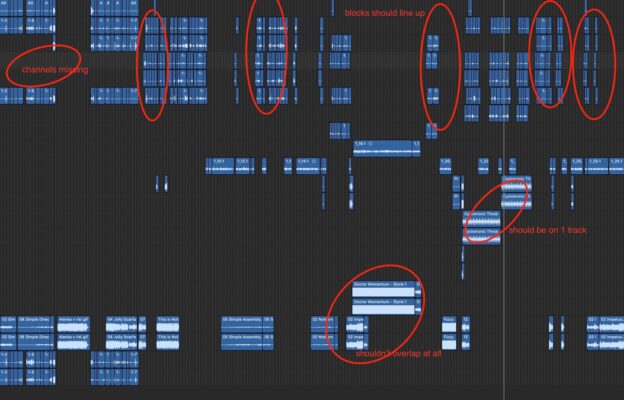
    I don’t have Protools and I want to check before sending to the sound mixer. I had ProTools guy complain about this before so this is not a Logic issue. There’s also an entire role missing in the X2Pro UI (Port 3), so there are issues even before the conversion. I see similar issues on their support forum, it’s not my user error. I’m just checking in whether you guys have any experience with this…

  • Jiri Fiala

    October 26, 2020 at 7:32 pm in reply to: X2Pro exports almost always faulty

    This is a more typical example of my woes.

Page 1 of 26

We use anonymous cookies to give you the best experience we can.
Our Privacy policy | GDPR Policy