Forum Replies Created

Page 2 of 26
  • Jiri Fiala

    October 26, 2020 at 6:40 pm in reply to: FCPX Post Audio Work Flow – AAF File?

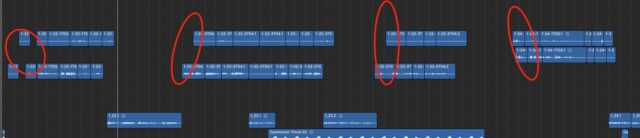
    I have never NOT had issues with X2Pro. I do mostly multicam edits (kids’ TV shows) and without fail, clips come out of X2Pro desynced, all over the place, some are missing (NOT disabled in FCPX)… The screenshot is pretty typical. Unless I manually flatten the multicams, I get faulty AAFs, but that’s no way to live…

  • Jiri Fiala

    June 20, 2020 at 6:46 am in reply to: Consolidation duplicates files

    Thank you! I wanted to retain as much easy re-connectability from the original tree folders (stored in the broadcast facility) as possible, so I just imported directly, but I’ll probably rewrap with EditReady. Still, duplication when consolidating seems like a bug, especially with FCPX which is extremely sensitive to proper media (with its UUIDs, requirements for exactly same audio/video channel configuration…).

  • Jiri Fiala

    January 2, 2019 at 12:56 pm in reply to: That pesky warning triangle …. is there a log file ?

    Apple really needs to step up their game in media management. It’s just not robust and reliable enough. I love that you almost never lose work as the background saving and backups are bulletproof but there are many bugs and limitations in media management.

  • Hi Joe!

    It’s a USB 3-connected HFS+ drive with externally managed media (consolidated into the “Final Cut Optimized/Original/Proxy folders but not as part of the library). The Libraries themselves are on APFS drive, either internal or external. Library A was created with FCPX 10.4.3 and updated to 10.4.4 as it came out, running on MacOS 10.14.2, 2015 rMBP and 2015 Retina iMac. Drives are fine. I did not notice that it would manifest after a crash. There’s all kinds of footage but only XAVC 50p and iPhone clips ever had this issue.

    I did not manually modify links in the Library. I did want to, as I had an additional issue with this Lib before (several clips from Sony FS7 (XAVC Long GOP) were reported as Missing File and there was NO way of reconnecting or re-adding. Re-linking went fine but clips were still Missing afterwards, deleting from Browser and dragging back into it from Finder did literally nothing, re-importing from resulted in Missing files also). But no, I didn ‘t modify the Library manually in any way.

    The black clips are created exclusively when creating a new library and dragging existing clips/projects into it. It doesn’t happen with all Libraries and/or Projects. I had this happen before, usually with Synced clips (with those, usually audio plays but video is completely black and there’s nothing that can be done about it other than manually opening the clip in timeline and dragging the video clip into it from browser).

    When I re-tried creating the new Lib and dragging to it from old Lib, it was always the same clips that had the issue. There is no craziness in file/clip names, nothing that would differentiate them from the clips that passed without issues.

    I can’t check your other suggestions as I don’t have the media drive with me. Thanks!

  • Thing is, it’s not really cross-library editing. I was merely copying a project to a new library. I didn’t edit media from library A to library B. It’s a nasty bug.

  • Hi! Thanks.

    They don’t play in the FCPX viewer, or they play but thumbnails are black? If you right click a black clip and pick “Reveal in Finder” does that point to the media location you expect?
    // no playback. Reveal shows correct clips which plays in quickview, other NLEs and/or other FCPX libraries, but not this one

    If you select each library in the left sidebar, then look at Inspector, is the media volume and folder what you expect? Are by chance both libraries sharing the same cache folder? // it’s a new library with cache inside. Volume and folder are correct

    Is the playback anomaly only when using proxies or when using original media? //original. Plus, the black clips never correct themselves, so it’s not only a playback issue.

    Have you installed Pro Video Formats 2.0.7? In Mojave that is in System Preferences>Software Update, for earlier macOS versions you get it here: https://support.apple.com/kb/DL1947?locale=en_US // yes, I have that installed. If I hadn’t, I guess the other clips from the same batch wouldn’t play as well.

    It seems completely random AND the issue is not present when doing the same thing (i.e. importing a sequence to a new library for handing out to other editor) via FCPXML instead of directly dragging it inside FCPX.

  • Jiri Fiala

    December 2, 2018 at 10:29 am in reply to: Unknown closed caption format

    I don’t at the moment, but I’ve added Subbits to my Tools list and I’ll probably buy it down the line. Thanks again!

  • Jiri Fiala

    December 2, 2018 at 9:08 am in reply to: Unknown closed caption format

    Oh my gosh, how did you convert it? Thank you so much!

  • Jiri Fiala

    December 1, 2018 at 9:57 am in reply to: Unknown closed caption format

    What I need is to convert it to .srt in order to bring it into NLE to hardcode into the video (I really don’t want to do copy/paste and time it manually in the NLE). For that, I need to know what the source format is. It’s apparently some kind of CC format used by a broadcaster (it’s SIMILAR to SRT but different) but what I got only has a .txt extension.

    Here’s the file.
    https://www.dropbox.com/s/ut42k4w41s2a9nb/venkov%208_18%20ENG.txt?dl=0

    Thanks for your help.

  • Jiri Fiala

    December 1, 2018 at 9:15 am in reply to: Unknown closed caption format

    Only as plain text. I give up and will probably copy/paste in NLE by hand. Thanks for the tip though, that looks like a superb subtitler.

Page 2 of 26

We use anonymous cookies to give you the best experience we can.
Our Privacy policy | GDPR Policy