Creative Communities of the World Forums

The peer to peer support community for media production professionals.

Activity Forums Apple Final Cut Pro X2Pro exports almost always faulty

  • X2Pro exports almost always faulty

    Posted by Jiri Fiala on October 26, 2020 at 6:44 pm

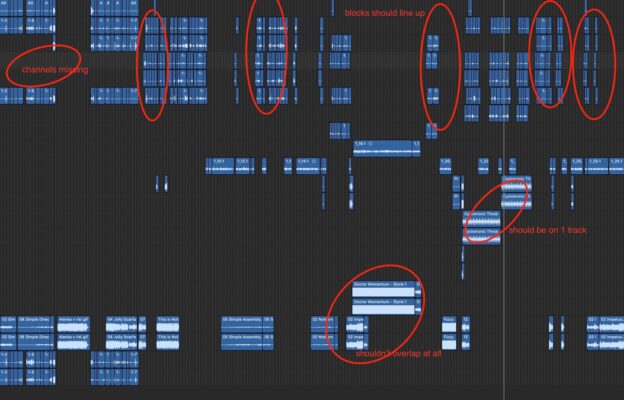
    I edit mostly multicam, dual audio stuff (kids’ show at the moment). AAFs exported from X2Pro are always all kinds of faulty, with clips’ channels all over the place, seemingy randomly desynced, clips starting at wrong TC etc. It’s completely unusable. This is going on for a while now. Unless I completely flatten all the synced clips and multicams (which is famously difficult in FCPX), I get faulty AAFs. Official support is not helpful. Any tips? Thanks! I can post XMLs and AAFs.

    Jeremy Garchow replied 5 years, 6 months ago 2 Members · 4 Replies
  • 4 Replies
  • Jiri Fiala

    October 26, 2020 at 7:32 pm

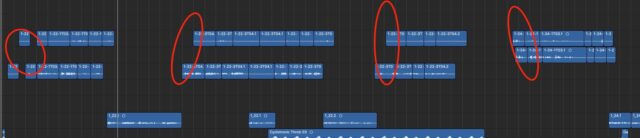
    This is a more typical example of my woes.

  • Jeremy Garchow

    October 27, 2020 at 3:36 am

    Are you sending this to Logic and not ProTools?

  • Jiri Fiala

    October 27, 2020 at 8:55 am

    I don’t have Protools and I want to check before sending to the sound mixer. I had ProTools guy complain about this before so this is not a Logic issue. There’s also an entire role missing in the X2Pro UI (Port 3), so there are issues even before the conversion. I see similar issues on their support forum, it’s not my user error. I’m just checking in whether you guys have any experience with this…

  • Jeremy Garchow

    October 27, 2020 at 1:20 pm

    But the import in to protocols does look different than the import to logic. I would have to see the timeline in fcpx with all the audio components expanded to compare.

    If you export an fcpxml and import that in to logic, what do you see?

We use anonymous cookies to give you the best experience we can.
Our Privacy policy | GDPR Policy