Forum Replies Created

Page 23 of 2910
  • Jeremy Garchow

    September 24, 2020 at 6:39 pm in reply to: FCPX Update

    Here’s the link: https://support.apple.com/en-us/HT201237

    There’s also a Pro Video Format Update to go along with it (which probably fixes the codec issues).

  • Jeremy Garchow

    September 24, 2020 at 6:38 pm in reply to: FCPX Update

    – Fixes an issue in which XAVC media from the Sony PXW-FX9 camera is not recognized

    Woot!

  • Jeremy Garchow

    September 24, 2020 at 3:07 pm in reply to: Proxies and Sharing

    Proxy preferred means you can mix proxy media when it’s available, and full res media, when proxy media is not available. Before, it was one or the other.

    The warning you are getting with the 3x share appears to be a bug.

  • Jeremy Garchow

    September 22, 2020 at 2:30 am in reply to: Dissolves causing jump in video

    Yes. FCP7 does not like mp4.

    Also, what’s the frame rate of your timeline and incoming clips? FCP7 wasn’t very good at mixing frame rates, either.

  • Jeremy Garchow

    September 19, 2020 at 2:35 pm in reply to: QuickTime Pro Replacement

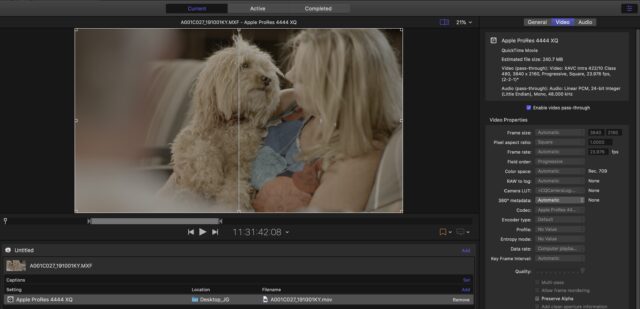
    Here’s a picture. You can see that I added a Pr444XQ preset, but once everything is set to passthrough and added in and out points on the clip, I am getting the same codec as the incoming clip (in this case XAVC, Class 480).

  • Jeremy Garchow

    September 19, 2020 at 2:28 pm in reply to: QuickTime Pro Replacement

    Hmm. I don’t have to do that here. Have you added a preset to the video? Any preset will do.

  • Jeremy Garchow

    September 19, 2020 at 2:15 pm in reply to: QuickTime Pro Replacement

    No problem! Make sure you do the same for audio too. 🙂

  • Jeremy Garchow

    September 19, 2020 at 2:06 pm in reply to: QuickTime Pro Replacement

    Do you know if it’s now possible to export clips without re-encoding with Adobe’s Media Encoder or Apple’s Compressor and keep timecode?

    Yes. Load the clip in to Compressor. Select any preset (like a ProRes preset) and apply it to the movie. Mark an in and out, select the Video tab and select “Video Passthrough”, move to the audio tab, and choose “Audio Passthrough”, Name the output, and start the batch. This will very quickly create a new file that is bound to the ins and outs you set in the Compressor interface.

  • Jeremy Garchow

    September 17, 2020 at 3:40 pm in reply to: QuickTime Pro Replacement

    Another thought is that you could use Compressor, set an in and out, and set both audio and video to passthrough to get new clips with TC.

  • Jeremy Garchow

    September 17, 2020 at 3:36 pm in reply to: QuickTime Pro Replacement

    I would try Switch. There’s a demo for it.

Page 23 of 2910

We use anonymous cookies to give you the best experience we can.
Our Privacy policy | GDPR Policy