Forum Replies Created

Page 2 of 2910
  • Jeremy Garchow

    January 13, 2026 at 4:01 pm in reply to: Apple Creative Suite

    Isn’t this just a way to get a bunch of Apps on subscription? Seems like you can still pay for what you want and not tied to a subscription. Website says this:

    “Can I still use my existing versions of Final Cut Pro, Logic Pro, Pixelmator Pro, MainStage, Motion, and Compressor?

    Yes. If you already own Final Cut Pro, Logic Pro, Pixelmator Pro, MainStage, Motion, or Compressor, you can continue using them. These standalone Mac apps are also available for one-time purchase and redownload from the App Store, so you can keep working with the tools you have.”

  • Jeremy Garchow

    December 6, 2025 at 2:41 pm in reply to: FCP mp4 full pathway for an mp4 output

    Anytime you export out of any program you will have to compress a new file. There is no way to make new frames without some form of compresssion cycle, obviously some are more lossy than others.

  • Jeremy Garchow

    October 3, 2025 at 8:10 pm in reply to: Locate and Copy Clips from NAS

    You can set the storage destination in your Library preferences and consolidate to an external source. It does not have to be in to the library.

    There is also an app called Reference X on the App Store that helps with this. You have to export as fcpxml v1.11 though, which is still possible in the latest version of FCP.

  • Jeremy Garchow

    June 13, 2025 at 3:56 pm in reply to: FCPX to Premiere Pro

    If you are trying to translate a whole library, XtoCC on the App Store is your best bet. Not a perfect translation but it will get you pretty close.

  • Jeremy Garchow

    May 14, 2025 at 5:40 pm in reply to: Sony Z150 mxf file issue

    Dragging in the MXF files saves a lot of disk space. I try to avoid the import window unless absolutely necessary. There will be no issue simply using the MXF files in FCP.

  • Jeremy Garchow

    April 12, 2024 at 7:36 pm in reply to: Sony FX30 media to ProRes

    Yes, ProRes will be bigger, just like the EditReady made ProRes files.

    FCP can handle either the mp4, or ProRes, but the Mac mini will have a more difficult time with the ProRes files since they are larger and have more data to process.

  • Jeremy Garchow

    April 12, 2024 at 7:19 pm in reply to: Sony FX30 media to ProRes

    Not really. You can always transcode to ProRes at any time in Final Cut by right clicking the media and choosing Transcode Media > Create Optimize Media.

    Edit Ready may insert timecode in to the ProRes files, and FCPX usually imports mp4 files with 00: tc, so that would be the only downside, in that you might not be able to link the orig mp4 to the EditReady made files, but you’d have to test that.

  • Jeremy Garchow

    April 12, 2024 at 7:08 pm in reply to: Sony FX30 media to ProRes

    Your drive is great, love those little powerhouses, it’s your MacMini that is probably struggling with the 4k ProRes. Yes, you can use the mp4s.

  • Jeremy Garchow

    April 12, 2024 at 6:18 pm in reply to: Sony FX30 media to ProRes

    There are six flavors of ProRes:

    Proxy

    LT

    SQ

    HQ

    444

    444XQ

    The data rate for everything but Proxy is going to be higher than fx30 mp4 files, so bigger files should be expected. Final Cut does just fine with any flavor of ProRes, but depending on your system, you may need to boost either your drive speed, processing speed, or both.

    Please give us more information about your setup.

  • Jeremy Garchow

    March 20, 2024 at 2:08 pm in reply to: Creating multiple events under each folder

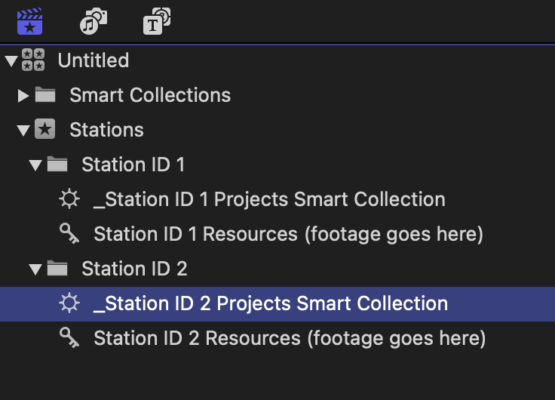
    Yes. You can not put Events in Folders, but you can put folders in events. You should explore keyword collections as an organizational tool, as well as Smart Collections. You can have one Event, and in that event is folders for different station IDs. In those folders you would have a keyboard collection for the resources, and a smart Collection that will collect the Project based in certain search criteria (like Type is Project, and Name includes ‘Station ID 1’, or whatever works best for your workflow). It could look like the attached.

Page 2 of 2910

We use anonymous cookies to give you the best experience we can.
Our Privacy policy | GDPR Policy