Forum Replies Created

Page 11 of 2910
  • Jeremy Garchow

    April 30, 2021 at 2:30 pm in reply to: Media no longer linked on storage drive

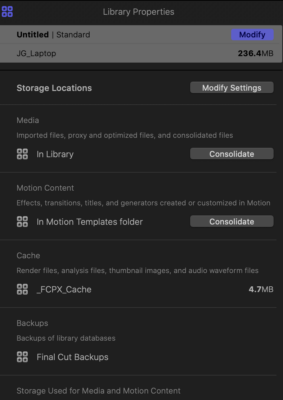
    1) Open the inspector (command-4)

    2) Select (click on) the library in the FCPX Browser

    3) Look at the inspector.

  • Jeremy Garchow

    April 30, 2021 at 1:30 pm in reply to: Media no longer linked on storage drive

    Open the inspector, and then select the library. It should show Library properties.

    Like this:

  • Jeremy Garchow

    April 30, 2021 at 12:13 pm in reply to: Media no longer linked on storage drive

    Opening from backup opens a completely different library. It’s not the right advice, unfortunately.

    Did you see me other post? When you open the inspector with the library selected, where does it list the media as being located? “In Library” or elsewhere?

  • Jeremy Garchow

    April 29, 2021 at 5:43 pm in reply to: Media no longer linked on storage drive

    Not sure if I was clear. I have no trouble opening the project. It all opens. It’s just that all of the media has to be relinked.

    Are you 100% sure all the media is in the library? How big the library? When you click on the library and open the inspector, does it say the media is in the library or elsewhere?

  • Jeremy Garchow

    April 29, 2021 at 12:51 pm in reply to: Media no longer linked on storage drive

    How are you backing things up to the HDD?

  • Jeremy Garchow

    April 28, 2021 at 6:59 pm in reply to: Disolve not disolving

    Try deleting your cache.

  • Jeremy Garchow

    April 28, 2021 at 12:15 pm in reply to: Oblivion jump

    Two things to try:

    1) Make a new Project and copy and paste your current Project in to the new one. If that doesn’t work:

    2) Trash your preferences by holding command and option while launching FCPX.

  • Davinci Resolve is free and fully functional. There is a version that you pay for, but the limit is resolution (over and above 4k).

  • Download a free trial.

    FCPX has has a free trial.

    Davinci Resolve is just free and can export srt.

    Do you have the srt file already or do you need to create the captions from scratch?

  • Jeremy Garchow

    March 31, 2021 at 5:35 pm in reply to: Best captions app

    As far as I know, this will be two separate processes. You will need a transcription service to “listen” and transcribe the material. There are services: speedscriber.com, simonsays.ai, rev.com to name a few with different levels of price and service. Then you get back a file, maybe a subtitle file like and .stl, and then you can take that and cover them in to FCPX titles. Apps like Subvert, or X-Title Importer are good ones to start with. Once the titles are in FCPX, you may have to adjust formatting.

Page 11 of 2910

We use anonymous cookies to give you the best experience we can.
Our Privacy policy | GDPR Policy